




 Microsoft
 OpenAI
 JP Morgan Chase
 Meta
Meta Oracle
 Uber
UberDesign an API Rate Limiter
Problem Context
🚦 A Rate Limiter controls how many requests a client can make to an API within a given time window. It's the traffic cop for your API.
Every major API you've used has rate limiting: Twitter limits tweets per hour, Stripe limits API calls per second, GitHub throttles unauthenticated requests. Without it, a single bad actor (or a bug in someone's script) could bring down your entire service.
Functional Requirements
Core Functional Requirements
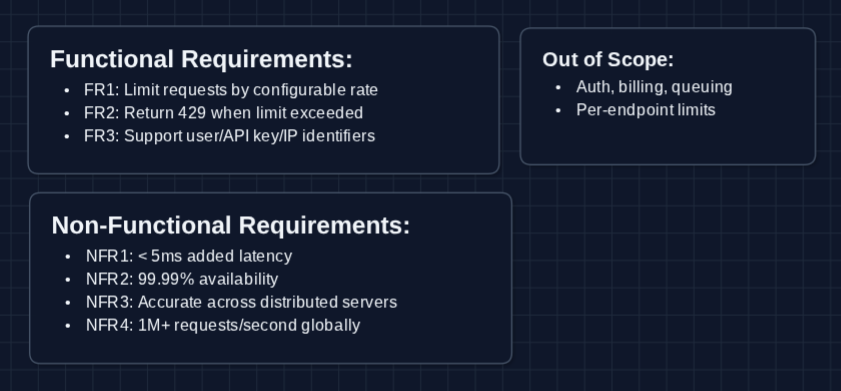
- FR1: The system should limit requests based on a configurable rate (e.g., 100 requests per minute per user).
- FR2: The system should return appropriate responses when rate limits are exceeded (HTTP 429).
- FR3: The system should support rate limiting by different identifiers (user ID, API key, IP address).
Out of Scope:
- Authentication and authorization (already established, like using JWT)
- Billing integration
- Request queuing
- Per-endpoint rate limits
Mentioning out-of-scope items shows the interviewer you understand the broader picture.
Non-Functional Requirements
Core Non-Functional Requirements
- NFR1: Rate limit checks should add < 5ms latency to requests.
- NFR2: The system should be highly available (99.99%+).
- NFR3: Rate limits should be accurate across distributed servers.
- NFR4: System should scale to handle 1M+ requests per second globally.
Here's the current whiteboard:
The Set Up
Defining the Core Entities
- Client: The entity making requests
clientId: Unique identifier (user ID, API key, or IP address)tier: Service tier (free, pro, enterprise)
- Rate Limit Rule: Configuration defining the limit
ruleId: Unique identifier for the ruleclientId: Which client this applies to (or*for default)limit: Max requests allowed (e.g., 100)windowSeconds: Time window duration (e.g., 60)burstLimit: Optional max burst (e.g., 150)
- Request Counter: Tracks requests in the current window
clientId: Who made the requestswindowKey: Current time window identifier (e.g.,14:05)count: Number of requests madeexpiresAt: When this counter resets
- Time Window: The period over which we count
start: Window start timestampdurationSeconds: Window length (60, 3600, etc.)
The counter is the heart of rate limiting. Everything else is about making that counter accurate and fast.
API Interface
The rate limiter doesn't expose a public API to end users. Instead, it's an internal service that other components query. We need to define:
- How servers check the limit
- What responses come from the rate limiter
- How limits can be set in the first place
You don't need to memorize the exact JSON format. Focus on understanding the inputs, outputs, and why each field exists.
Rate Limit Check (Internal): FR1, FR3
Called by API servers before processing each request.
1. Check Rate Limit
POST /ratelimit/check

Request:
{
  "clientId": "user_abc123",
  "resource": "api"
}

Response (allowed):
{
  "allowed": true,
  "remaining": 87,
  "limit": 100,
  "resetAt": 1704355200
}

Response (denied):
{
  "allowed": false,
  "remaining": 0,
  "limit": 100,
  "resetAt": 1704355200,
  "retryAfter": 23
}
Why POST and not GET? POST is used because this endpoint represents an explicit action (checking and consuming the quota)
Response Headers (User-Facing): FR2
Users never call the rate limiter directly, but they see standard headers in every API response:
Normal Response:
HTTP/1.1 200 OK
X-RateLimit-Limit: 100
X-RateLimit-Remaining: 87
X-RateLimit-Reset: 1704355200
Rate Limited Response:
HTTP/1.1 429 Too Many Requests
X-RateLimit-Limit: 100
X-RateLimit-Remaining: 0
X-RateLimit-Reset: 1704355200
Retry-After: 23

{
  "error": "Rate limit exceeded",
  "message": "Too many requests. Please retry after 23 seconds."
}
The Retry-After header tells well-behaved clients when to try again. Bots will ignore it and keep hammering (they'll stay blocked).
Admin Configuration: FR1
Admins configure limits for different clients or tiers.
Set Rate Limit Rule
PUT /ratelimit/rules/{clientId}

Request:
{
  "requestsPerMinute": 100,
  "burstLimit": 150
}

Response:
{
  "clientId": "user_abc123",
  "requestsPerMinute": 100,
  "burstLimit": 150,
  "updatedAt": "2024-01-04T12:00:00Z"
}
What's burst limit? The sustained rate is 100/min, but we allow brief spikes to 150. This handles legitimate traffic bursts without being overly restrictive.
High-Level Design
Let's tackle our functional requirements:
- FR1: Limit requests by configurable rate
- FR2: Return 429 when limit exceeded
- FR3: Support different identifiers
We'll build up from the most simple implementation and fix red flags as we go. In a real interview, you can start at Diagram 2.
1) The Simplest System: FR1, FR2
The simplest rate limiter is just a counter in memory.
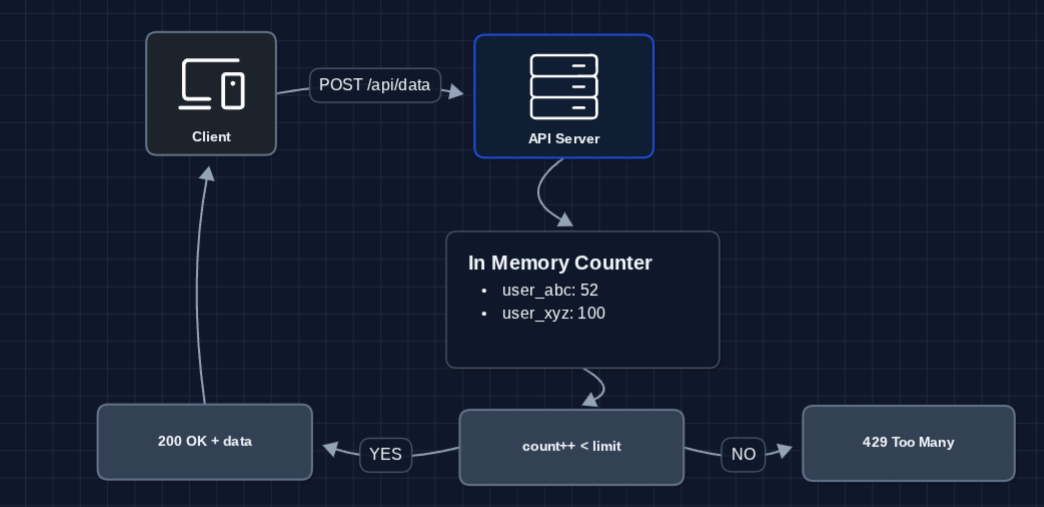
Logic:
- Request comes in with client identifier
- Increment counter for that client
- If counter is less than limit, allow request
- If counter is greater than or equal to limit, reject with 429
What breaks?
- Counter never resets (everyone eventually gets blocked forever!)
- If server restarts, all counts are lost
- A single server can't scale horizontally
First, we need time windows to reset counters.
2) Add Time Windows: FR1, FR2
The counter needs to reset periodically. Let's add time-based windows:
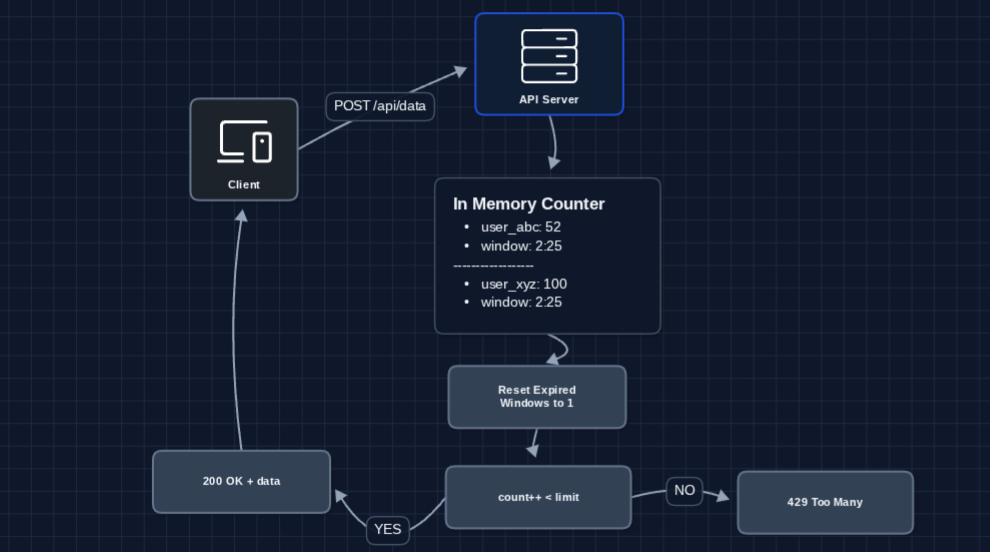
Now limits reset properly! A user blocked at 14:05 gets a fresh quota at 14:06.
What breaks?
- Boundary problem: A user sends 99 requests at 14:00:59, then 99 more at 14:01:01. That's 198 requests in 2 seconds! (our limit is 100/minute). The window boundary creates a loophole.
- In-memory storage doesn't survive restarts.
- A Single server still can't scale.
3) Sliding Window: FR1, FR2
The fixed window boundary can be exploited. Sliding window looks at a rolling time period instead:
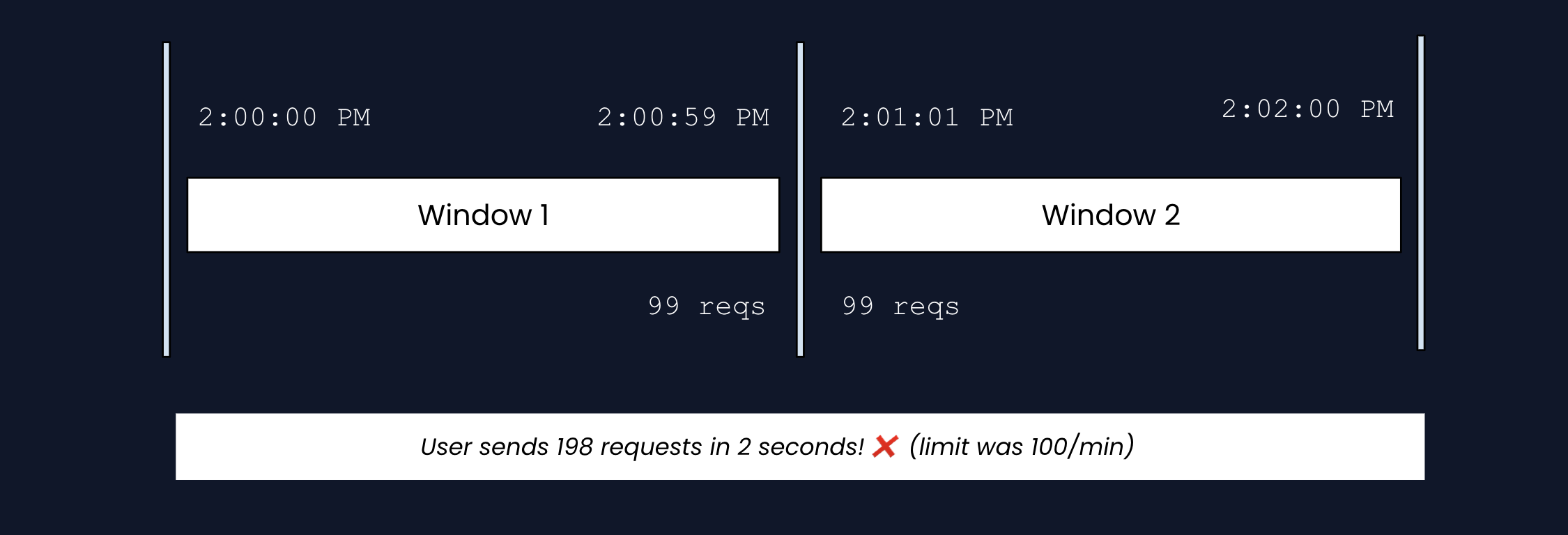
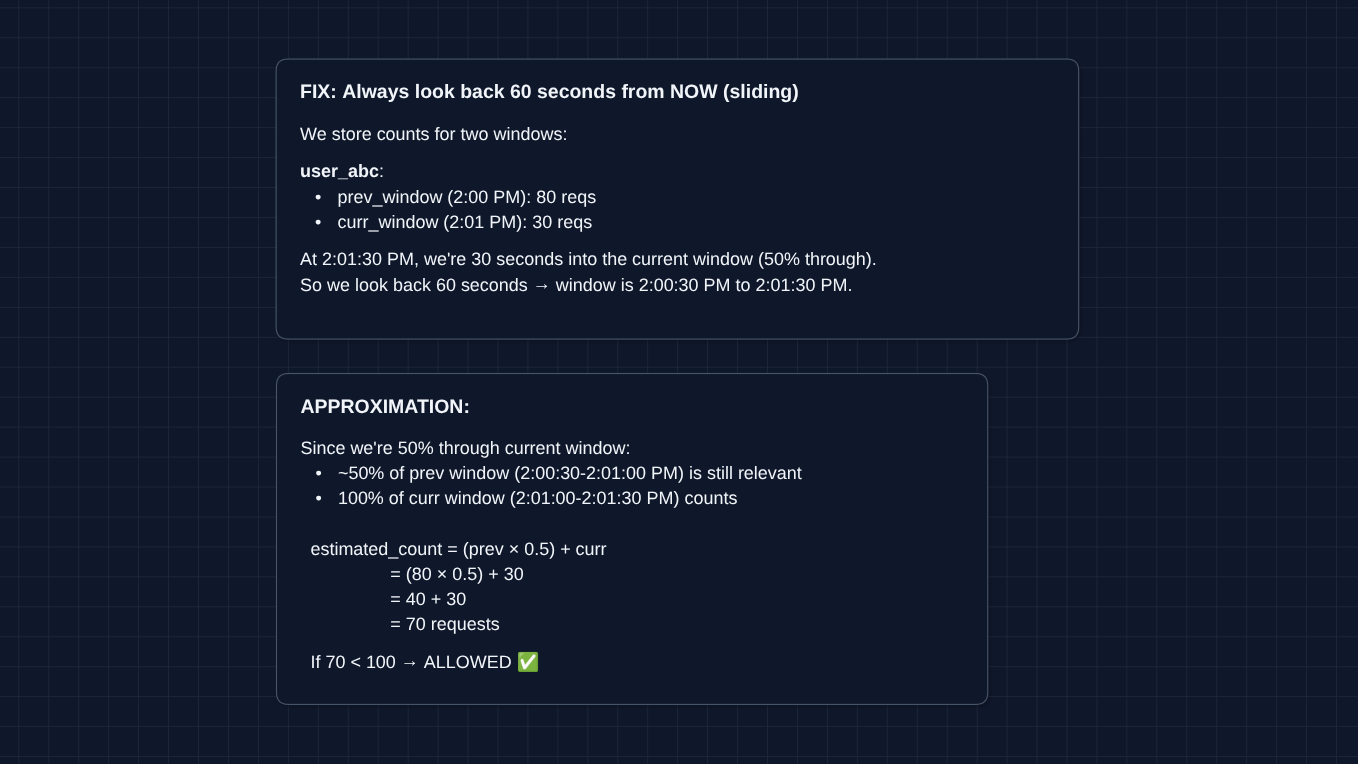
Why not store exact timestamps? For perfect accuracy, you'd store when each request happened: [2:00:01 PM, 2:00:03 PM, ...]. That's O(n) memory: 10,000 requests = 10,000 timestamps. The approximation uses O(1) memory (just 2 numbers no matter the volume).
What breaks?
- Still in-memory on one server
- Multiple API servers means multiple isolated counters (a user could hit Server A 100 times AND Server B 100 times!)
The counter needs to be centralized.
4) Centralized Counter (Redis): FR1, FR2, NFR3
Multiple servers need to share the same counter. Enter Redis:
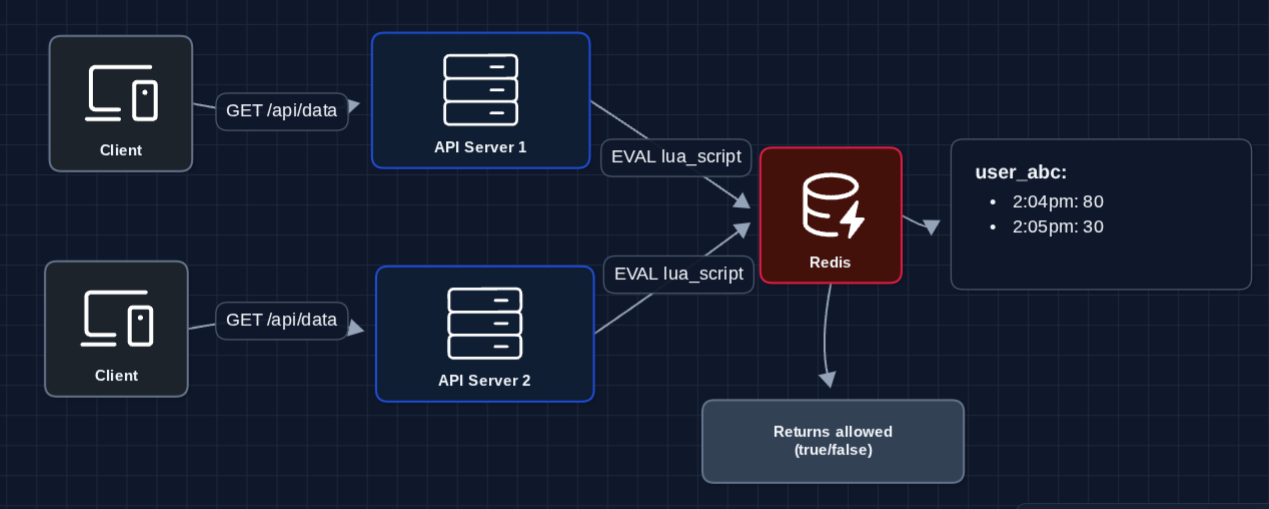
Why Lua script? Without it, two servers could READ count=99, both calculate 99 < 100, then both INCR (101 requests allowed when limit is 100). Lua runs atomically inside Redis so the check and increment happen as one indivisible operation.
Why Redis specifically?
- Sub-millisecond reads/writes
- Lua scripts run atomically (no race conditions)
- Built-in TTL (keys auto-expire)
Now both servers see the same counter. A user can't bypass limits by hitting different servers.
This completes our functional requirements:
- FR1 ✅ Configurable rate limits (via Rules Config)
- FR2 ✅ Proper 429 responses with headers
- FR3 ✅ Client identification (clientId in Redis key)
But we still have problems to solve:
- Redis becomes a single point of failure (NFR2)
- If Redis is in us-east-1 and your servers are in Asia, that's 200ms latency per request (NFR1)
- How do we handle 1M+ requests per second? (NFR4)
We address non-functional requirements and more in the deep dives:
- NFR1 (Latency): How do we reduce Redis latency?
- NFR2 (Availability): What happens when Redis fails?
- NFR3 (Consistency): How do we handle distributed counting across regions?
- NFR4 (Scale): How do we handle 1M+ RPS?
Potential Deep Dives
1) What algorithm should we use?
We glossed over algorithms earlier. There are four main approaches, each with trade-offs:
Token Bucket is the industry standard (used by AWS, Stripe, etc.), but understanding all four helps you discuss trade-offs intelligently.
1a) Fixed Window Counter

How it works: Divide time into fixed 1-minute windows. Count requests in the current window. When the clock hits the next minute, reset the counter to zero.
The problem: As previously demonstrated in the HLD, we can have a boundary exploit.
1b) Sliding Window Log
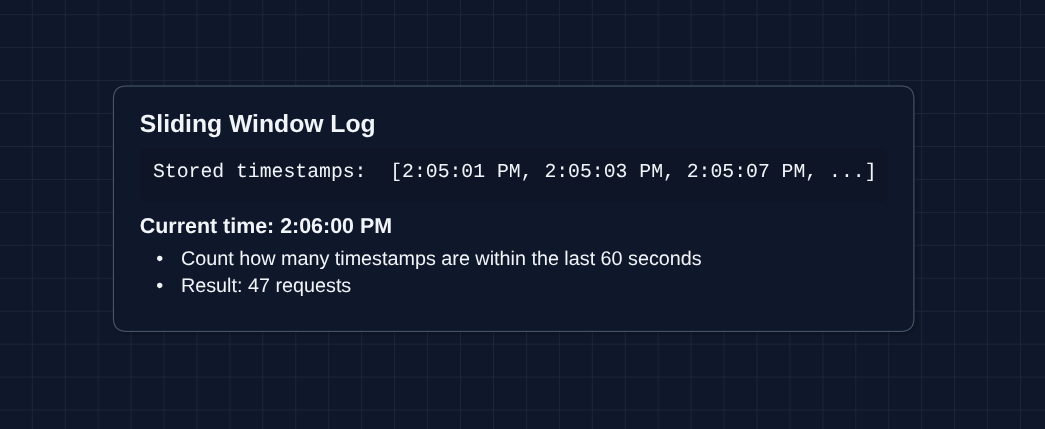
How it works: Store the exact timestamp of every request. To check the limit, count how many timestamps fall within the last 60 seconds from right now. (no boundary exploit)
1c) Sliding Window Counter (Approximation)
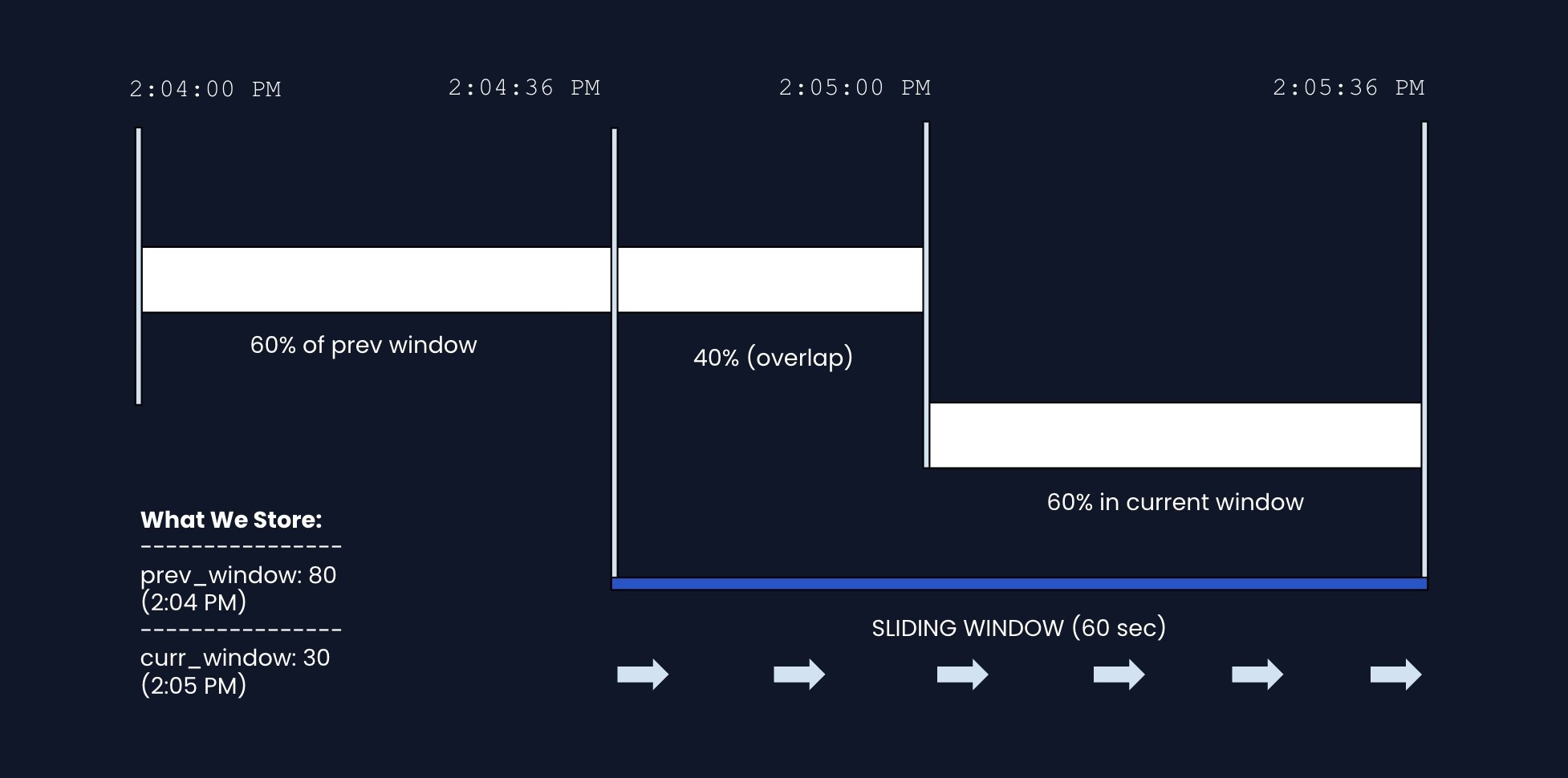
The main idea: We want to know "how many requests in the last 60 seconds?" but we don't want to store every timestamp. So we use two fixed-window counters and combine them with a weighted average for prediction.
How it works:
- Windows are fixed 60-second periods based on the clock (2:04, 2:05, 2:06...)
- We store a count for the whole previous window (complete) and current window (still in progress)
- When checking the limit, we combine the current window count and a weighted average of the previous window (based on what percent of that window is included) to see if the limit is exceeded.
Example: At 2:05:36 PM (36 seconds into the current window, starting at 2:05:00 PM)
- Previous window (2:04 PM): 80 requests
- Current window (2:05 PM): 30 requests SO FAR
- We're 60% through the current window, so 40% of the previous window overlaps with our 60-second lookback (look at diagram above)
  estimated = (prev × overlap%) + curr
            = (80 × 0.4) + 30
            = 32 + 30
            = 62 requests
The trade-off: We assume requests were evenly spread in the previous window. This isn't perfect, but it's good enough for rate limiting and we only store 2 numbers instead of thousands of timestamps.
1d) Token Bucket (Recommended)
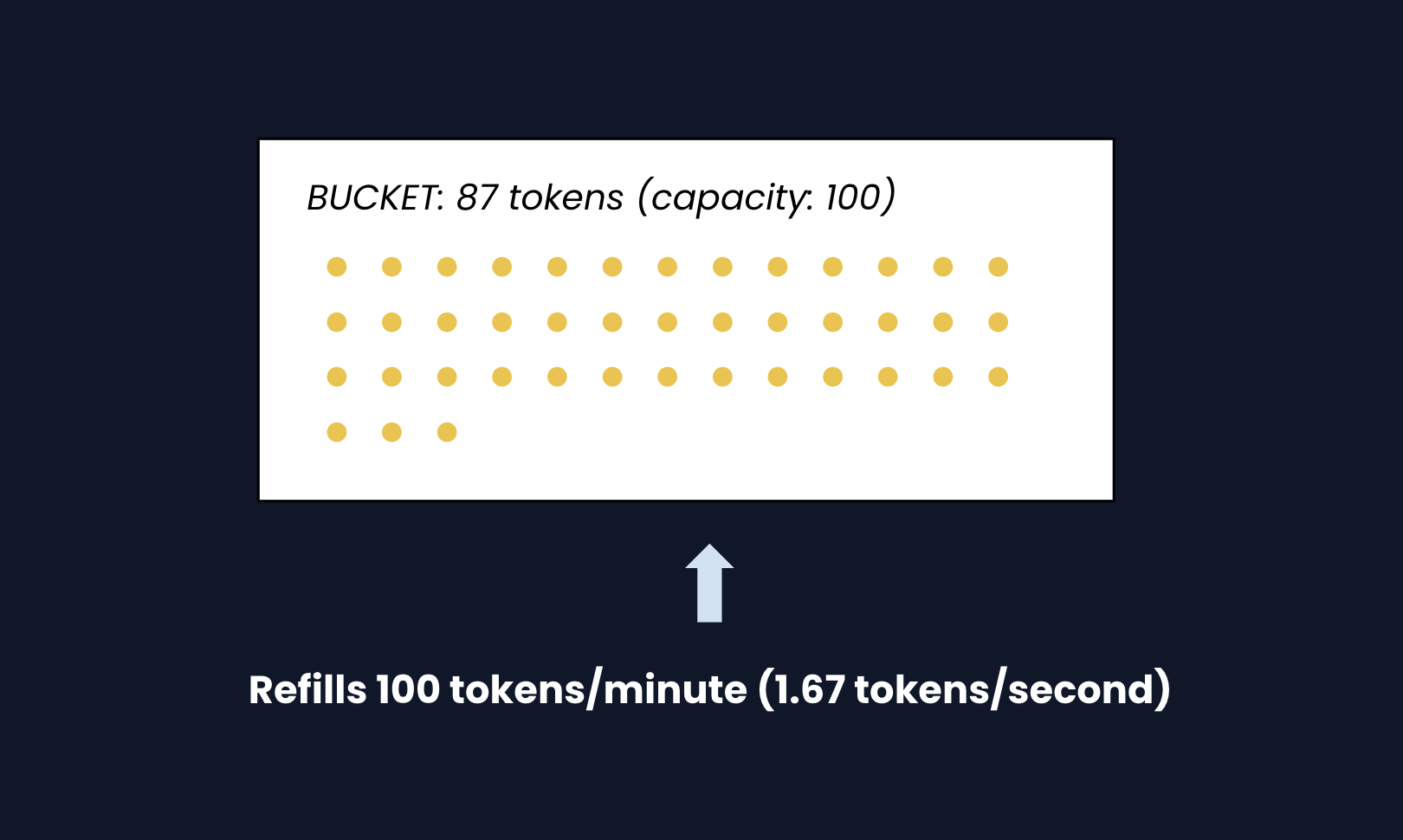
How it works: Imagine a bucket that holds tokens. Each request must "spend" one token. The bucket refills at a steady rate (like 100 tokens per minute). If the bucket is empty, the request is rejected.
Step by step:
- Refill: Calculate how many tokens to add based on time since last request
tokens_to_add = time_elapsed × refill_rate- Cap at bucket capacity (can't exceed 100)
- Check: If there's at least 1 token, consume it and allow the request
- Deny: If empty, reject with 429
Why it handles bursts: Unlike fixed windows, a user can "save up" tokens. If they haven't made requests for 30 seconds, they've accumulated ~50 tokens and can burst 50 requests instantly. This matches real-world usage patterns.
Example timeline:
- 2:00:00 PM: Bucket starts full: 100 tokens
- 2:00:01 PM: User sends 100 requests, 0 tokens left
- 2:00:02 PM: User tries 1 request, allowed (1.67 tokens refilled, use 1, 0.67 left)
- 2:00:02 PM: User tries another, denied (only 0.67 tokens, need 1)
Why it's the standard: AWS, Stripe, GitHub, and most major APIs use Token Bucket because:
- It allows legitimate traffic bursts
- It has O(1) memory (just 2 values:
tokensandlast_refill_time) - It provides smooth, predictable rate limiting
- It's intuitive to explain to users ("you have X requests remaining")
Bottom line: Use Token Bucket for production. It handles bursts gracefully and is the industry standard.
2) How do we handle distributed rate limiting?: NFR1, NFR3 (Consistency)
With Redis deployed per region, a user could hit US Redis (100 requests), then EU Redis (100 more) with a VPN (getting 200 requests when their limit is 100).
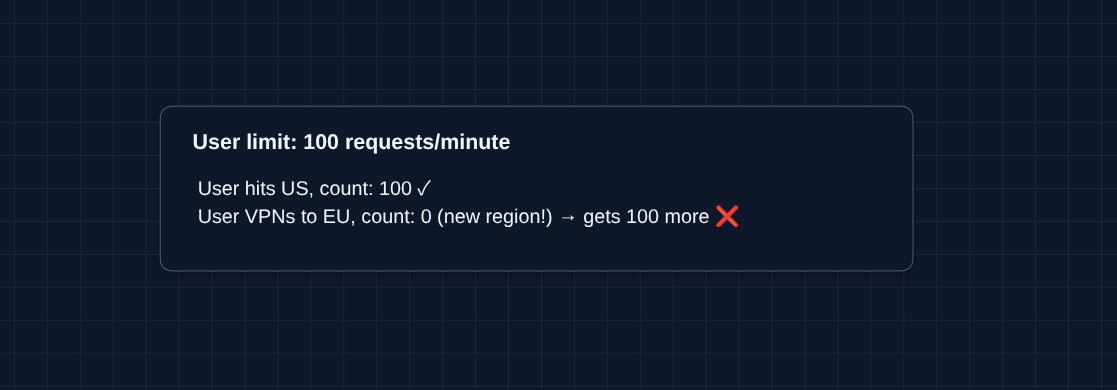
Strict per-user accuracy requires either cross-region coordination (adds latency) or routing each user to one region.
Solution A: Sticky Sessions (Recommended for per-user limits)
Route each user to the same region always. Their count lives in one Redis.
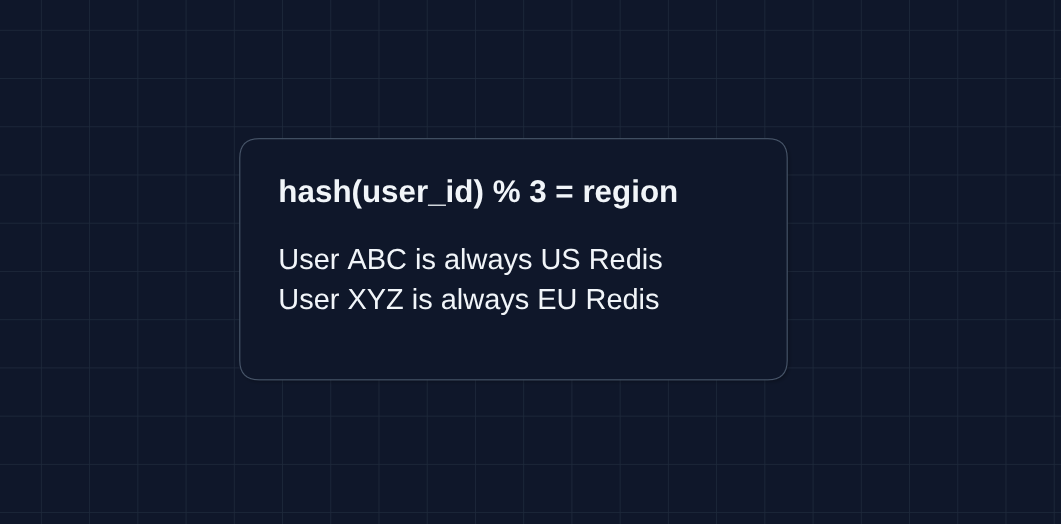
How: Your load balancer (AWS ALB, Cloudflare) hashes the user ID and routes consistently.
Trade-off: A user in Asia routed to US Redis gets higher latency.
Solution B: Accept Some Inaccuracy
- Give each region the full limit. Most users don't VPN between regions mid-session.
- Trade-off: The rare user gaming the system gets 2-3x their limit. For fair usage limits, this is often acceptable because it would cost you much more in the long run to implement cross-region tracking.
Solution C: Cross-Region Sync (Expensive)
- Sync each user's count across regions using a global Redis.
- Trade-off: This adds latency to every request and is complex to implement. It's only worth it for very strict security limits.
For per-user limits: use sticky sessions.
3) What happens when Redis fails?: NFR2 (99.99% Availability)
Redis is our critical dependency. When it's unreachable, we have three choices:
| Option | Behavior | Trade-off |
|---|---|---|
| Fail Open | Allow all requests | No rate limiting (risk abuse) |
| Fail Closed | Deny all requests | Blocks legitimate users |
| Fail to Local Cache | Use in-memory counters | Only works with sticky sessions |
Local Cache Fallback
Each server falls back to its own in-memory counter. This only works if a user's requests consistently hit the same server (via load balancer hashing). Otherwise they could hit different servers and exceed their limit.
Without consistent routing, your options are fail-open or fail-closed.
Circuit Breaker Pattern
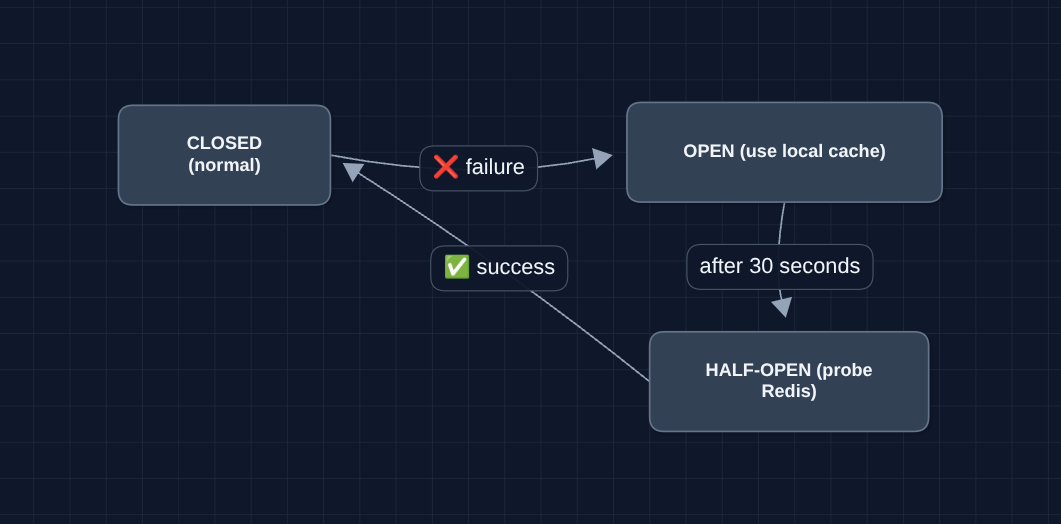
Why? If Redis is slow (not fully down), hammering it with retries makes things worse. Circuit breaker stops trying temporarily, then probes to recover.
4) How do we handle 1M+ requests per second?: NFR4 (Scale)
The simple answer: Shard Redis by user ID.
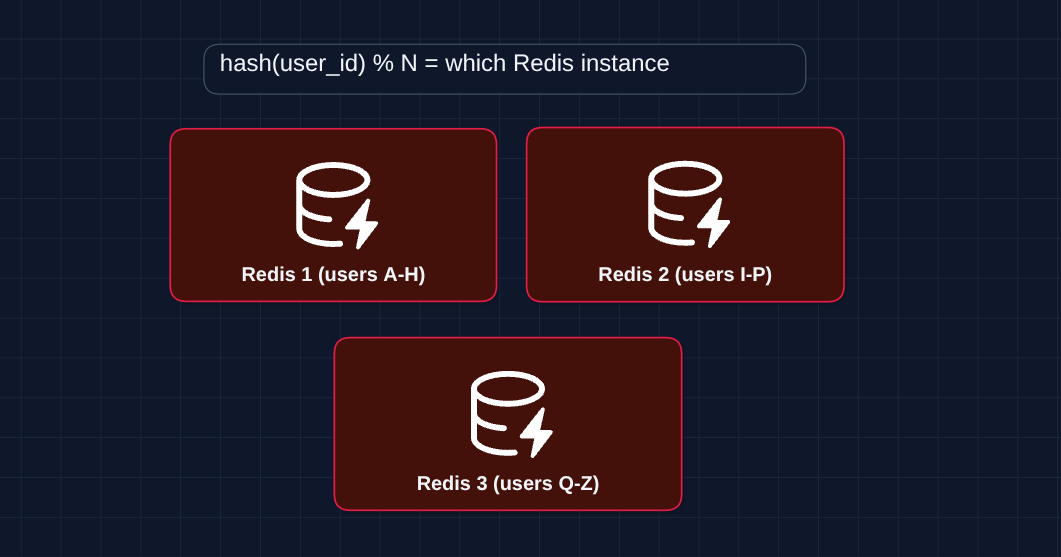
Each Redis handles ~100K requests/second. For 1M RPS, use 10+ Redis instances. This is the same pattern as database sharding.
Optional Optimizations (if sharding isn't enough)
-
Request batching: Instead of 1 Redis call per request, batch multiple requests and flush every 10ms. Reduces Redis calls by 5-10x.
-
Cache rejections locally: Once Redis says a user is over their limit, cache that locally in the server's memory. New requests from that user get denials (rate limited until 2:01) and don't hit Redis.
5) How do we support different rate limit tiers?: FR1, FR3
We store the tier and limit mappings in a configuration database:
| Tier | Requests/min | Burst |
|---|---|---|
| Free | 60 | 10 |
| Pro | 1,000 | 100 |
| Enterprise | 10,000 | 1,000 |
Flow:
- Request arrives with API key
- We look up the tier for that key
- Apply that tier's limit
Caching tier lookups: Hitting the database on every request is too slow. Cache the mapping locally with a TTL. When a user upgrades, publish an event to invalidate caches.
What to Expect?
That covered a lot! Here's what matters at each level.
Mid-level
- Breadth over Depth (80/20): Build the core system with centralized Redis (Diagrams 1-4). It's okay to treat scaling as a black box.
- Expect Guided Questions: The interviewer won't expect you to know everything. "Why Redis?" or "What happens at window boundaries?" are fair game.
- Collaborative Design: You lead the initial design, but expect the interviewer to guide you toward problems you missed.
- The Bar: Complete the core flow with Redis as centralized storage. Know why in-memory alone fails. Understand the algorithms (Token Bucket is recommended).
Senior
- Balanced Breadth & Depth (60/40): Go deeper on areas where you have hands-on experience. Don't just say "token bucket" but explain how it handles bursts and why it's the industry standard.
- Proactive Problems: Identify failure modes before being asked. "What if Redis dies?" and "How do we handle users across regions?" should come from you.
- Trade-off Discussions: Explain why you chose one approach over another. "We use sticky sessions to avoid distributed consistency issues" is higher level thinking.
- The Bar: Complete Diagram 4 and proactively dive into 2-3 deep dives: algorithms, distributed rate limiting (sticky sessions), or Redis failure handling (circuit breaker).
Staff
- Depth over Breadth (40/60): The interviewer assumes you know the basics. Get to Diagram 4 in ~15 minutes, then spend most time on deep dives.
- Experience-Driven: Draw from real projects. "We hit this exact problem when..." is more valuable than textbook answers.
- Drive the Conversation: You lead the discussion, identifying and solving problems before the interviewer prompts. They're observing your thought process, not teaching.
- The Bar: Cover all deep dives unprompted: algorithm trade-offs (why Token Bucket), distributed consistency (sticky sessions vs cross-region sync), failure handling (circuit breaker), scaling (shard by user ID), and tiered limits.
Mock interview this question with AI & pass your real interview. Good luck! 🚦