




 Meta
Meta Miro
Miro Clio
Clio Coinbase
 Goldman Sachs
 Epic Games
 Amazon
 Pintrest
Design Cloud Storage & Sync
Problem Context
☁️ Cloud storage services like Dropbox handle billions of files across hundreds of millions of users. Cloud storage is bidirectional as users constantly upload, download, and sync files across multiple devices.
Functional Requirements
Cloud storage seems simple on the surface, but the complexity lies in synchronization. Work with your interviewer to jot down requirements, and adjust to what they would like to see.
Core Functional Requirements
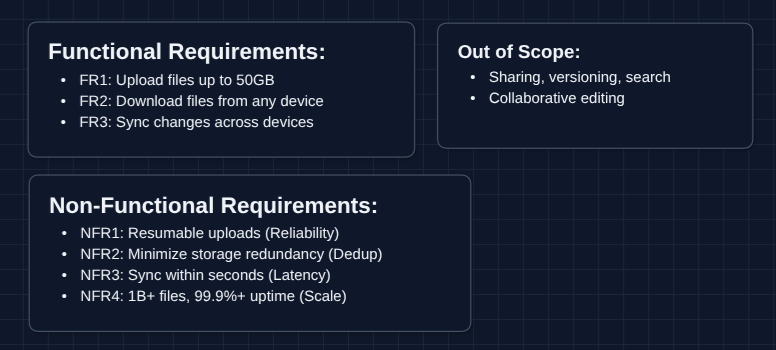
- FR1: Users should be able to upload files up to 50GB.
- FR2: Users should be able to download files from any linked device.
- FR3: File changes should propagate to all linked devices automatically.
Out of Scope:
- File sharing and permissions (collaborative access).
- Version history and rollback.
- Search functionality.
- Collaborative editing (Google Docs-style).
- User authentication.
Focusing on upload, download, and sync gives us plenty to discuss. Sharing and versioning are common follow-up questions.
Non-Functional Requirements
Core Non-Functional Requirements
- NFR1: Uploads should be resumable after network failure.
- NFR2: Storage should minimize redundancy across users.
- NFR3: Sync should complete within seconds for active users.
- NFR4: System should handle 1B+ files with 99.9%+ availability.
Here's what our whiteboard looks like:
Let's keep going!
The Set Up
Planning the Approach
Based on our requirements, we need to tackle two distinct problems:
- File Transfer: How files move between clients and storage (upload/download).
- Synchronization: How devices learn about changes and stay in sync.
Architecturally, we need to separate the control plane (metadata, sync state) from the data plane (raw file bytes). This separation is what makes cloud storage scalable.
In an interview, start with a simple upload/download flow, then layer in sync. Make it clear you're building toward a complete system before optimizing, noting there are red flags.
Defining the Core Entities
For this problem, we have several entities to work with:
- File: The raw bytes stored in blob storage (S3).
- FileMetadata: Information about the file (name, size, owner, sync status, chunk list).
- Chunk: A 5-10MB piece of a file, identified by its SHA-256 hash (fingerprint).
- User: The account that owns files, with a list of linked devices.
Chunks are the fundamental unit of transfer and deduplication. We'll see why shortly.
API Interface
Our APIs naturally split based on whether they handle metadata (control plane) or raw bytes (data plane). Let's define each with their purpose.
Focus on understanding why each API exists, not just memorizing the syntax. In a real 45 minute interview, writing everything will take too much time.
Upload APIs: FR1
These handle chunked uploads for large files with resumability.
1. Initialize Upload
POST /files/upload/init

Request:
{
  "fileName": "vacation_video.mp4",
  "fileSize": 5368709120,  // 5GB in bytes
  "fileHash": "sha256:abc123...",
  "chunks": [
    { "index": 0, "hash": "sha256:chunk0..." },
    { "index": 1, "hash": "sha256:chunk1..." },
    ...
  ]
}

Response:
{
  "uploadSessionId": "session_xyz789",
  "chunksToUpload": [0, 1, 3, 5],  // Skip chunks 2,4 - already exist!
  "presignedUrls": {
    "0": "https://s3.aws.com/presigned/chunk0...",
    "1": "https://s3.aws.com/presigned/chunk1...",
    ...
  }
}
Why chunksToUpload? This is deduplication. If chunk 2 already exists (maybe from another user's identical file), we skip uploading it entirely. The server just references the existing chunk.
Why presigned URLs? The 50GB file never touches our application servers. The client uploads chunks directly to S3 using these time-limited URLs, reducing server load.
2. Complete Upload
POST /files/upload/{sessionId}/complete

Request:
{
  "uploadSessionId": "session_xyz789"
}

Response:
{
  "fileId": "file_abc123",
  "status": "ready"
}
What happens? After the client finishes uploading all chunks to S3, it calls this endpoint to finalize. The server verifies all chunks are present, creates the file metadata record, and makes it available for download and sync.
Download APIs: FR2
These provide access to files from any device.
1. Get File Metadata
GET /files/{fileId}/metadata

Response:
{
  "fileId": "file_abc123",
  "fileName": "vacation_video.mp4",
  "fileSize": 5368709120,
  "fileHash": "sha256:abc123...",
  "chunks": [
    { "index": 0, "hash": "sha256:chunk0..." },
    ...
  ],
  "updatedAt": "2024-01-15T10:30:00Z"
}
2. Get Download URL
GET /files/{fileId}/download

Response:
{
  "downloadUrl": "https://s3.aws.com/presigned/file_abc123...",
  "expiresAt": "2024-01-15T11:30:00Z"
}
Why presigned URL again? Same reason as upload (the download bypasses our servers). S3 handles the bandwidth directly.
Sync APIs: FR3
These keep devices aware of file changes.
1. Get Changes (Delta Sync)
GET /sync/changes?cursor=1705312200

Response:
{
  "changes": [
    { "fileId": "file_abc", "action": "created", "metadata": {...} },
    { "fileId": "file_xyz", "action": "modified", "metadata": {...} },
    { "fileId": "file_old", "action": "deleted" }
  ],
  "nextCursor": 1705315800,
  "hasMore": false
}
What's the cursor? It's a timestamp (or position marker). The client asks for everything that changed since X. This is called delta sync (we only transfer what's new).
2. Report Local Change
POST /sync/notify

Request:
{
  "deviceId": "device_123",
  "fileId": "file_abc",
  "action": "modified",
  "newHash": "sha256:newversion..."
}
What happens? When a user saves a file locally, the client notifies the server. The server then pushes this change to other devices.
API Evolution Note: In the HLD diagrams below, you'll see:
- Diagrams 1-2 use simple
PUT /filesandGET /files: single-request upload/download. - Diagram 3+ use chunked APIs
High-Level Design
Let's start off with our functional requirements:
- FR1: Upload files up to 50GB
- FR2: Download files from any device
- FR3: Sync changes across devices
We'll start with The simplest design and incrementally improve it. In an interview, you can start with Diagram 2 or 3.
1) The Simplest System: FR1, FR2 (Upload/Download)
Let's start with the basic system that stores and retrieves files.
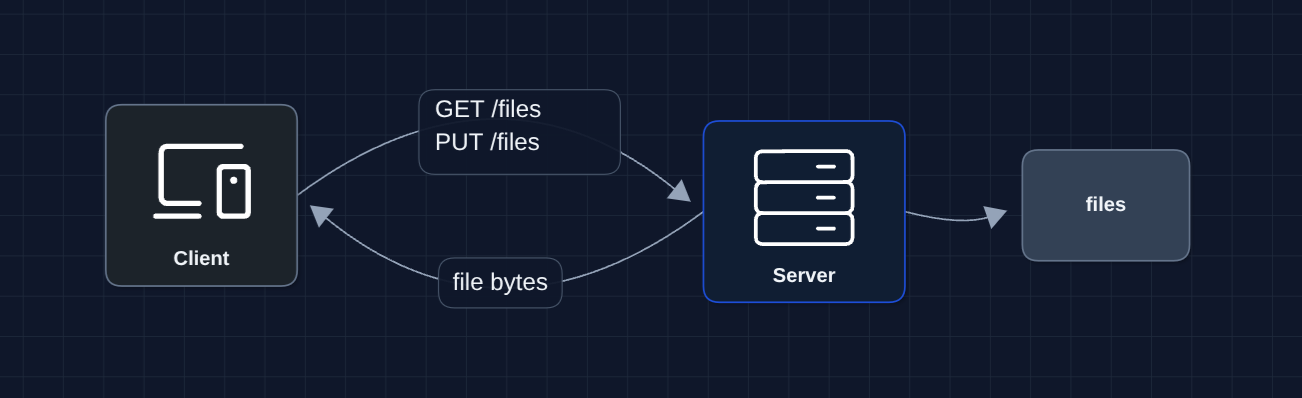
The user uploads a file, server saves it to disk. User downloads, server reads from disk.
But what breaks?
- Server disk fills up (users have lots of files)
- Single server is a single point of failure
- 50GB uploads timeout over HTTP
- No way for other devices to know about new files
We need to separate storage from compute and handle large files properly.
2) Separate Storage (Blob Storage): FR1, FR2 (Upload/Download)
Let's move files to dedicated object storage. S3 is designed for this and is petabyte-scale plus highly durable.
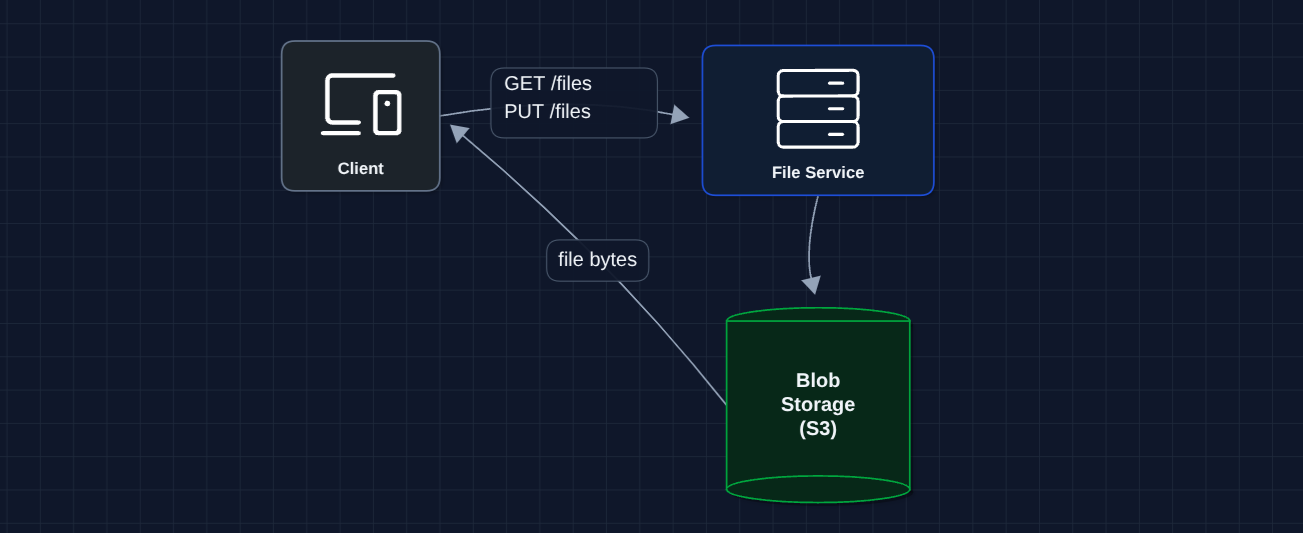
Better! S3 handles petabytes of storage with 11 nines of durability.
But what breaks?
- 50GB uploads still timeout: HTTP connections drop, and we lose progress
- All data flows through our servers: This is expensive and slow
- No metadata: We need to track file ownership, names, sync state
Let's fix the upload problem first.
3) Chunked Uploads with Presigned URLs: FR1 (Upload) ✅
Instead of one massive upload, we split files into chunks and upload directly to S3.
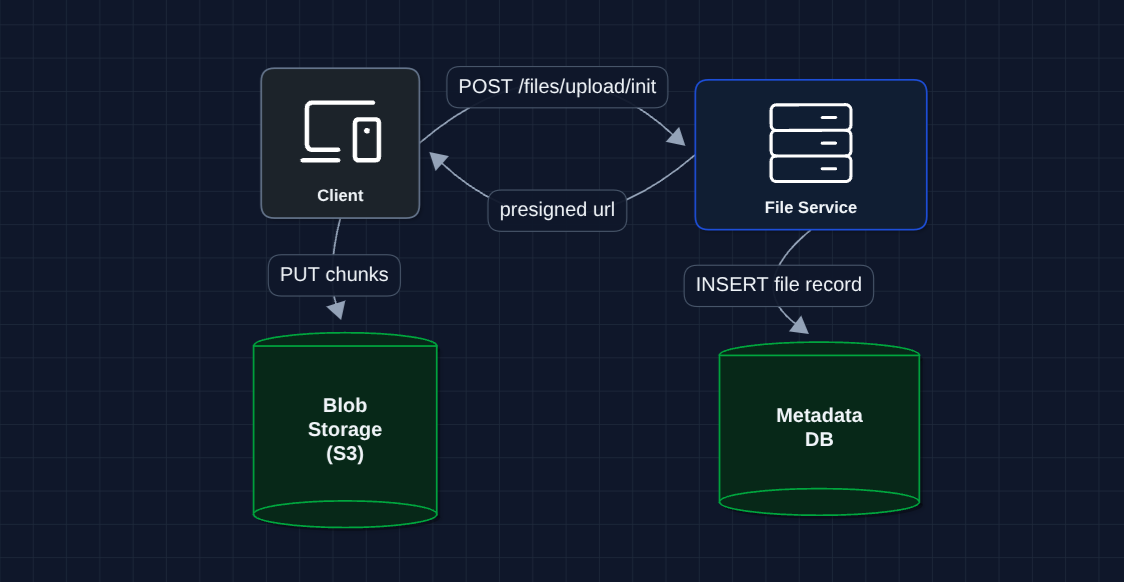
The chunking strategy:
- Split file into 5-10MB chunks
- Generate SHA-256 hash for each chunk (fingerprint)
- Upload chunks independently
- If network fails after chunk 47 of 100, resume from chunk 48
What breaks?
- If two users upload the same file, we store it twice
- We need to track metadata to know what files exist
- Still no sync (other devices on same account don't know about this file)
4) Add Deduplication: NFR2 (Storage Efficiency)
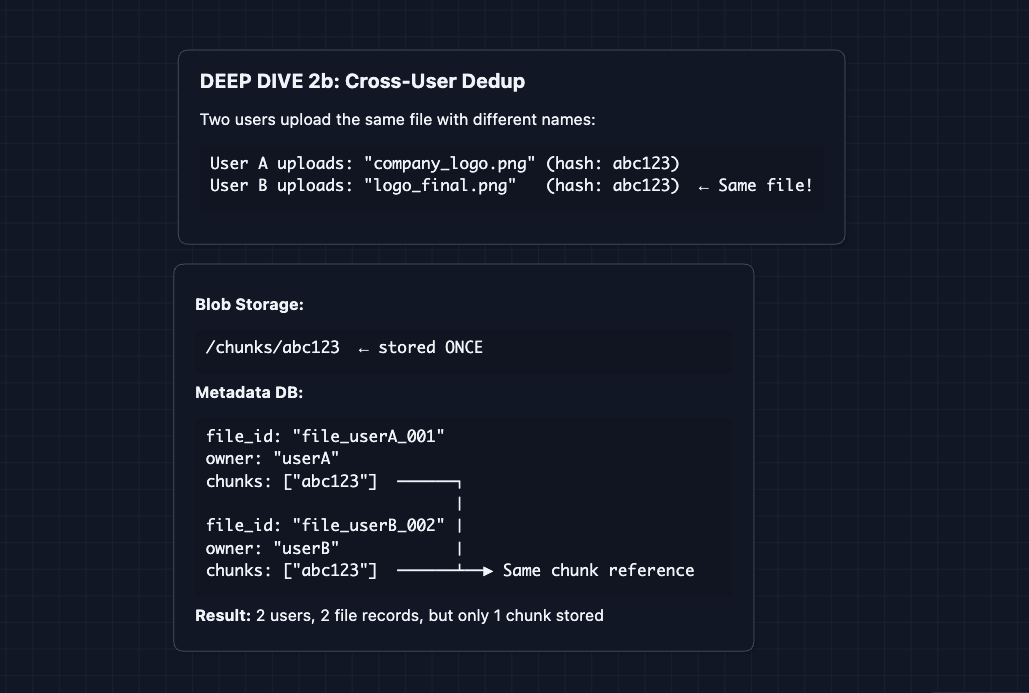
Chunks are identified by their SHA-256 hash. If two files share identical chunks, we only store them once.
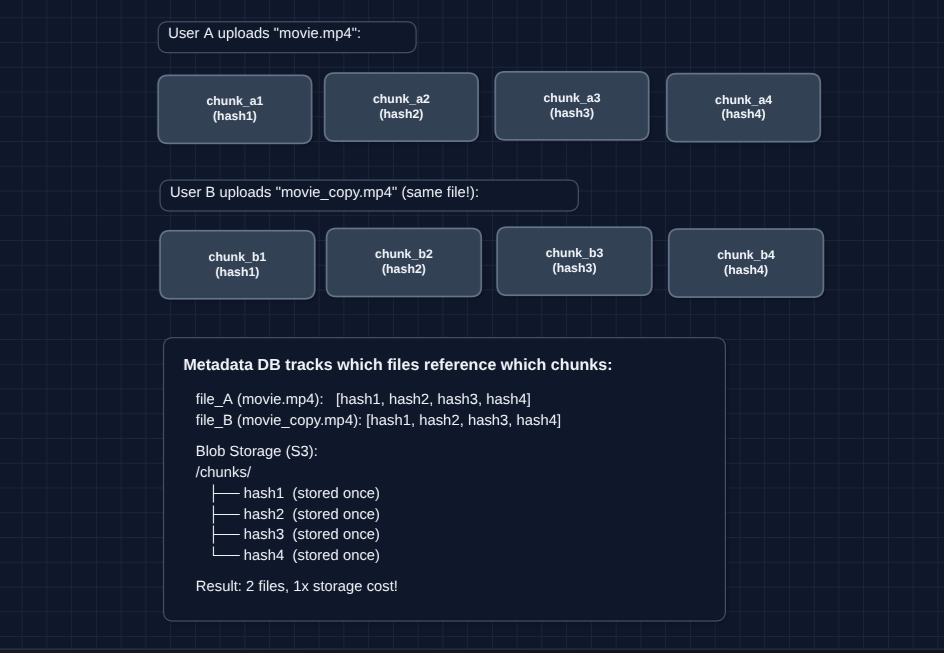
How dedup works in our upload flow:
- Client computes hashes for all chunks locally
- Sends hash list to server
- Server checks which hashes already exist
- Server responds: Only upload chunks 2 and 5
- Client skips existing chunks, uploads only new ones
At scale, deduplication can save a lot of storage. If a million users have the same popular PDF or viral image, it's only stored once.
What breaks?
- Users can upload and download, but changes don't reach other devices
- We need a synchronization mechanism
5) Add Sync Service (Polling): FR3 (Sync)
Now let's tackle the sync problem. Device A saves a file, but how does Device B find out?
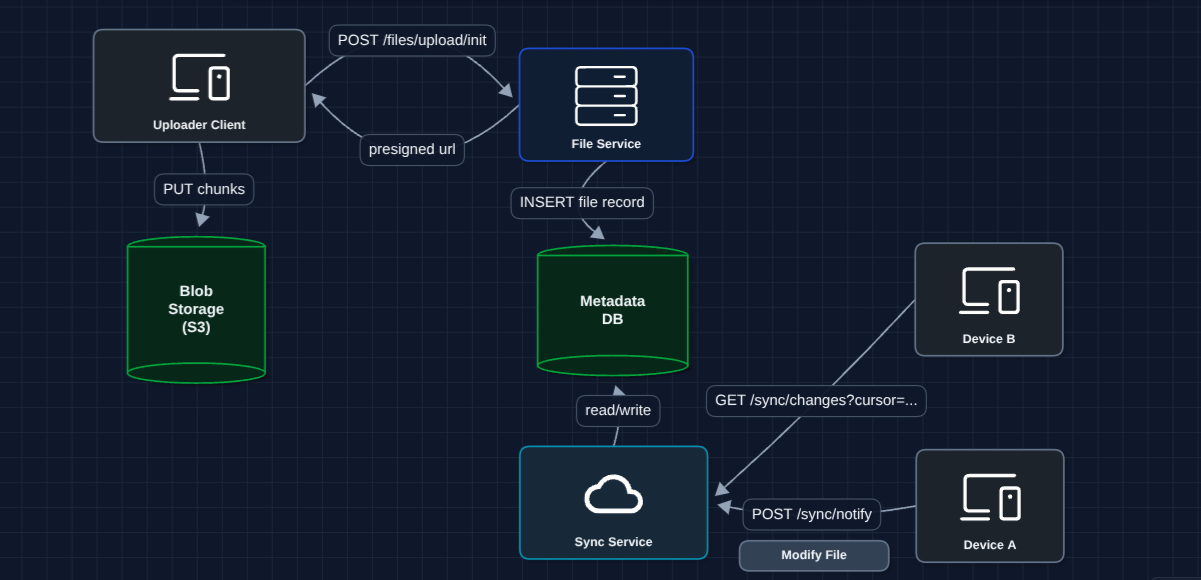
How it works:
- Device A saves a file, notifies Sync Service, and uploads chunks to S3
- Device B polls every 30s to see what changed.
- Sync Service returns the changes (file IDs)
- Device B downloads updated chunks from S3
What breaks?
- Polling is inefficient: If nothing changed, we're wasting requests
- Polling has latency: Up to 30-second delay before Device B sees changes
6) Hybrid Sync (WebSocket + Polling): FR3 (Sync) ✅
Instead of polling, we push notifications to active devices in real-time.
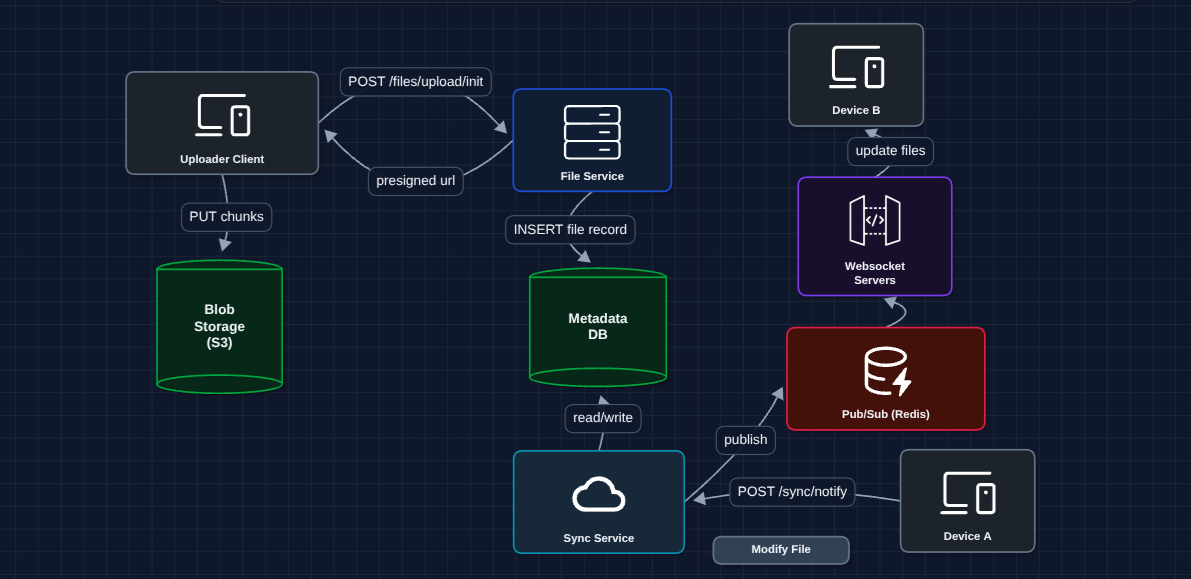
How it works:
- Device A saves file, notifies Sync Service, and uploads chunks to S3
- Sync Service publishes change to Redis Pub/Sub
- Redis broadcasts to all WebSocket servers
- Each WS server pushes notification to its connected devices
- Device B receives update instantly (<1 second)
Why Pub/Sub? Without Redis, Device A's change goes to WS Server 1, but Device B is connected to WS Server 3. Redis ensures all servers receive the broadcast.
Now we have a complete working system that satisfies all functional requirements:
- FR1 ✅ Upload files up to 50GB (Diagram 3: chunked + presigned URLs)
- FR2 ✅ Download from any device (Diagram 3: metadata DB + presigned URLs)
- FR3 ✅ Sync changes across devices (Diagram 6: hybrid WebSocket + polling)
Now we can address our non-functional requirements in the deep dives:
- NFR1 (Resumability): How do interrupted uploads recover?
- NFR2 (Deduplication): How exactly does fingerprinting work?
- NFR3 (Sync Latency): How do we detect local file changes?
- NFR4 (Scale): How do we handle conflicts when files change simultaneously?
Potential Deep Dives
1) How do interrupted uploads recover?: NFR1 (Resumability)
In Diagram 3, we said uploads are chunked. But how does resumability actually work?
The Metadata DB tracks the state of every chunk in an upload session.
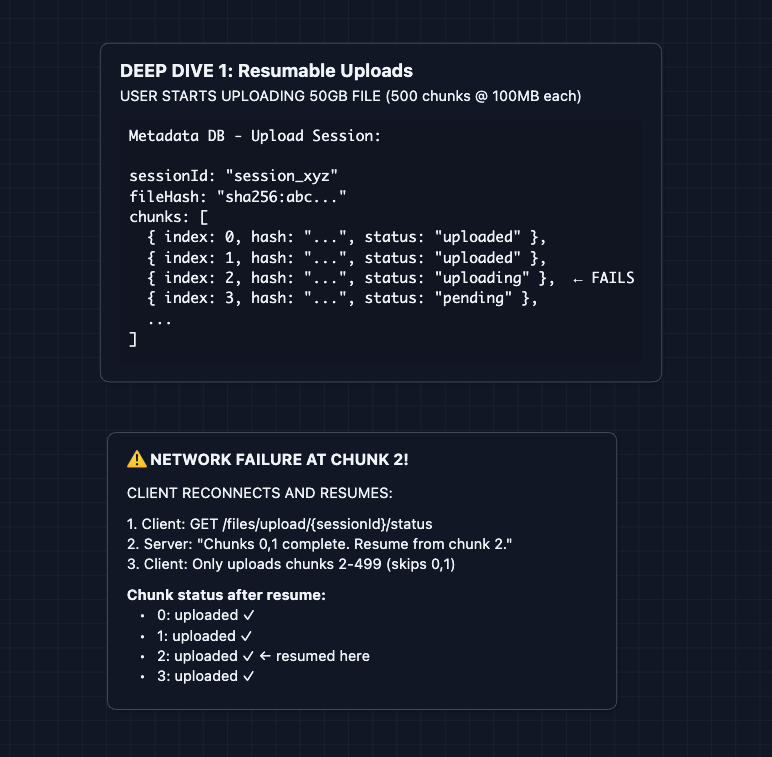
Key mechanisms:
- Session state in DB: Every chunk's status is tracked (pending, uploading, uploaded)
- Idempotent uploads: Re-uploading the same chunk is safe. S3 handles it.
- Client-side checkpointing: Client remembers where it left off
This is why we chunk before uploading. Without chunking, a failed 50GB upload means starting over. With 100MB chunks, you lose at most one chunk's worth of progress.
2) How does deduplication work?: NFR2 (Storage Efficiency)
In Diagram 4, we showed that identical chunks aren't stored twice. Here's the mechanism in detail.
The fingerprinting process:
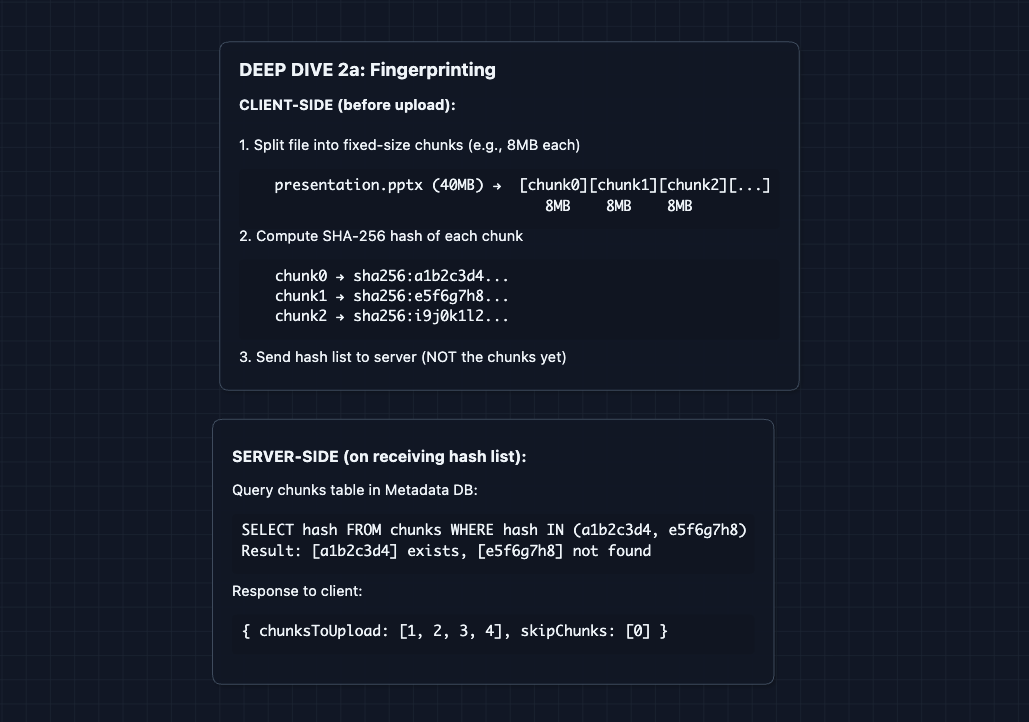
Why SHA-256? It's a cryptographic hash. The odds of two different chunks producing the same hash (collision) are astronomically low (1 in 2^256).
3) How does the desktop client detect file changes?: NFR3 (Sync Latency)
This deep dive is about the desktop client (the app running on your laptop), not the server. But it matters because the server can't sync what it doesn't know about. The client must detect and report changes first.
In Diagram 5, Device A calls POST /sync/notify after a file changes. But how does the desktop client know to do that?
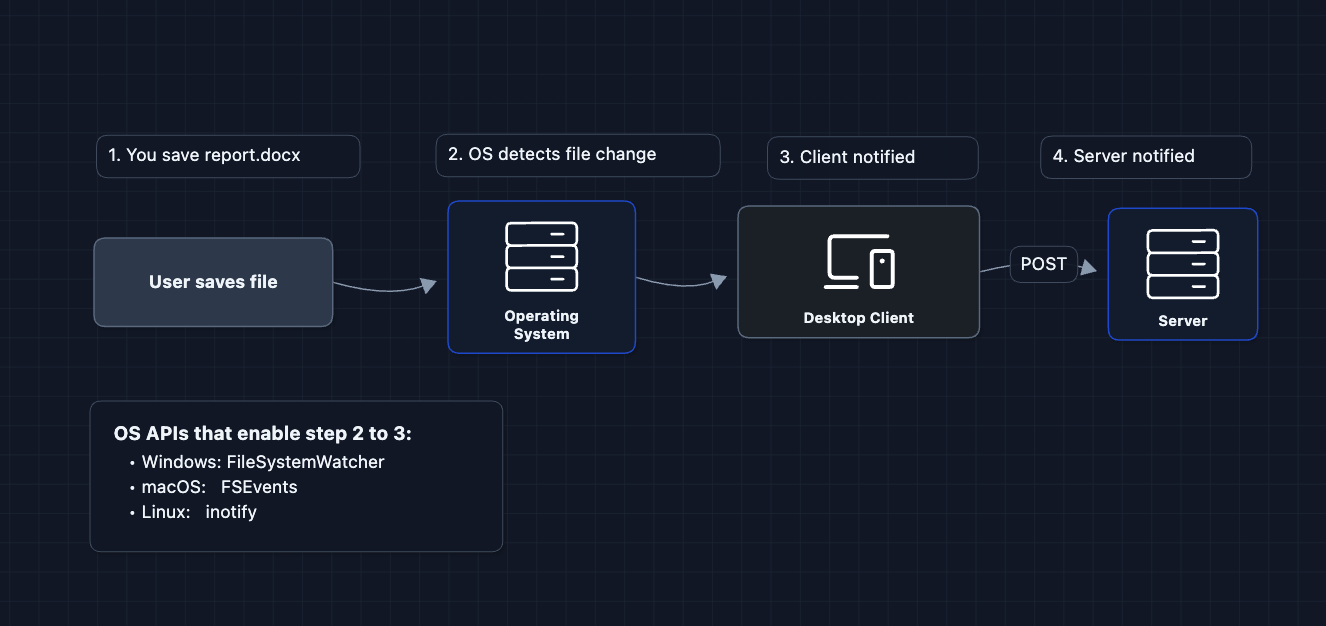
Why does this matter?
Without file watchers, the client would have to scan every file every few seconds to see if anything changed. That's wasteful and slow. File watchers let the OS notify the client instantly when you save a file, allowing sub-second sync.
Files exist in both places: your local disk AND the cloud. The local copy gives you instant access and offline editing. The cloud copy is for backup and syncing to other devices.
4) How do we handle conflicts?: NFR4 (Scale + Correctness)
What if User A and User B both edit the same file at the same time?
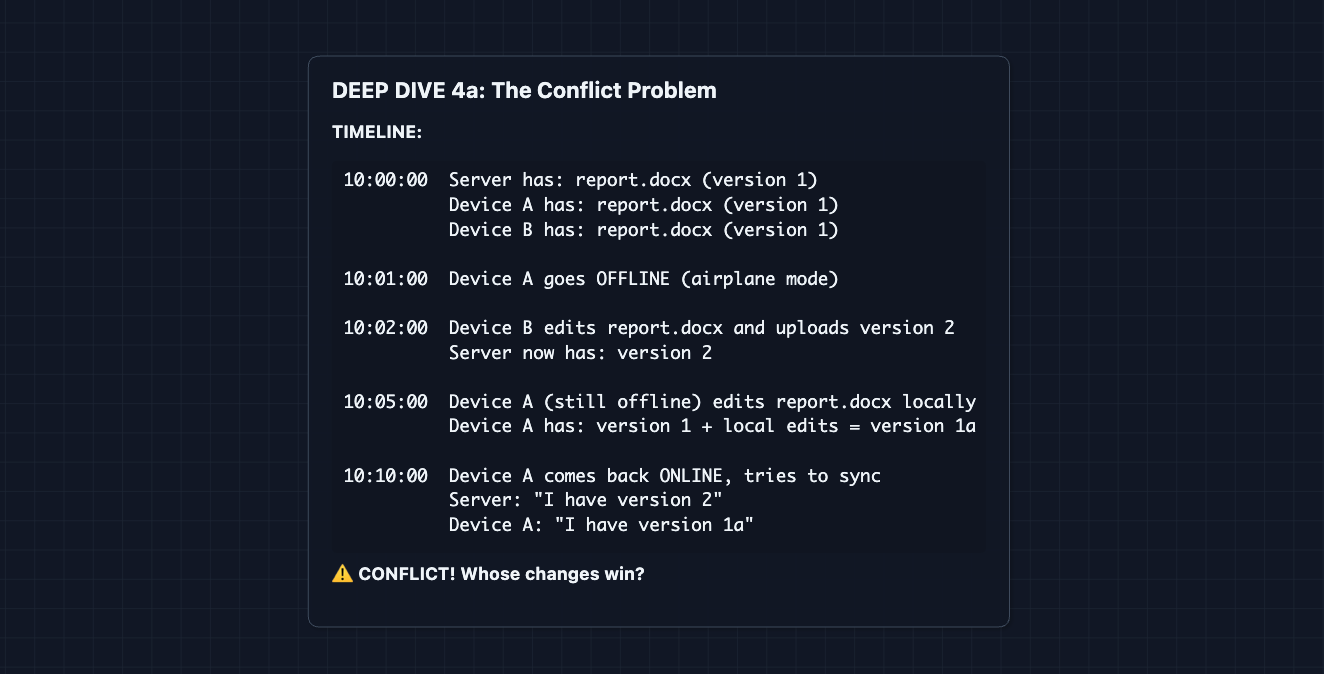
Resolution strategy: Last-Write-Wins (LWW) with conflict copies
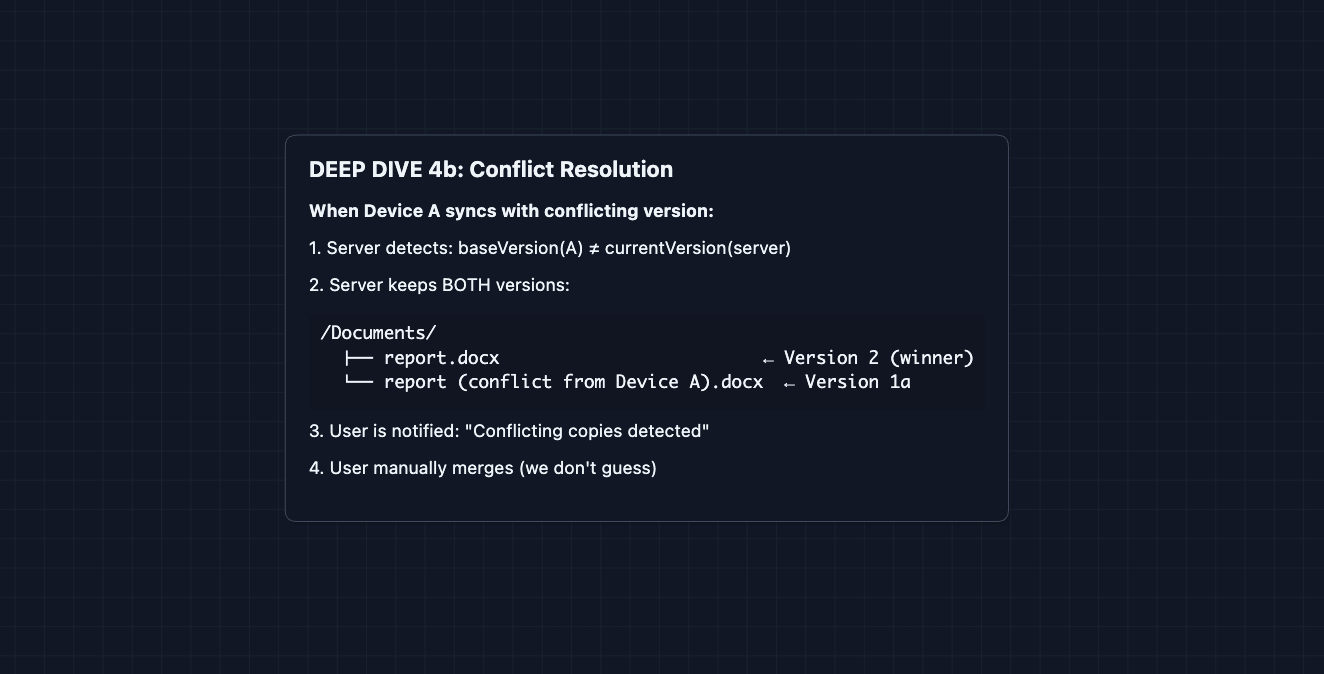
Why not auto-merge? For code (git) or text, auto-merge sometimes works. For binary files (images, zip files), there's no way to merge. Even for text, auto-merge can corrupt important documents. It's safer to let the user decide.
Alternative: Operational Transformation (OT)
For real-time collaborative editing (like Google Docs), you use OT or CRDTs to merge concurrent edits. But that's out of scope for basic file sync.
5) How is data secured?: Security
Files should be encrypted for security. We have two main options at hand:
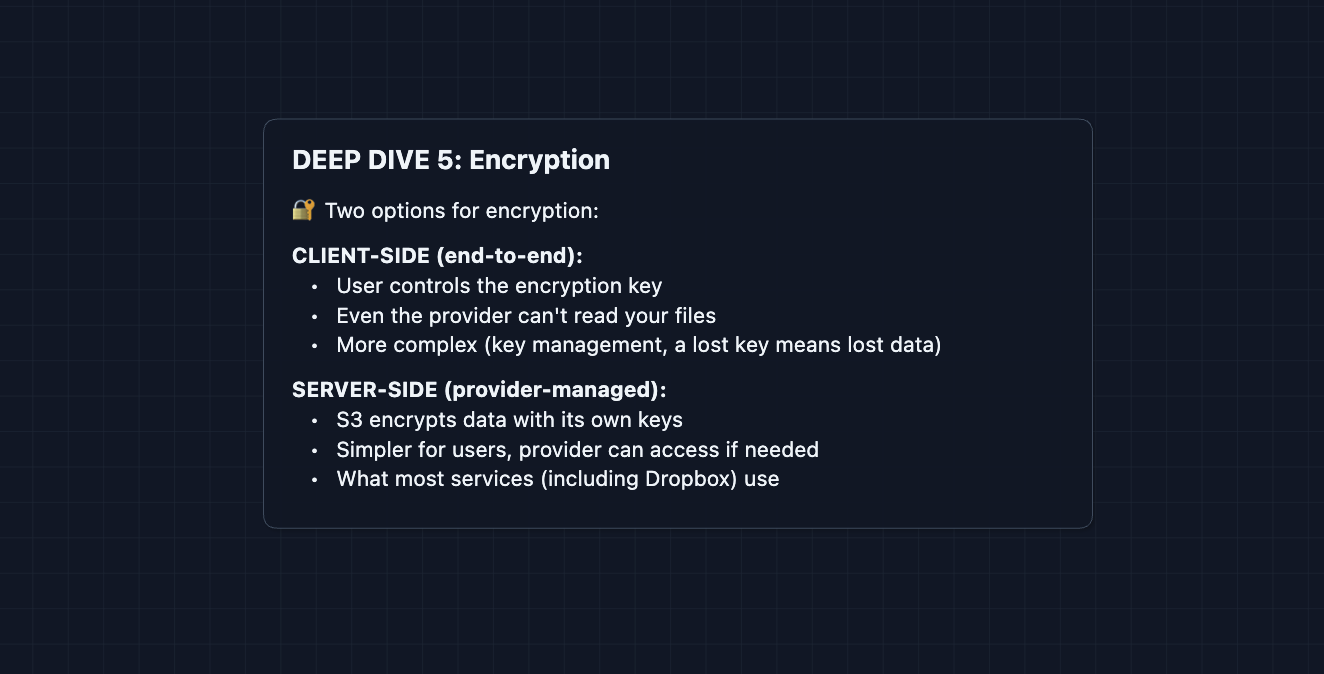
Interview note: If compression comes up, remember: compress BEFORE encrypt. Encrypted data looks random and won't compress. But most cloud storage services (Dropbox, Google Drive) don't actually compress files.
What to Expect?
That was a complete cloud storage system! Here's what you need to cover at each level.
Mid-level
- Breadth over Depth (80/20): Cover upload/download flow with chunking, basic sync with polling. Treat deduplication as a nice-to-have optimization.
- Expect Basic Probing: Be ready for questions like "Why not upload directly to S3 without presigned URLs?" or "What's a SHA-256 hash?"
- Assisted Driving: You propose the initial architecture, but expect the interviewer to guide you toward chunking and sync concerns.
- The Cloud Storage Bar: You must successfully design chunked uploads with presigned URLs and explain why sync is needed. You must understand that metadata and bytes are separate concerns.
Senior
- Balanced Breadth & Depth (60/40): You should proactively discuss deduplication, explain the control plane vs. data plane separation, and handle "what if the upload fails?" without prompting.
- Proactive Problem-Solving: You raise sync latency concerns yourself: "Polling isn't great for real-time, let me add WebSockets for active clients."
- Articulate Trade-offs: You can explain "Last-Write-Wins is simple but loses data. Alternative is conflict copies. Neither is perfect."
- The Cloud Storage Bar: Complete system with hybrid sync (WebSocket + polling) and 2-3 deep dives: resumability, deduplication, or conflict resolution. You discuss trade-offs clearly.
Staff
- Depth over Breadth (40/60): Speed through the HLD in ~15 minutes. Interviewers assume you know chunking, S3, WebSockets. Spend time on the interesting parts.
- Experience-Backed Decisions: You immediately say "We need to separate control and data planes" and explain why from experience. You know the failure modes of each component.
- Full Proactivity: You anticipate every deep dive before being asked. You discuss storage costs, chunk size trade-offs (smaller = better dedup, more overhead), and operational complexity.
- The Cloud Storage Bar: Address ALL deep dives without prompting: resumability, deduplication (including cross-user), file watchers, conflict resolution, and encryption trade-offs.
Go try a mock interview on this question with AI and good luck! ☁️