




 ZoomInfo
 Atlassian
 Google
 Meta
MetaDesign a Web Crawler
Problem Context
🕷️ A web crawler is a program that systematically browses the internet, downloading pages and following links to discover new content.
The goal: Collect raw text from 10 billion web pages in under 5 days to train a Large Language Model (LLM). That's roughly 23,000 pages per second, sustained, around the clock.
Functional Requirements
Web crawlers can do many things: indexing for search, monitoring price changes, archiving the web. It's important that you narrow down scope with your interviewer first.
Core Functional Requirements
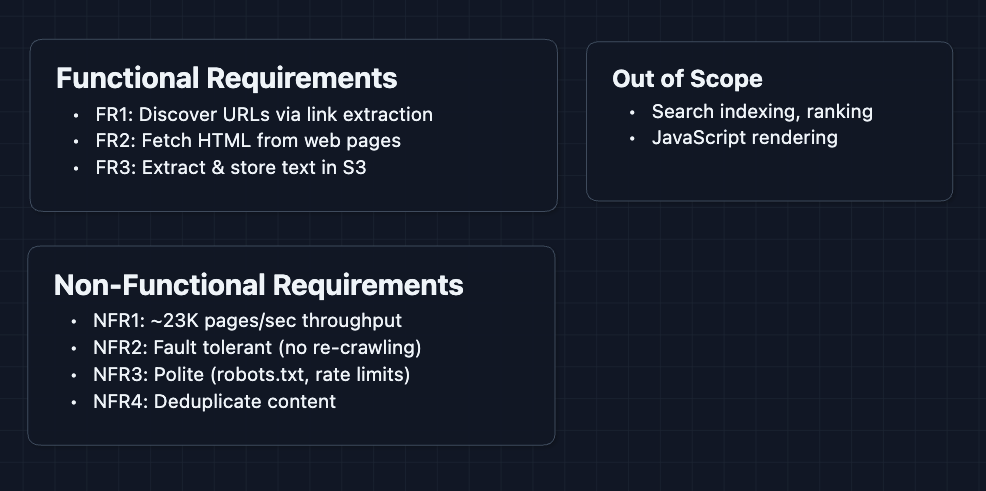
- FR1: Accept seed URLs and continuously discover new URLs by extracting links from crawled pages.
- FR2: Fetch raw HTML content from web pages across the internet.
- FR3: Extract plain text and store it in blob storage (S3) for downstream consumption.
Out of Scope
- Search indexing and ranking
- Structured data extraction (JSON-LD, schema.org)
- Image/video downloading
- Real-time crawling or freshness guarantees
- JavaScript rendering (we'll crawl static HTML only)
Limiting scope to static HTML is a reasonable trade-off. Most of the web's textual content is accessible without JavaScript execution, and rendering adds enormous complexity.
Non-Functional Requirements
Core Non-Functional Requirements
- NFR1: Crawl at ~23,000 pages/second sustained throughput.
- NFR2: Never lose crawl progress (failures should not require re-crawling).
- NFR3: Respect robots.txt and rate limits (max 1 request/second/domain).
- NFR4: Avoid processing duplicate content from mirror sites or protocol variations.
Here are our requirements:
Let's build this.
The Set Up
Planning the Approach
The web crawler is fundamentally a data pipeline. URLs go in, text comes out. Between those endpoints, we need to:
- Manage the URL Frontier: Which URLs do we need to visit? Which have we already seen?
- Fetch Pages: Download HTML while being a good citizen of the web.
- Extract Content: Pull out the text and discover new links to crawl.
Defining the Core Entities
- URL: A web address to be crawled. Has a status:
queued,fetching,fetched,parsed,failed. - Domain: A hostname (
example.com). Groups URLs for rate limiting and robots.txt compliance. - Page: The raw HTML content downloaded from a URL.
- Extracted Text: The cleaned text content, stripped of HTML tags and scripts.
- Link: A URL discovered within a page that gets added back to the frontier.
API Design
Our crawler has a simple external interface for operators, plus internal communication between services.
Operator APIs (External)
These let the team that runs the crawler monitor and control it.
1. Start a Crawl
POST /api/v1/crawls

Request:
{
  "seedUrls": [
    "https://en.wikipedia.org",
    "https://www.bbc.com",
    "https://news.ycombinator.com"
  ],
  "maxDepth": 10,
  "targetPageCount": 10000000000
}

Response:
{
  "crawlId": "crawl_2024_llm_training",
  "status": "running",
  "createdAt": "2024-01-15T00:00:00Z"
}
What happens? The seed URLs get pushed into our URL frontier, and fetcher workers start pulling from it immediately.
2. Check Crawl Progress
GET /api/v1/crawls/{crawlId}/status

Response:
{
  "crawlId": "crawl_2024_llm_training",
  "status": "running",
  "stats": {
    "urlsQueued": 15234567890,
    "urlsFetched": 8234567890,
    "urlsParsed": 8134567890,
    "urlsFailed": 12345678,
    "textStoredGB": 47234
  },
  "throughput": {
    "currentPagesPerSecond": 24103,
    "averagePagesPerSecond": 23456
  }
}
3. Pause or Resume
POST /api/v1/crawls/{crawlId}/pause
POST /api/v1/crawls/{crawlId}/resume
This would be useful for throttling during maintenance or if we're hitting infrastructure limits.
High-Level Design
Let's build this step by step, starting from the simplest working implementation and rebuilding for scale
1) The Simplest Crawler
Starting off, we will have one loop and one URL at a time.
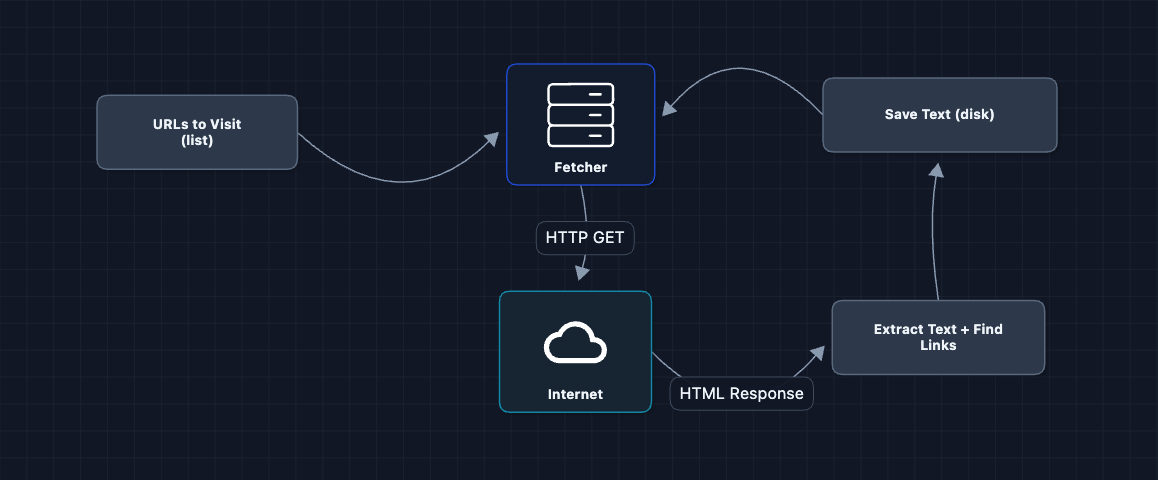
This actually works for a few hundred pages. Then it doesn't. What breaks?
- Sequential execution: One URL at a time means ~1 page/second. At that rate, 10 billion pages takes 317 years.
- Memory overflow: The URL list grows unbounded as we discover millions of links.
- No crash recovery: If the process dies, we start over from scratch.
We need to handle more than one URL.
2) Add a URL Queue: FR1
Instead of an in-memory list, let's use a proper queue. This allows for parallelism.
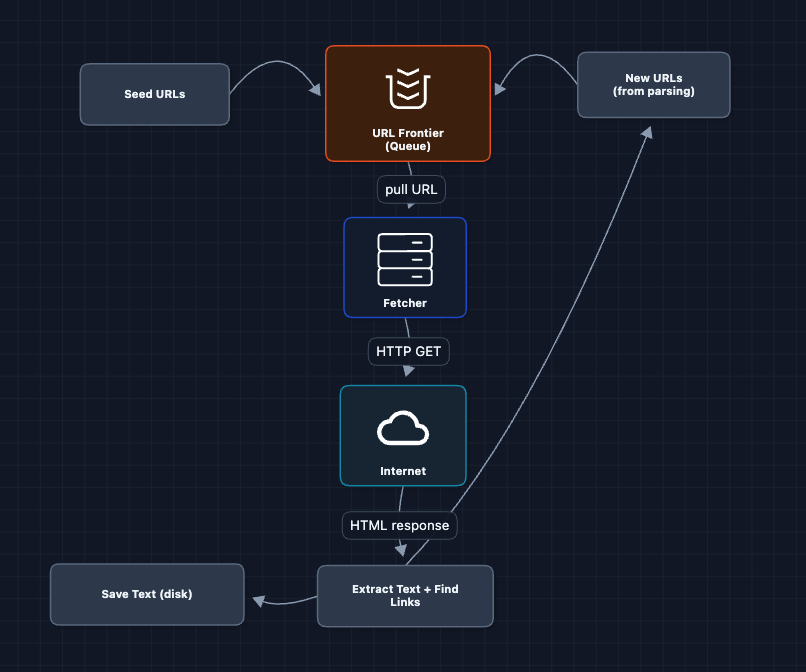
This is better. The queue persists even if the fetcher crashes. We can run multiple fetchers.
What breaks?
- Where does the text go? We're still saving to local disk, which fills up fast.
- Where does the HTML go? If parsing fails, we have to re-fetch the whole page.
We need proper storage.
3) Add Blob Storage: FR2, FR3
Let's separate storage from compute. Raw HTML and extracted text both go to S3.
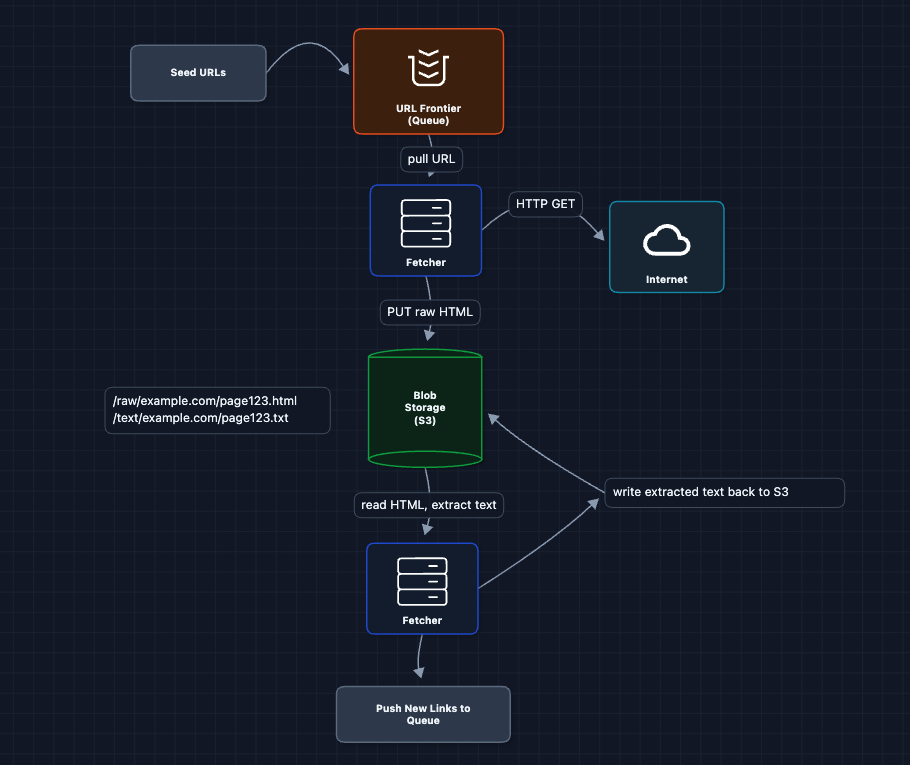
Now we have durable storage! But there's a tiny problem.
What breaks?
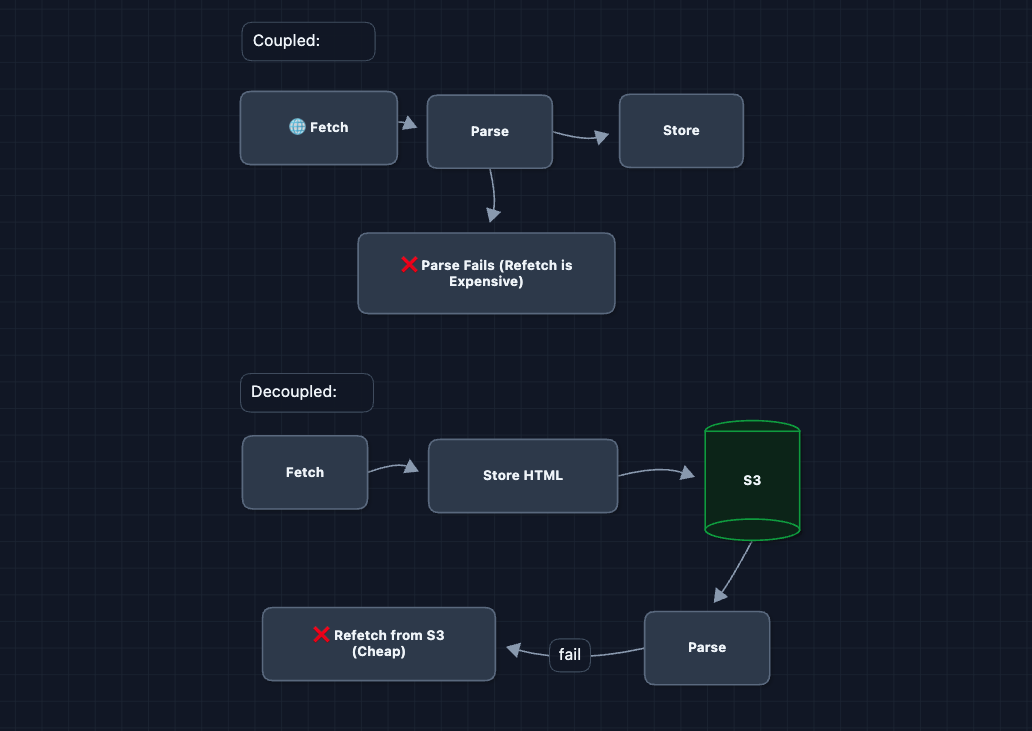
- Coupled pipeline: The fetcher does BOTH fetching AND parsing. If parsing fails (malformed HTML), we have to re-fetch the page.
- Blocked on slow parsing: Fetchers wait while extracting text instead of fetching more pages.
We need to decouple fetch from parse.
4) Separate Fetch and Parse: FR2, FR3
Here, we split the monolithic fetcher into two services.
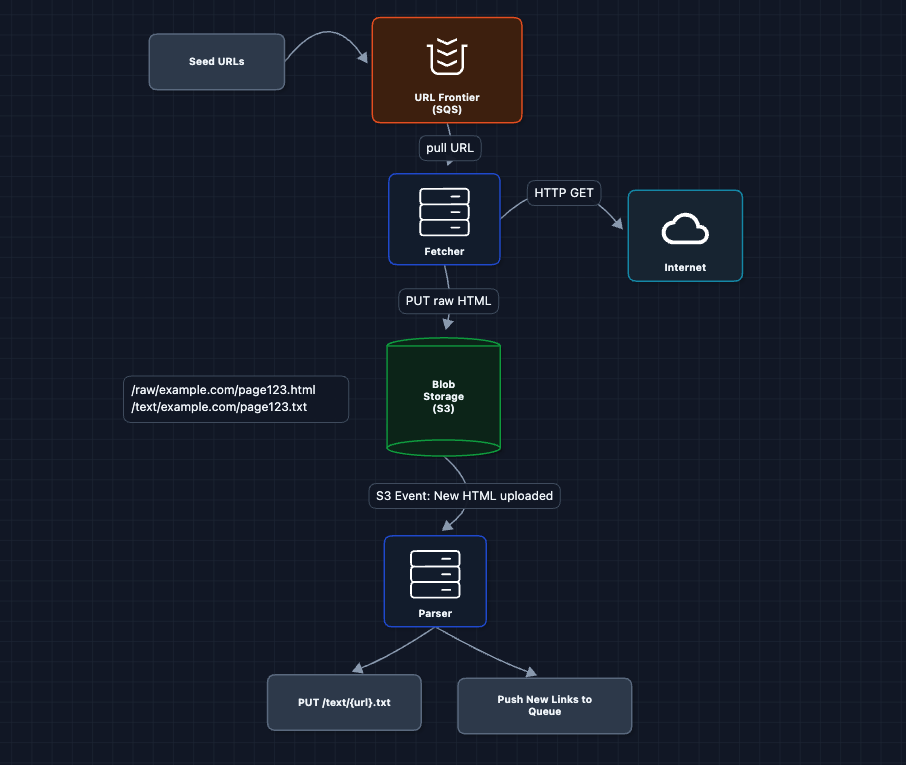
Why is this better?
- Fetcher crashes? HTML is already in S3. Parser picks it up later.
- Parser crashes? HTML is still there. Another parser instance retries.
- Fetcher can stay busy: It doesn't wait for parsing.
S3 event notifications trigger the parser automatically when new HTML appears. This is cleaner than polling and scales naturally.
What breaks?
- No visibility: We have no idea which URLs have been fetched, parsed, or failed.
We need a state tracker.
5) Add Metadata Database: FR1, FR2, FR3
Every URL should have a status. Let's track it with a Metadata DB (DynamoDB), a NoSQL key-value store that handles high write throughput and scales horizontally via consistent hashing.
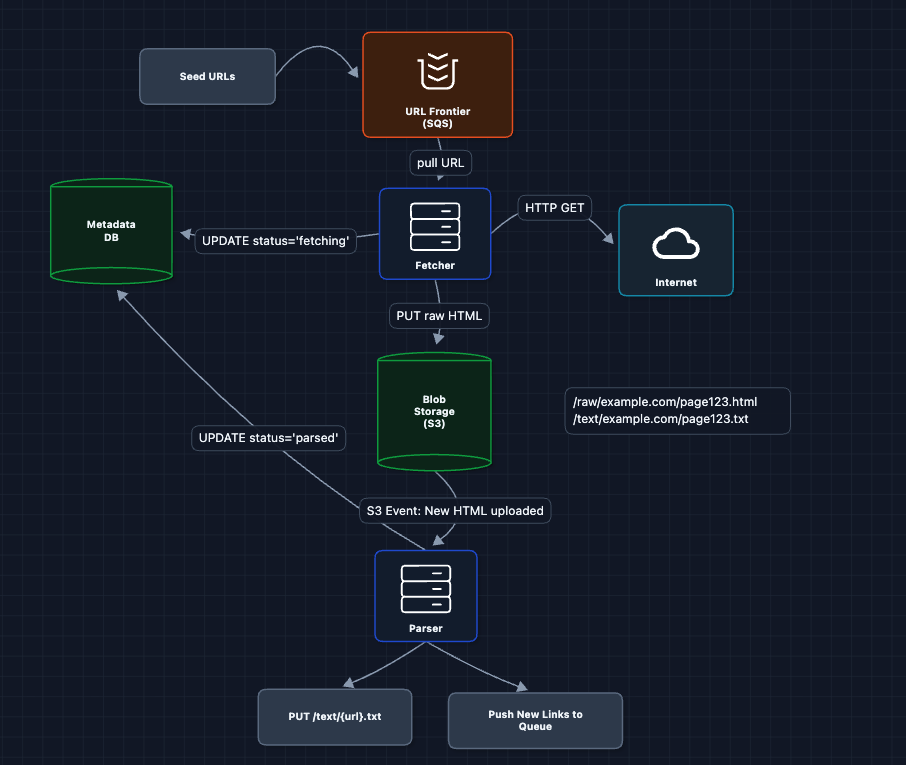
Now we can:
- Query how many URLs are in each state
- Resume from exactly where we left off after a crash
- Detect stuck URLs that never completed
What breaks?
- Still too slow: One fetcher can do maybe 100 pages/second. We need 23,000.
Time to scale horizontally.
6) Scale Fetchers Horizontally: FR2
More workers mean more throughput.
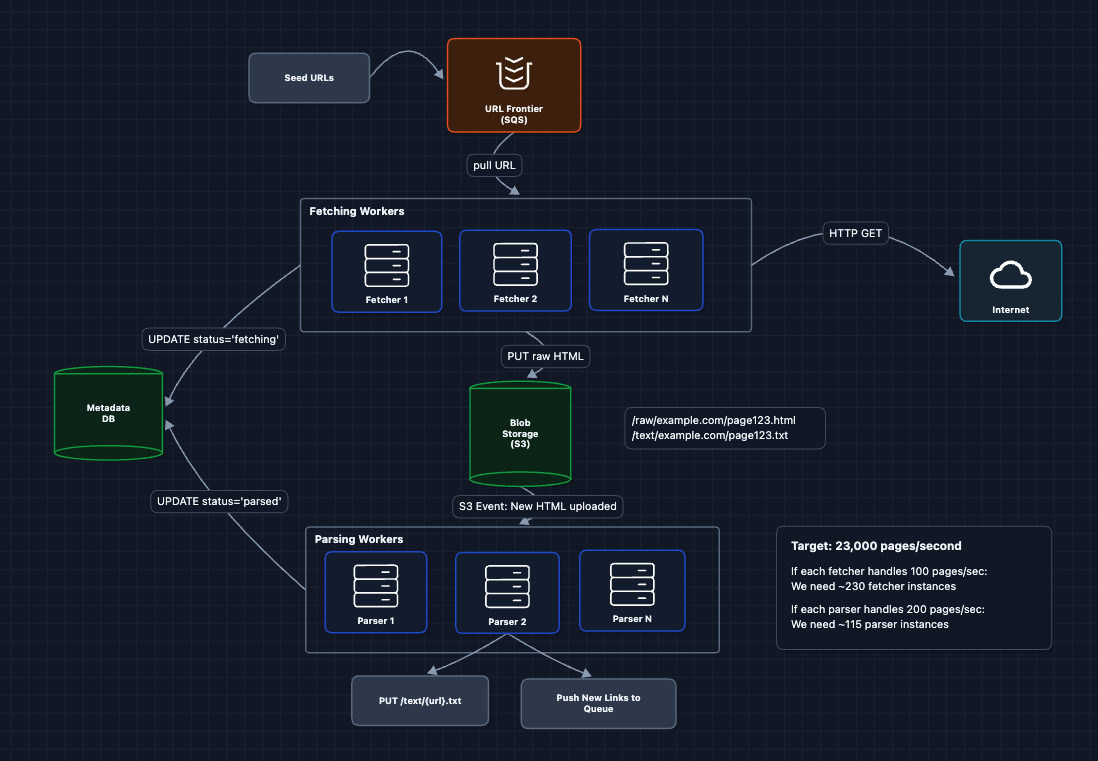
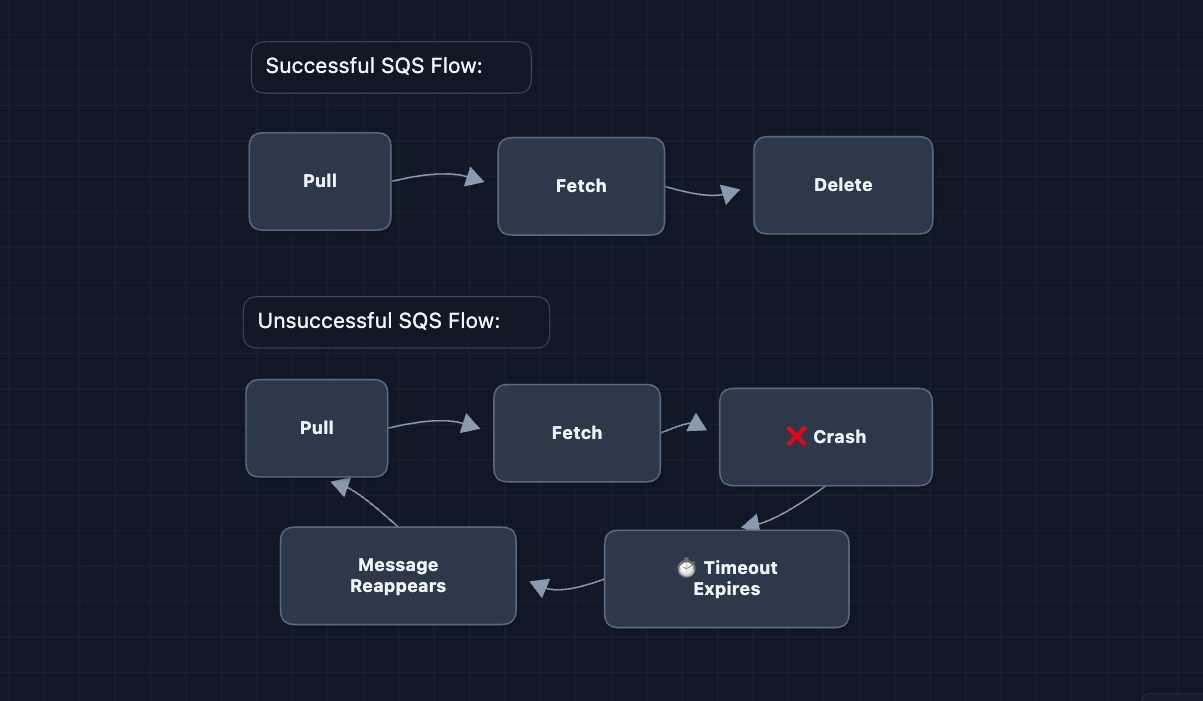
SQS visibility timeouts are key here. When a fetcher pulls a URL, it becomes invisible to other fetchers for N seconds. If the fetcher doesn't delete it (because it crashed), the URL reappears for retry.
What breaks?
- We're attacking websites: 230 fetchers hitting the same domain simultaneously will get us blocked.
We have to ensure politeness for our crawler.
7) Complete System: FR1, FR2, FR3 ✅
Let's put it all together. Here's the complete working system:
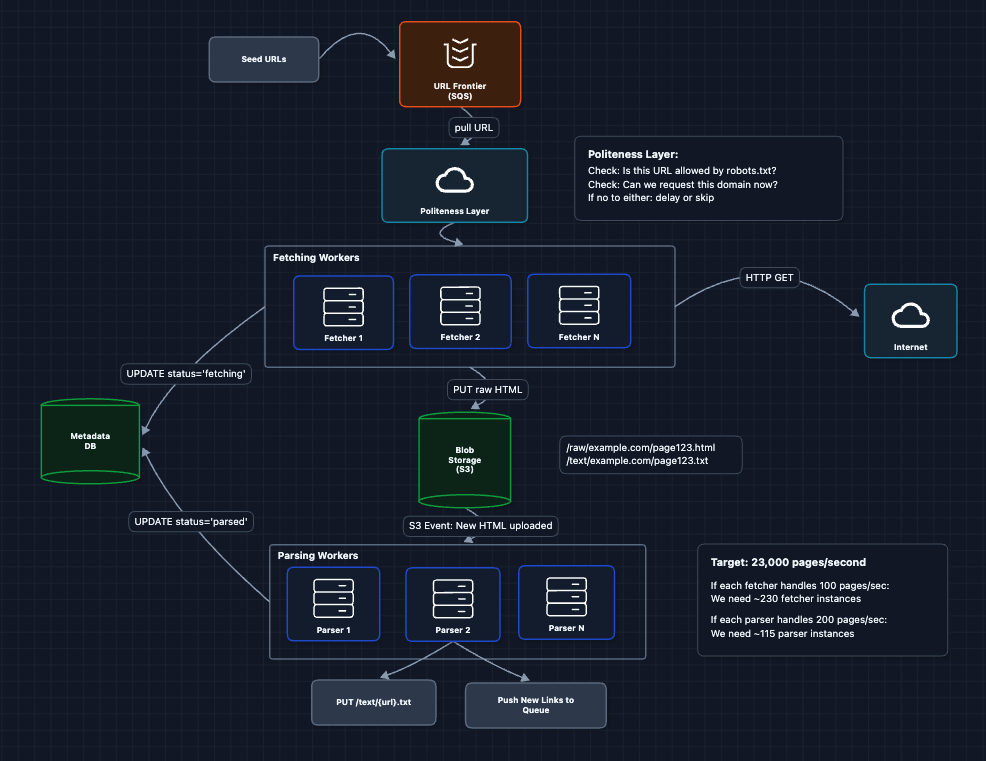
This is our baseline architecture. We have a complete, working system that satisfies all functional requirements (FR1, FR2, FR3). Now we can address our non-functional requirements and more in the deep dives:
- NFR1 (Efficiency): How do we scale DNS lookups?
- NFR2 (Fault Tolerance): How do we recover from failures?
- NFR3 (Politeness): How do we respect websites?
- NFR4 (Deduplication): How do we avoid duplicate content?
Potential Deep Dives
1) How do we respect websites (Politeness)?: NFR3
Every request we make costs the target server CPU, bandwidth, and money. If we crawl too aggressively, websites will:
- Block our IP addresses
- Return error pages instead of content
- (rarely but still possible) take legal action
Robots.txt Compliance
Every website can publish a robots.txt file at its root that specifies crawling rules:
# example.com/robots.txt

User-agent: *
Disallow: /private/
Disallow: /admin/
Crawl-delay: 2

User-agent: GPTBot
Disallow: /
Our crawler must:
- Fetch
robots.txtbefore crawling any URL on a domain - Parse and cache the rules in Redis
- Check every URL against the rules before fetching
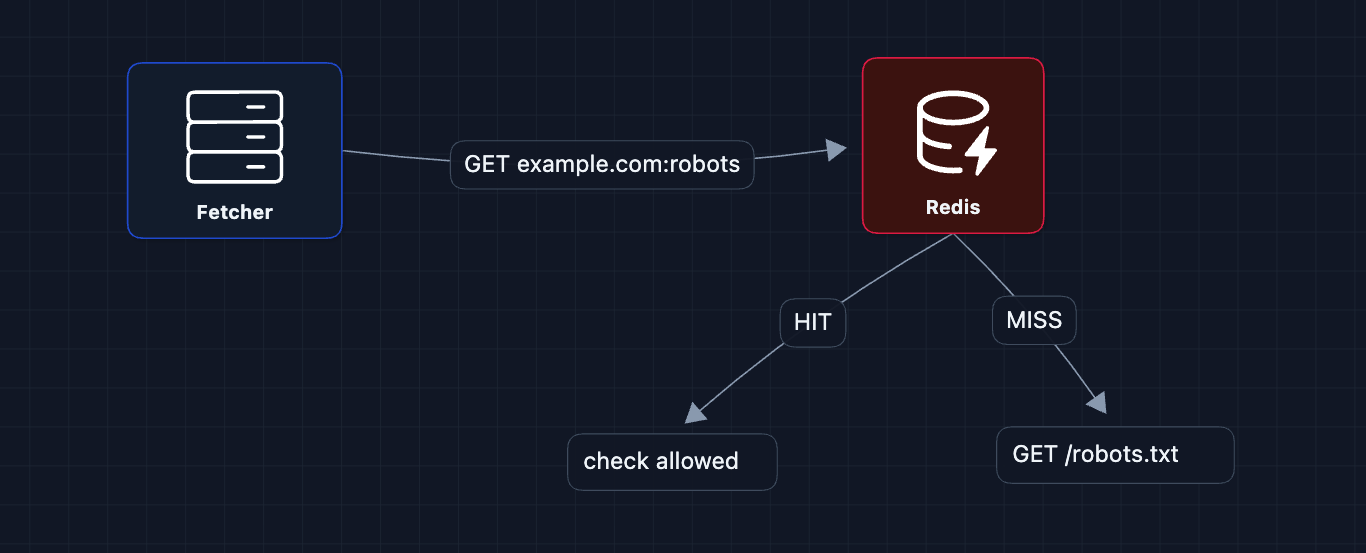
What about domains without robots.txt?
If robots.txt returns 404, assume everything is allowed. If it times out, treat the domain as temporarily unavailable and retry later.
Rate Limiting
Even if robots.txt allows access, we shouldn't flood a domain with requests. Standard practice is 1 request per second per domain.
We use Redis as a per-domain counter. Each domain gets a key that tracks how many requests have been made in the current second.
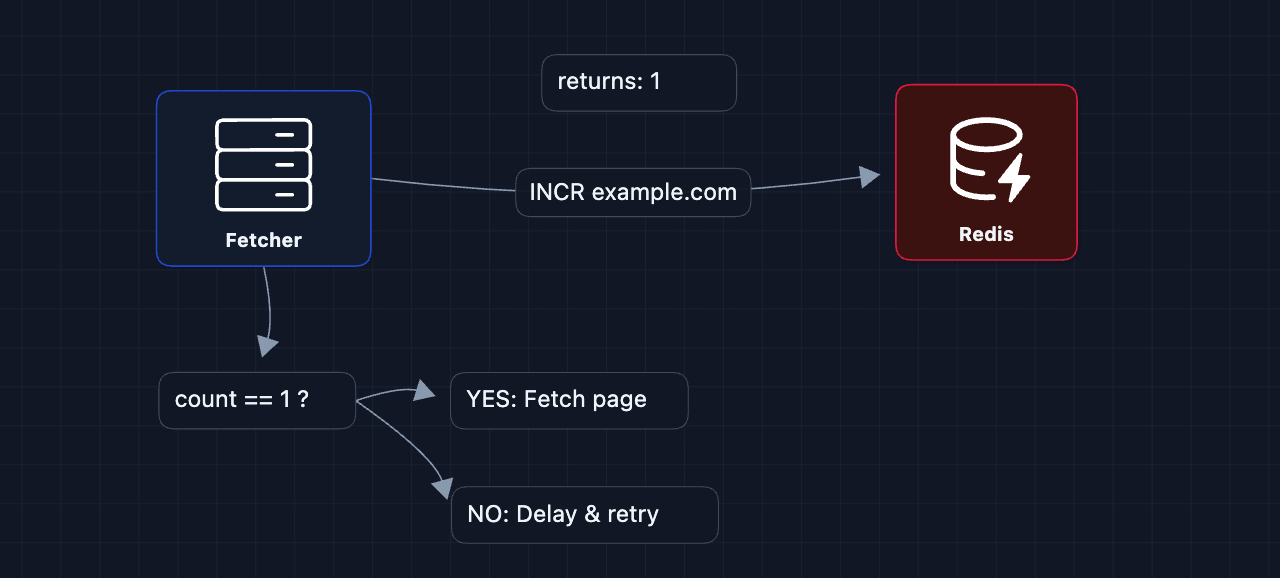
How it works:
- Before fetching
example.com, the fetcher runsINCR example.comin Redis INCRatomically adds 1 to the key and returns the new value. If the key doesn't exist, Redis creates it with value1- The fetcher also sets
EXPIRE 1son the key (meaning it auto-deletes after 1 second) - If
INCRreturns 1: You're the first to request this domain in the current second. Proceed with the fetch. - If
INCRreturns > 1: Another fetcher already hit this domain this second. Wait and retry later.
The INCR and EXPIRE commands must happen atomically (using MULTI/EXEC), otherwise a crash between them could leave a key that never expires, permanently blocking that domain.
What about Crawl-delay in robots.txt?
Some sites specify a custom delay (Crawl-delay: 5 means wait 5 seconds between requests). To respect this:
- When parsing
robots.txt, store the crawl-delay per domain in Redis (crawl_delay:cnn.comis5) - When rate limiting, instead of hardcoding
EXPIRE 1, look up that domain's delay - Use
EXPIRE {crawl_delay}instead
Jitter (Avoiding Thundering Herds)
Imagine the frontier queue suddenly has 100 CNN URLs (from parsing a popular page). 100 fetchers pull them simultaneously, all get rate-limited (from Redis), and all retry after exactly 1 second, creating the same spike again. Add random jitter to each retry delay so fetchers wake up at staggered times.
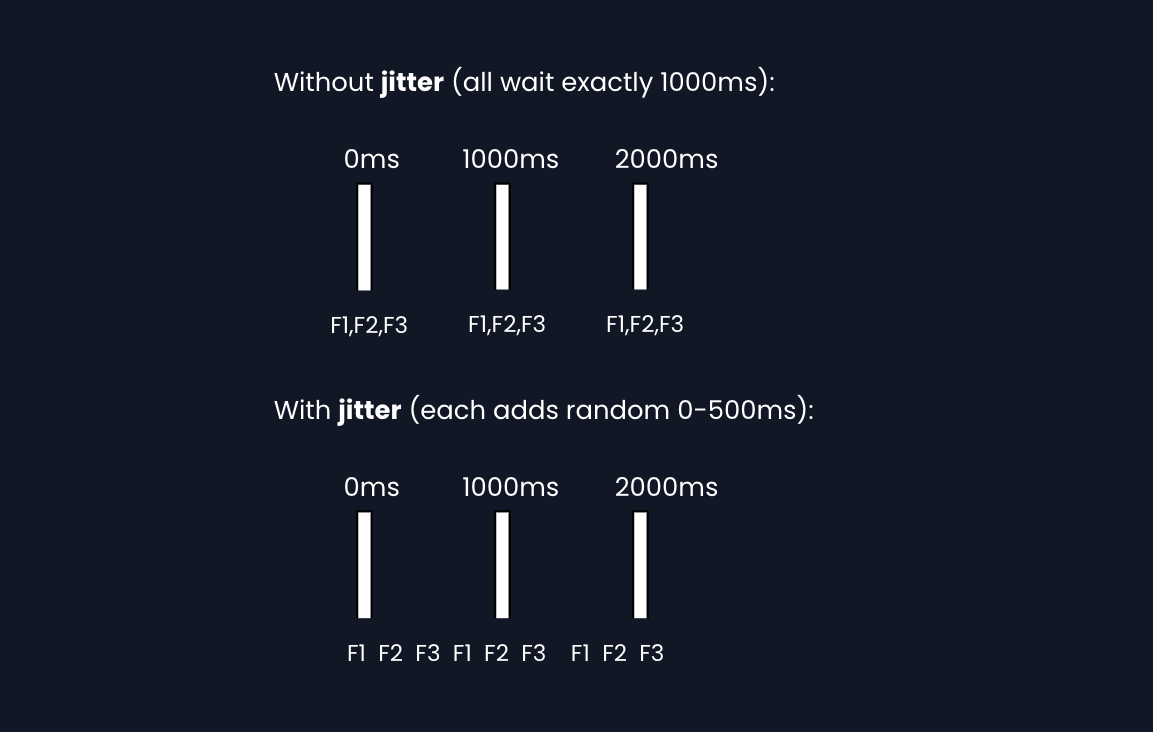
Implementation: sleep(base_delay + random(0, 500ms)) before each request.
2) How do we recover from failures?: NFR2 (Fault Tolerance)
At 23,000 pages/second with hundreds of workers, failures are guaranteed. Servers crash, but we need to handle this gracefully.
SQS Visibility Timeouts
The URL Frontier uses SQS, which has built-in fault tolerance via visibility timeouts. When a fetcher pulls a message, it becomes invisible to others for N seconds. If the fetcher doesn't delete it (because it crashed), the message reappears automatically.
Decoupling Saves Expensive Work
Remember when we split fetch and parse? This matters for fault tolerance because the network fetch is the expensive part.
Dead Letter Queues
Some URLs will always fail (site permanently down, malformed HTML that crashes the parser). After N retries, move them to a dead letter queue for human review.
Exponential Backoff
When a site returns 429 (rate limited) or 5xx (server error), don't immediately retry. Back off exponentially:
   1st failure: wait 1s
   2nd failure: wait 2s
   3rd failure: wait 4s
   4th failure: wait 8s
   ... and so on
This prevents hammering a struggling server and gives it time to recover.
3) How do we avoid duplicate content?: NFR4 (Deduplication)
The web is full of duplicates:
http://example.comvshttps://example.comexample.com/pagevsexample.com/page?utm_source=twitter- Mirror sites hosting identical content
Crawling duplicates wastes resources and pollutes our training data with repetition.
URL Normalization
Before adding any URL to the frontier, normalize it to catch obvious duplicates.
   BEFORE: HTTP://EXAMPLE.COM:80/path/../other?b=2&a=1#section

   AFTER:  http://example.com/other?a=1&b=2
Normalization rules: lowercase host, remove default port, resolve .., sort query params, strip fragments, remove tracking params (utm_*, fbclid).
4) How do we avoid getting trapped?: NFR1 (Efficiency)
Some websites create infinite loops: calendar pages (/2024/01/01, /2024/01/02, ...), session IDs in URLs, infinite pagination.
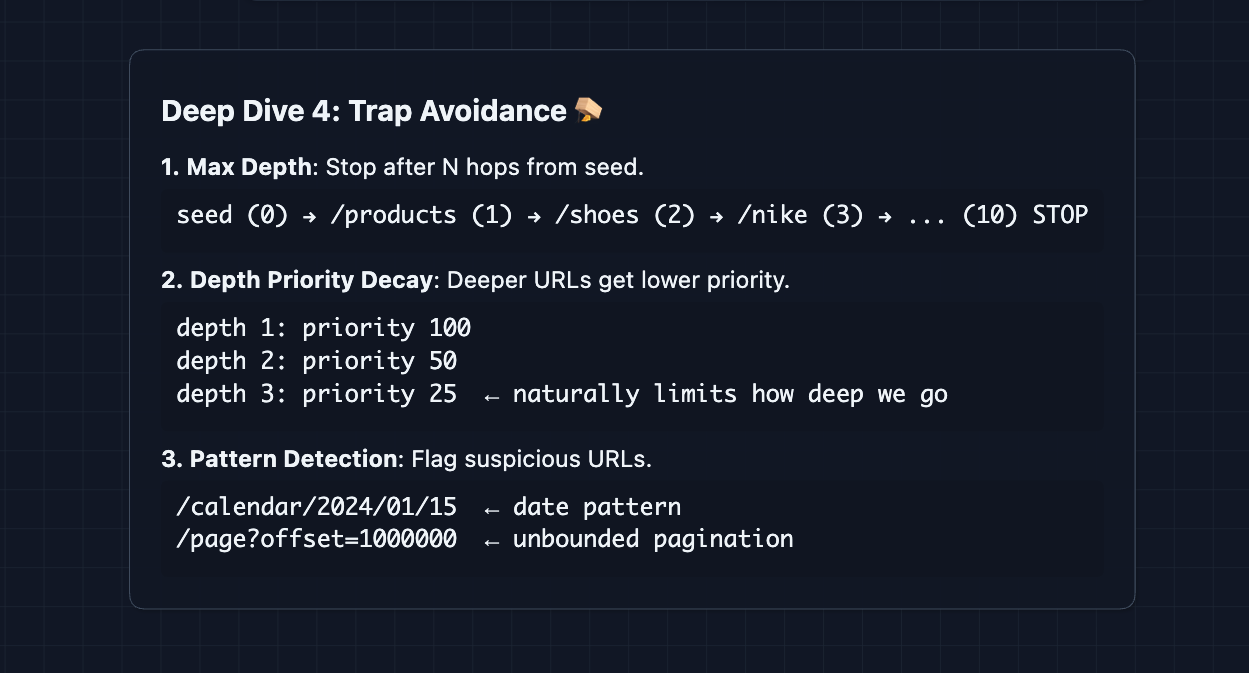
One trade-off is over-filtering. There are legitimate sites with millions of pages, such as Wikipedia and Amazon.
What to Expect?
This system is deceptively deep. The basic architecture is straightforward, but the devil is in operational details.
Mid-Level
- Breadth-oriented (80/20): Focus on getting the complete pipeline working: URL Frontier to Fetcher to Storage to Parser to Frontier.
- Expect guidance on trade-offs: The interviewer will prompt you on questions like "What happens if a fetcher crashes?"
- Must demonstrate understanding of: Why we need a queue, why we separate fetch from parse, what robots.txt looks like.
- The bar: Complete the HLD, explain the data flow clearly, acknowledge politeness is needed even if details aren't very concrete.
Senior
- Balanced (60/40): Go deeper on areas you've worked with. If you've built data pipelines, flex that. If you've dealt with external APIs, talk about rate limiting in depth.
- Justify technology choices: "I'd use SQS over Kafka here because we need visibility timeouts for automatic retry, and we don't need message replay or ordering guarantees."
- Address failure modes proactively: Before the interviewer asks "What if X fails?", you should be mentioning it.
- The bar: Complete system through Diagram 7, deep dive into 2-3 areas (Politeness + Fault Tolerance are essential), discuss scaling numbers (how many fetchers for 23K/sec?).
Staff
- Depth-oriented (40/60): Breeze through the architecture in 15 minutes. Spend the rest on the hard parts.
- Production-ready thinking: Talk about DNS rate limits before being asked. Mention jitter for thundering herd prevention. Discuss how you'd handle different regions or detect crawler traps.
- Drive the conversation: You should be asking clarifying questions: "Do we care about JavaScript-rendered content? What's our budget for DNS resolvers? How fresh does the data need to be?"
- The bar: All deep dives addressed substantively. Discussion of operational concerns: monitoring, alerting, cost estimation. Ability to adapt the design for different constraints (stricter politeness, real-time requirements, specific data quality needs).
Do a mock interview of this question with AI & pass your real interview. Good luck! 🕷️