




 Meta
Meta Doordash
 Microsoft
 Roblox
 Oracle
 Uber
Uber Amazon
Design Instagram
Problem Context
📸 Instagram is a photo and video sharing platform where users share content with followers. It has 2B+ monthly active users and sees 100M+ photos uploaded daily.
Functional Requirements
Instagram has evolved massively (Reels, Shopping, DMs), but the main product is still the feed. Let's clarify scope with the interviewer to focus on what to focus on for this interview.
Core Functional Requirements
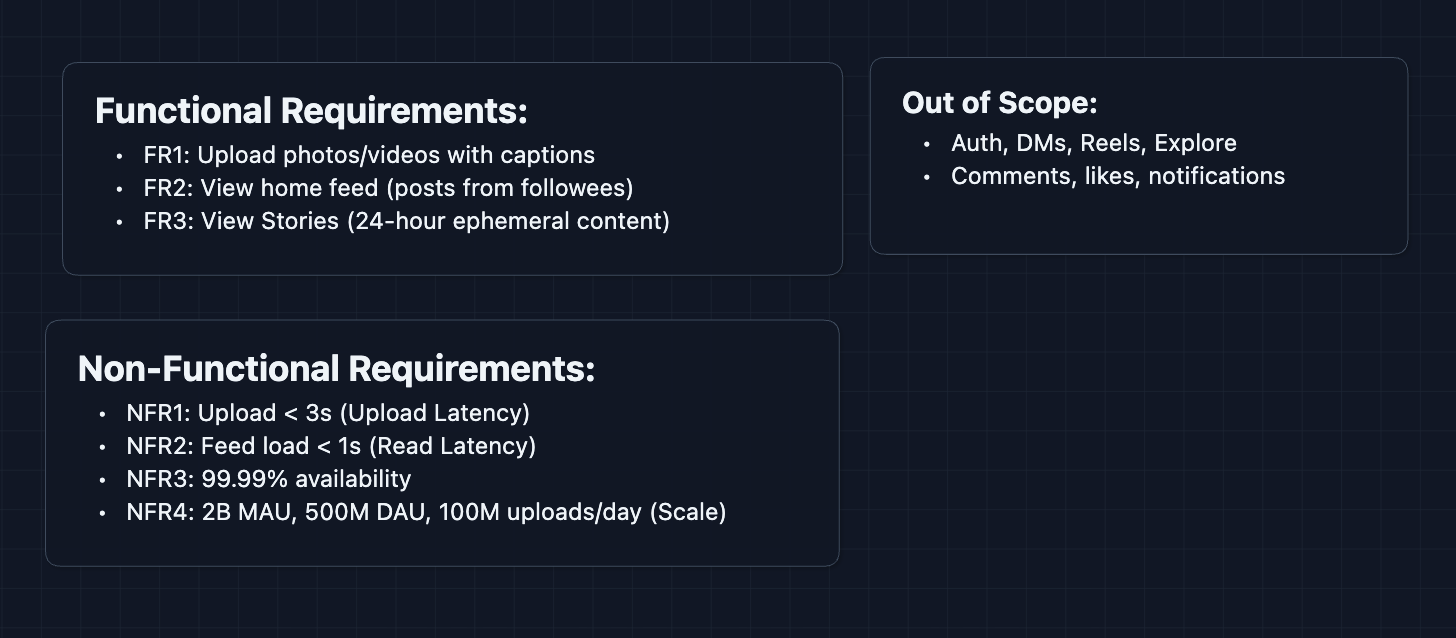
- FR1: Users should be able to upload photos/videos with captions.
- FR2: Users should be able to view their home feed (posts from followed accounts).
- FR3: Users should be able to view Stories (24-hour ephemeral content).
Out of Scope:
- User authentication and profile management.
- Direct messages.
- Reels and Explore page.
- Comments, likes, and notifications system.
- Shopping and ads.
Stories are worth including because they introduce a different data pattern (ephemeral content with TTL), with fairly little work.
Non-Functional Requirements
Core Non-Functional Requirements
- NFR1: Photo uploads should complete in < 3 seconds.
- NFR2: Feed should load in < 1 second.
- NFR3: System should be highly available (99.99%+).
- NFR4: System should handle 2B monthly active users, 500M daily active users, 100M+ uploads/day.
Here's what we have so far:
Let's build this!
The Set Up
The Core Challenge
Instagram is the largest photo-sharing platform in the world. Every second, users upload thousands of photos and videos. Each upload needs to be processed (resized, compressed, thumbnails generated) and then delivered globally to millions of devices.
But that's just the write path. When you open Instagram, posts from everyone you follow need to appear.
Core Entities
User
{
  userId: "u_12345",
  username: "foodphotographer",
  followerCount: 50000,
  followingCount: 800
}
Post
{
  postId: "p_abc789",
  authorId: "u_12345",
  caption: "Sunday brunch vibes 🥞",
  mediaUrls: [
    "https://cdn.instagram.com/p_abc789/full.jpg",
    "https://cdn.instagram.com/p_abc789/thumb.jpg"
  ],
  createdAt: "2025-01-09T10:30:00Z"
}
Story (ephemeral!)
{
  storyId: "s_xyz456",
  authorId: "u_12345",
  mediaUrl: "https://cdn.instagram.com/s_xyz456.jpg",
  createdAt: "2025-01-09T08:00:00Z",
  expiresAt: "2025-01-10T08:00:00Z"   // 24 hours later
}
Follow Relationship (asymmetric)
{
  followerId: "u_67890",      // who is following
  followeeId: "u_12345"       // who is being followed
}
APIs
1. Upload APIs (FR1)
Get Upload URL
- Endpoint:
POST /api/v1/media/upload-url
Request Body:
{
  "userId": "u_12345",
  "mediaType": "image",
  "filename": "brunch.jpg"
}
Response:
{
  "uploadId": "upload_abc",
  "presignedUrl": "https://s3.amazonaws.com/uploads/...",
  "expiresIn": 3600
}
Why presigned URL? The actual image (5-20MB) goes directly to S3. Our API servers never touch the bytes, saving bandwidth and CPU.
Create Post
- Endpoint:
POST /api/v1/posts
Request Body:
{
  "userId": "u_12345",
  "uploadId": "upload_abc",
  "caption": "Sunday brunch vibes 🥞",
  "location": "New York, NY"
}
Response:
{
  "postId": "p_abc789",
  "status": "processing",
  "createdAt": "2025-01-09T10:30:00Z"
}
What happens next? The image is queued for processing (resize, compress, generate thumbnails). Once complete, the post goes live.
2. Feed APIs (FR2)
Get Home Feed
- Endpoint:
GET /api/v1/feed?userId={userId}&limit=20&cursor={cursor}
Response:
{
  "posts": [
    {
      "postId": "p_abc789",
      "authorId": "u_12345",
      "authorUsername": "foodphotographer",
      "caption": "Sunday brunch vibes 🥞",
      "mediaUrls": {
        "full": "https://cdn.instagram.com/p_abc789/full.jpg",
        "thumbnail": "https://cdn.instagram.com/p_abc789/thumb.jpg"
      },
      "createdAt": "2025-01-09T10:30:00Z"
    }
  ],
  "nextCursor": "cursor_abc123"
}
What's happening? Feed Service fetches pre-computed post IDs for this user, hydrates them with full post data and media URLs, then returns paginated results.
3. Stories APIs (FR3)
Create Story
- Endpoint:
POST /api/v1/stories
Request Body:
{
  "userId": "u_12345",
  "uploadId": "upload_def"
}
Response:
{
  "storyId": "s_xyz456",
  "expiresAt": "2025-01-10T10:30:00Z"
}
Get Stories Feed
- Endpoint:
GET /api/v1/stories/feed?userId={userId}
Response:
{
  "storyGroups": [
    {
      "authorId": "u_12345",
      "authorUsername": "foodphotographer",
      "stories": [
        {
          "storyId": "s_xyz456",
          "mediaUrl": "https://cdn.instagram.com/s_xyz456.jpg",
          "createdAt": "2025-01-09T10:30:00Z"
        }
      ],
      "hasUnwatched": true
    }
  ]
}
High-Level Design
We'll build this incrementally, starting with The simplest approach and rebuild it to handle scale.
For your interview, acknowledge that you're starting simple intentionally. There will definitely be flaws in the design, but tell the interviewer you know those and and will address them in the deep dive.
1) The Simplest Upload: FR1 (Photo Upload)
Let's start with the most basic approach: user sends photo to server, server stores it.
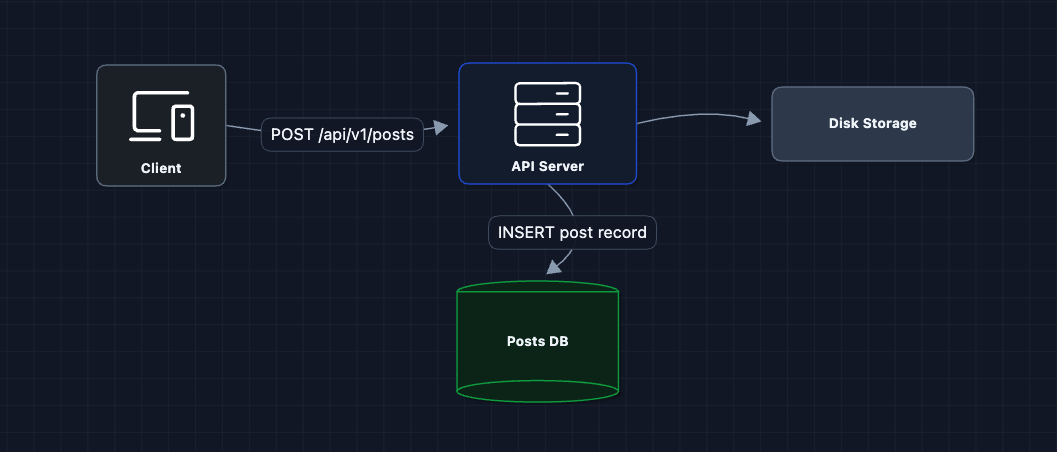
User sends photo, server saves it. In theory, this would work.
What breaks?
- Server bandwidth: A 10MB photo goes through our API server. At 100M uploads/day, that's 1 petabyte of data through our servers.
- Single point of failure: All photos on one disk.
- No optimization: Raw photos are huge. A 4K image might be 15MB, but users on mobile only need 500KB.
We need to separate uploads from our API servers and add media processing.
2) Presigned URLs + Object Storage: FR1 (Photo Upload)
Let's bypass our servers entirely for the heavy lifting:
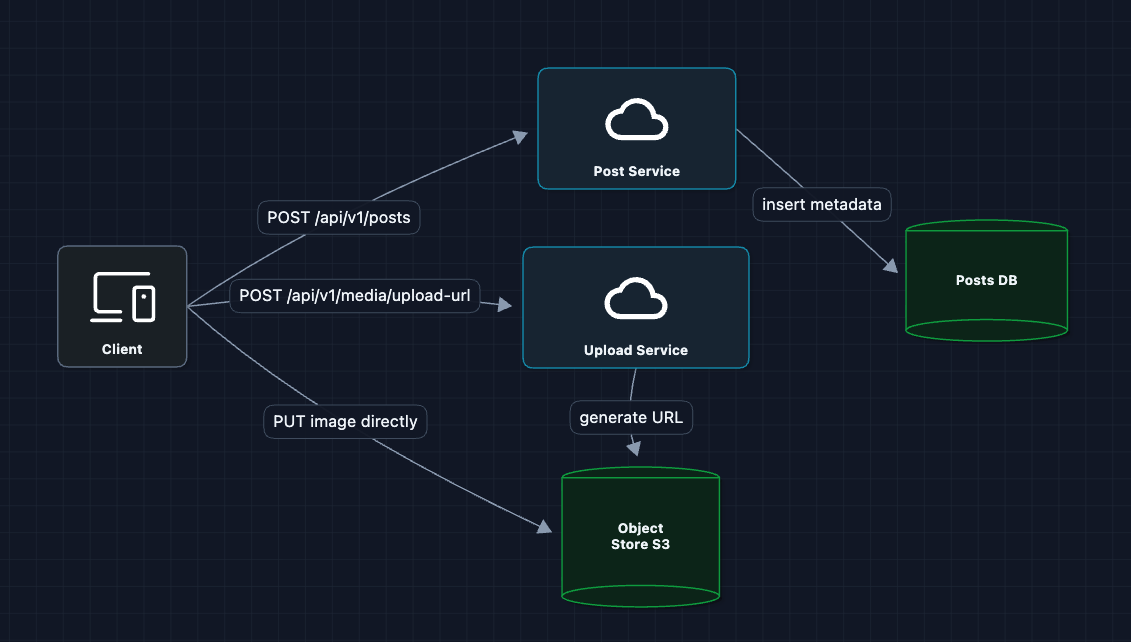
Now the 10MB photo goes directly to S3. Our API servers only handle tiny JSON requests.
What breaks?
- Raw images are too big: Mobile users with slow connections can't load a single 15MB photo.
- No thumbnails: Feed shows small previews. We're wasting bandwidth sending full-resolution images.
- Inconsistent formats: iPhone shoots HEIC, Android shoots JPEG, some cameras shoot RAW.
We need an image processing pipeline.
3) Add Media Processing: FR1 (Photo Upload) ✅
After upload, we process the image into multiple sizes and formats:
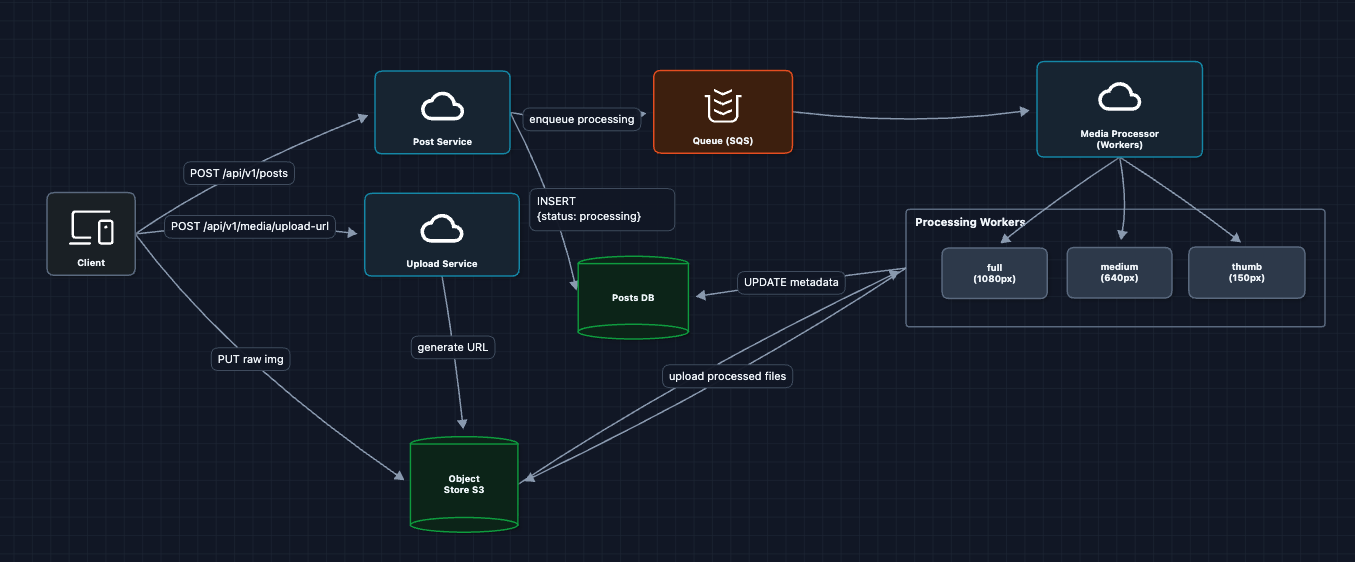
The processing flow:
- User uploads raw image to S3
- Post Service creates post record with
status: "processing" - SQS job triggers Media Processor workers
- Workers read raw image, create 3 sizes, write back to S3
- Workers update Posts DB with final URLs and
status: "live"
Why multiple sizes? The grid view on a profile page shows 150px thumbnails. Loading 1080px images for a grid of 30 posts would waste 95% of the data transferred.
What breaks?
- Users are far from S3: S3 in us-east-1, but users in Tokyo. Thats 200ms latency per image request.
- S3 egress is expensive: Serving images directly from S3 at scale costs a fortune.
We need to cache images closer to users.
4) Add CDN for Media Delivery: NFR1 (Upload Latency) ✅
Add a Content Delivery Network to cache images at the edge, just for a clear optimization in our HLD:
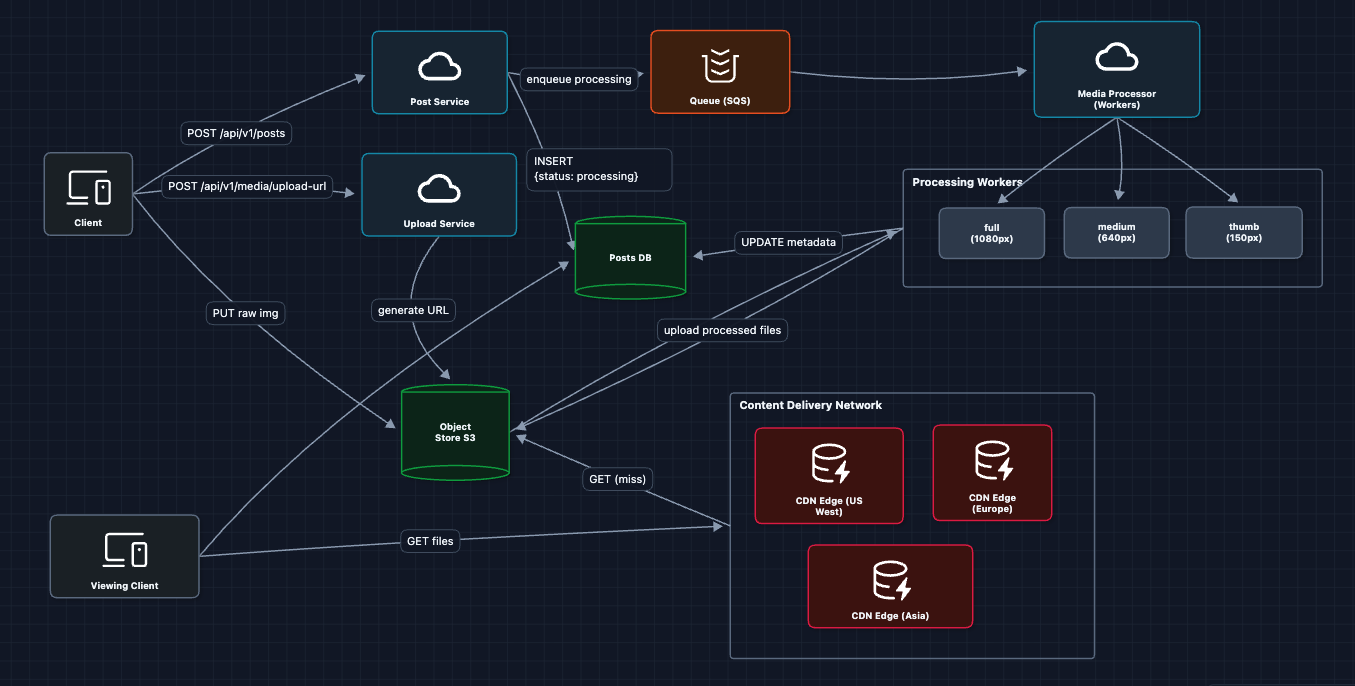
Now a user in Tokyo gets images from the Tokyo edge server (<20ms) instead of S3 in Virginia (200ms+).
What breaks?
- We can upload images, but how does a user see their feed?
5) Building the Feed: FR2 (Home Feed) ✅
When a user opens Instagram, we need to show posts from everyone they follow.
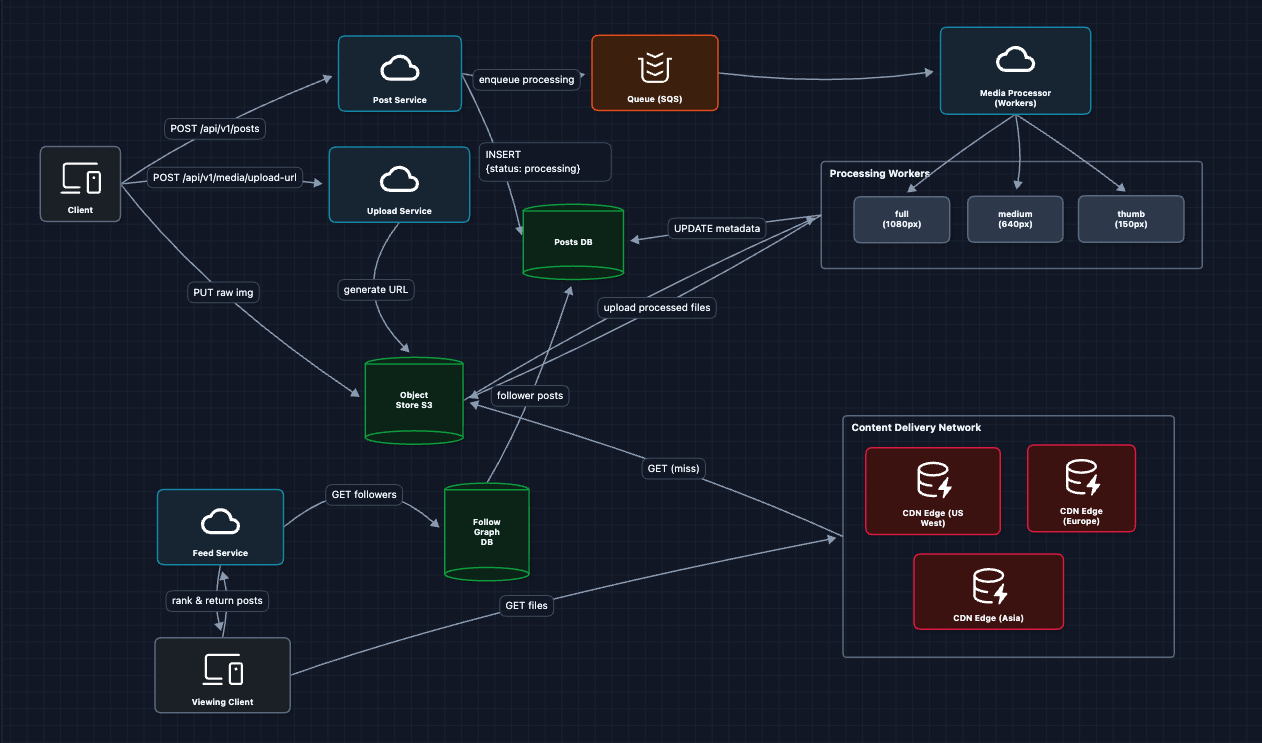
Alice asks for her feed, we look up who she follows, grab their recent posts, merge and return. This satisfies FR2!
This works, but will it scale? At 500M DAU with hundreds of followees each, computing feeds on every request won't hold up. We'll address caching, fan-out, and the celebrity problem in the Deep Dives section.
6) Adding Stories: FR3 (Ephemeral Content) ✅
Stories are fundamentally different from posts: they expire after 24 hours, shown in a separate horizontal bar, and grouped by user.
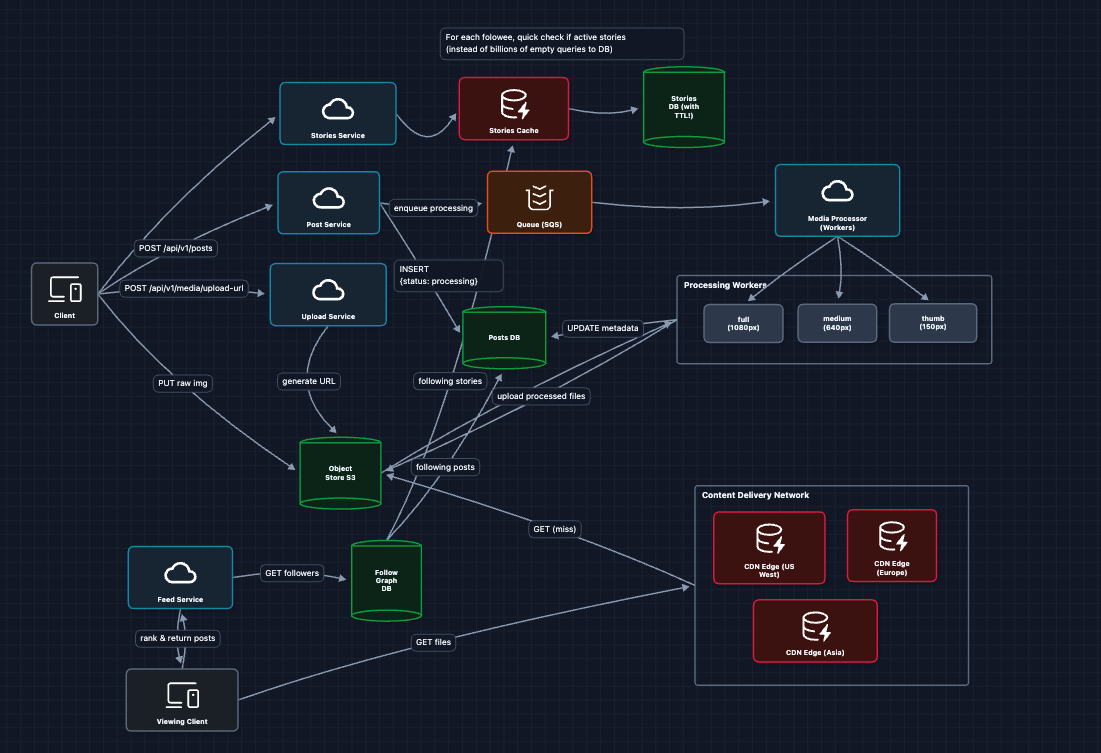
Why not fan-out for Stories? Stories have a 24-hour TTL. By the time we fan-out to millions of followers, many stories are already expired. It's more efficient to pull at read time.
Complete System
This is our baseline architecture!
We now satisfy all functional requirements:
- FR1 ✅ Upload photos/videos (presigned URL to S3 to Media Processor to CDN)
- FR2 ✅ View home feed (query Follow Graph to Posts DB and return)
- FR3 ✅ View Stories (TTL-based ephemeral storage)
Now we can address our non-functional requirements in the deep dives:
- NFR1 (Upload Latency): How do we process images in < 3 seconds?
- NFR2 (Read Latency): How do we serve feeds in < 1 second?
- NFR4 (Scale): How do we handle 100M+ uploads/day?
- NFR3 (Availability): What happens when things fail?
Potential Deep Dives
1) How do we process images in under 3 seconds?: NFR1 (Upload Latency)
In Diagram 3, we showed async image processing. But users want to see their post instantly. Can we hit 3 seconds end-to-end?
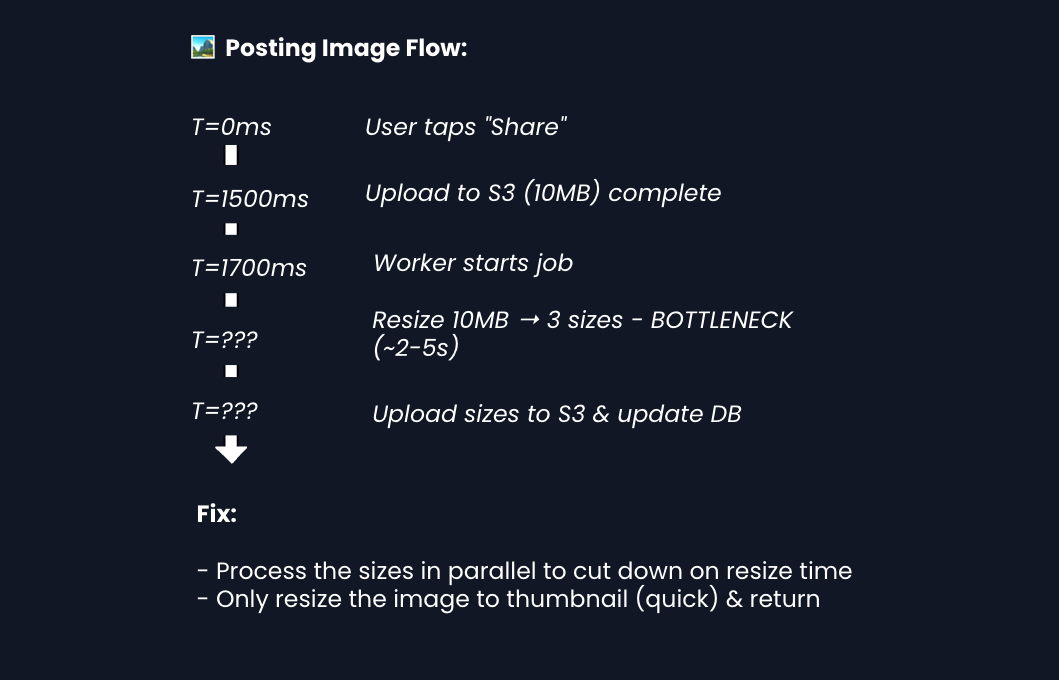
The user's perception of speed matters more than actual completion time. You can finish most of the work in the background.
2) How do we serve feeds in under 1 second?: NFR2 (Read Latency)
In Diagram 5, we query the Follow Graph and Posts DB on every request. At 500M DAU with 800 followees each, this creates massive DB load and ~300-600ms latency.
The Fix: Fan-out on Write
Instead of computing feeds at read time, we pre-compute them at write time for active users. When Alice posts, we push her postId to every follower's feed cache. Now when Bob opens the app, his feed is already waiting.
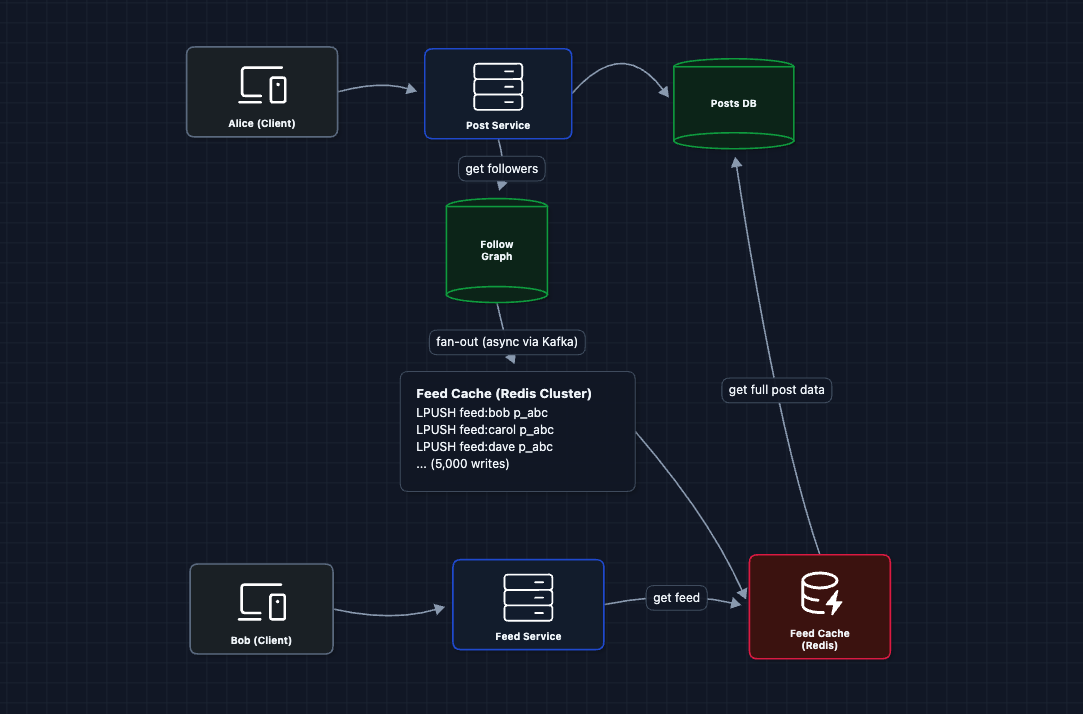
Scaling the Fan-out:
- Async via Kafka: Fan-out happens in background workers, not blocking the post creation.
- Redis Cluster: Feed caches are sharded across nodes (e.g.,
feed:bobhashes to node 3). - Batch writes: Workers batch
LPUSHcommands to reduce round-trips.
The Celebrity Problem
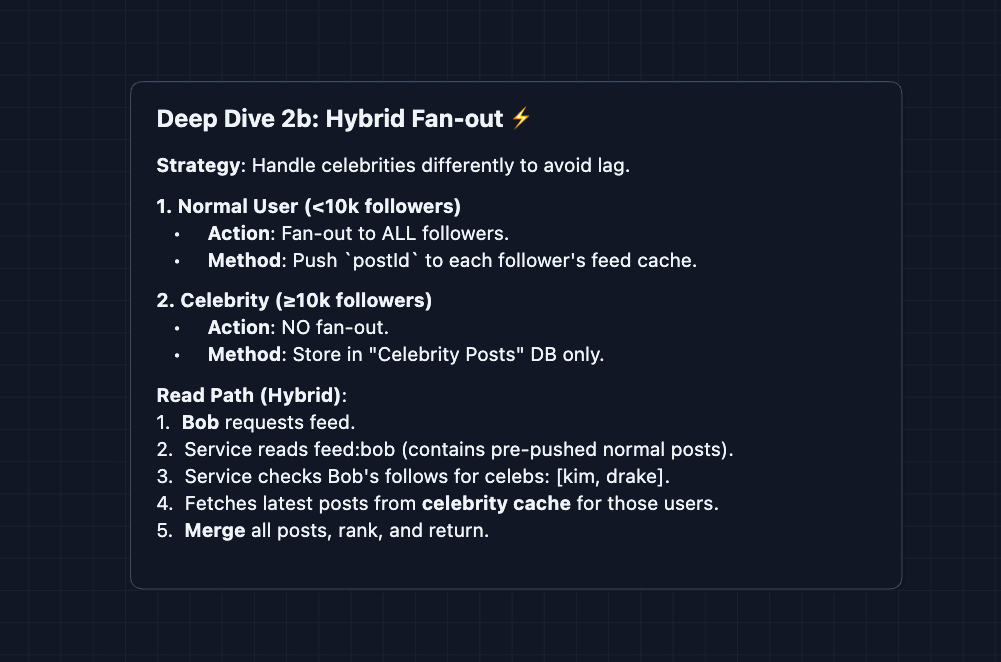
Kim Kardashian has 360M followers. One post = 360M cache writes. Even at 100K writes/sec, that's 1 hour to fan-out a single post. By then, she's already posted again.
The fix is hybrid fan-out. We treat celebrities differently.
3) How do Stories handle the 24-hour expiration?: FR3 (Ephemeral Content)
Stories automatically disappear after 24 hours. How do we implement this efficiently?
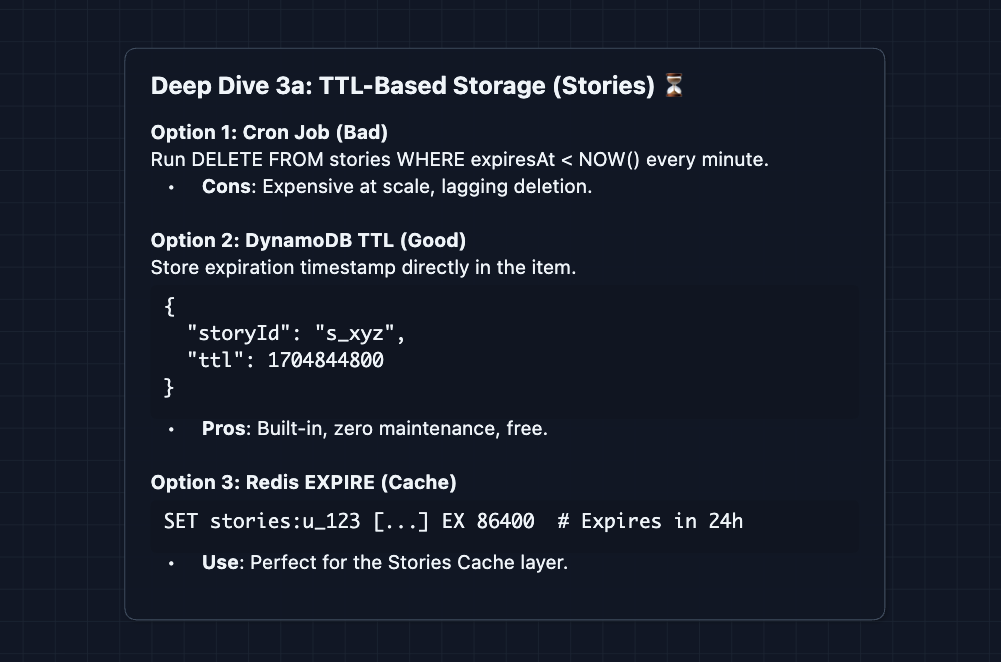
Why not fan-out for Stories? With a 24-hour TTL, the data is inherently short-lived. Fan-out requires updating millions of caches for content that expires soon. It's cheaper to query at read time since the dataset is small (users typically have 0-5 active stories).
4) How do we handle 100M+ uploads per day?: NFR4 (Scale)
100M uploads/day is ~1,150/sec sustained, spiking to 5,000/sec at peak. Each processing job takes ~2 seconds (download, resize 3x, upload). At peak, that's 10,000 concurrent jobs needed.
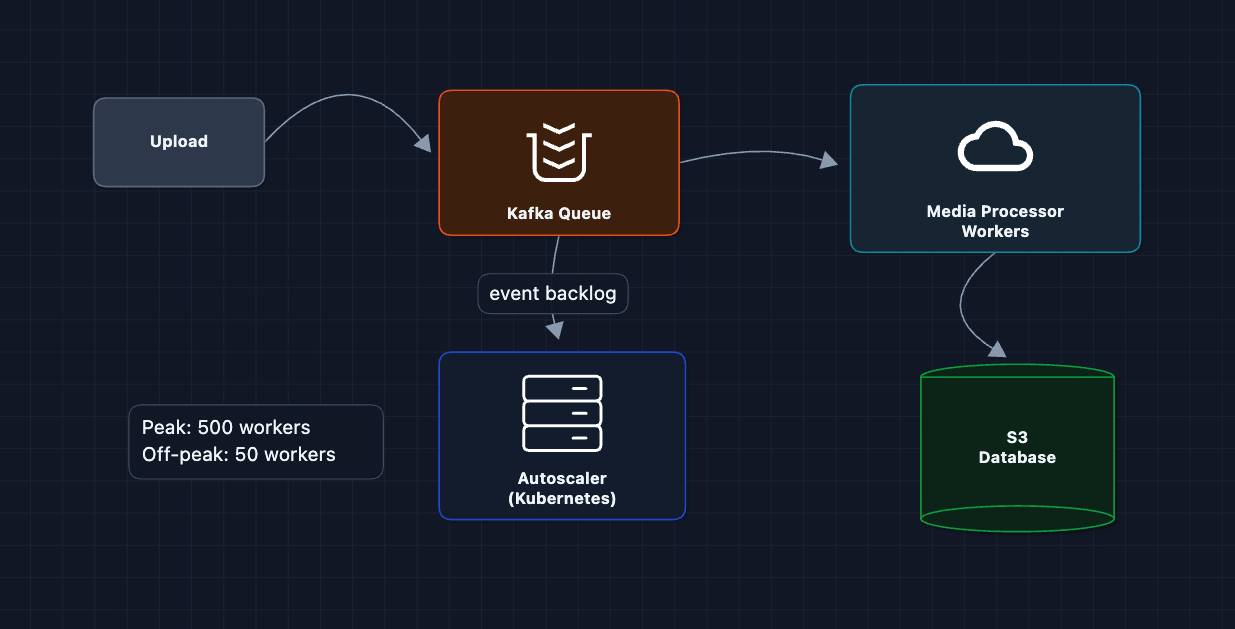
Key Optimizations:
- Auto-scaling: Kubernetes watches Kafka backlog depth. Spin up workers when queue grows, scale down overnight.
- Priority queues: Celebrity posts (seen by millions) jump the queue. Regular posts can wait an extra second.
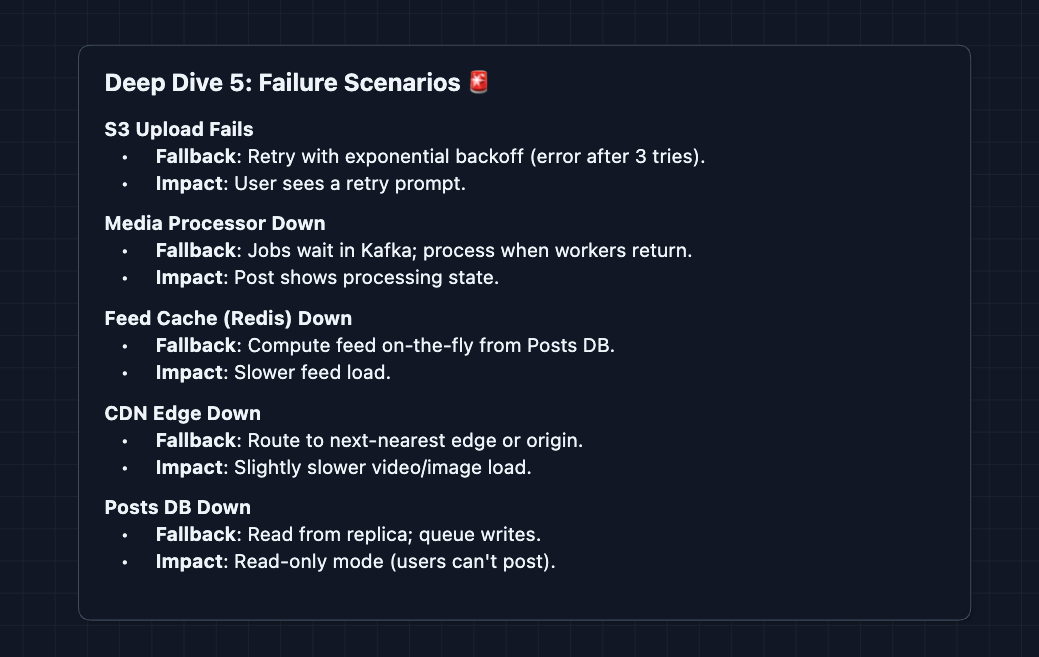
5) What happens when things fail?: NFR3 (Availability)
Every component can fail. We need graceful degradation at each layer:
What to Expect?
Instagram is a great system design question because it tests both media handling AND social feed generation. Here's what different levels should focus on.
Mid-level
- Know both paths. The upload path and the feed path are equally important. Don't neglect either one.
- Understand presigned URLs. If you can't explain why we upload directly to S3 instead of through our servers, you're missing a core concept.
- Be ready for "why CDN?" The answer is latency (edge caching close to users) and cost (cheaper egress than S3).
- Minimum bar: Draw a working system where users can upload photos and see a feed. Acknowledge that scale will be a problem and show initiative to address them in the deep dives.
Senior
- Balanced Breadth & Depth (60/40): You should go deeper into areas you have experience with. Don't just name-drop technologies but explain how image processing pipelines work and why you'd choose a particular queue system.
- Proactive Problem-Solving: Lead with the Celebrity Problem before the interviewer asks. Propose Hybrid Fan-out (push for normal users, pull for celebrities) and explain the trade-off math.
- Articulate Trade-offs: You can thoroughly explain pros/cons of architectural choices ("Fan-out is expensive for writes but gives fast reads. With 100M daily uploads but 500M daily active users reading feeds, we're read-heavy so caching makes sense").
- The Instagram Bar: Complete the full system and proactively dive into 2-3 deep dives: image processing latency, feed caching and fan-out (Deep Dive 2), or Stories TTL implementation. You explain the celebrity problem and hybrid fan-out.
Staff
- Depth over Breadth (40/60): The interviewer assumes you know the basics. Breeze through the high-level design quickly (~15 min) so you have time for interesting challenges.
- Experience-Backed Decisions: Talk about operational concerns. How do you handle a viral post that's being viewed 1M times/minute? How do you roll out a new image format (WebP, AVIF)? How do you handle regional compliance (data residency)?
- Full Proactivity: You drive the entire conversation. You bring up concerns like cache warming for trending posts, cost optimization (S3 storage tiers), and handling image moderation in the processing pipeline.
- The Instagram Bar: Address ALL deep dives without prompting: progressive image loading, feed ranking at read time, Stories architecture, CDN cache invalidation, and cost optimization. You understand the economics of running Instagram at scale (storage costs, bandwidth costs, compute costs).
Do a mock interview of this question with AI & pass your real interview. Good luck! 📸