




 Metropolis
 Airbnb
 Meta
Meta Linkedin
 Navan
Navan Microsoft
 Uber
Uber Reddit
 Oracle
Design Global Notification Service
Problem Context
📬 A Global Notification Service delivers messages to users across multiple channels such as push notifications, SMS, email, and in-app, at a massive scale.
Functional Requirements
A notification service can do many things. We need to establish clear priorities with our interviewer to scope the design appropriately.
Core Functional Requirements
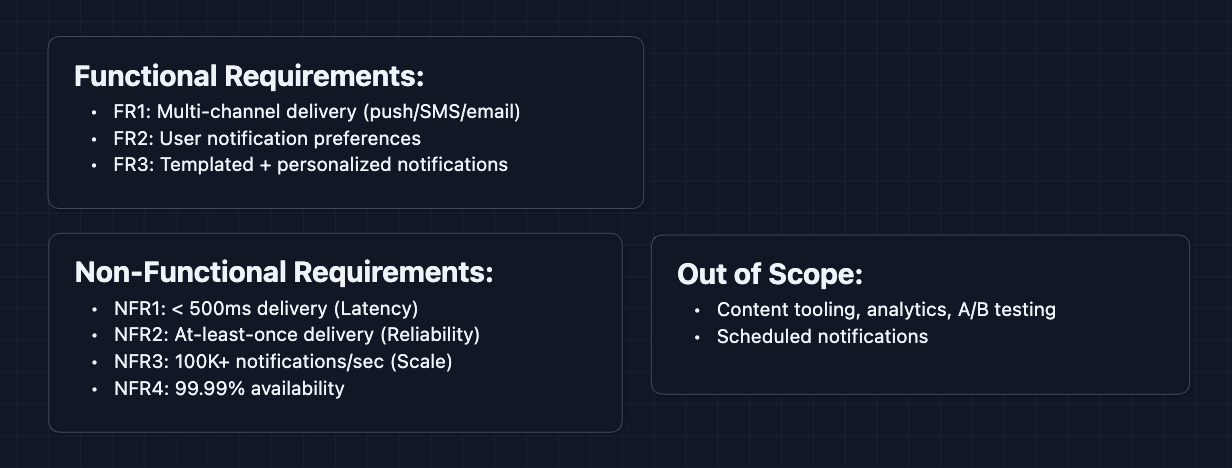
- FR1: The system should be able to send notifications across multiple channels (push, SMS, email, in-app).
- FR2: Users should be able to configure their notification preferences per channel.
- FR3: The system should support templated notifications with user-specific personalization.
Out of Scope:
- Notification content creation tooling.
- Analytics dashboards for delivery metrics.
- A/B testing for notification copy.
- Rich media notifications (images, videos).
- Scheduled notifications.
Acknowledging what's out of scope signals to the interviewer that you understand the breadth of the problem while staying focused.
Non-Functional Requirements
Core Non-Functional Requirements
- NFR1: End-to-end delivery latency should be < 500ms for time-sensitive notifications.
- NFR2: The system should guarantee at-least-once delivery.
- NFR3: The system should handle 100K+ notifications per second globally.
- NFR4: System should be highly available (99.99%+).
Here's what we have so far:
Let's start building.
The Set Up
Planning the Approach
Based on our requirements, here's how we'll build up the system:
- Main Delivery Path: How a notification request becomes a delivered message.
- Multi-Channel Routing: How we send to the right channel based on user preferences.
- Scale & Reliability: How we handle massive throughput and guarantee delivery.
In an interview, start with the simplest working system first. Make it clear to your interviewer that you're building something with flaws but you will get to addressing them in the deep dives.
Defining the Core Entities
For this problem, we work with these entities:
- Notification Request: An incoming request to notify a user (contains user ID, message, channel preferences).
- User Preferences: A user's settings for which channels they want notifications on, quiet hours, etc.
- Template: A reusable notification format with placeholders, like
"Hi {{name}}, your order {{orderId}} has shipped!". - Delivery Record: Tracks whether a notification was delivered successfully, failed, or is pending retry.
API Interface
Our APIs need to handle both sending notifications and managing user preferences.
For the interview, focus on the key inputs/outputs and the purpose of each endpoint. You don't have to write all of this on the whiteboard, but get a understanding of how we are using these APIs.
Send Notification API: FR1, FR3
This is the main entry point. Internal services call this to send notifications.
1. Send Notification
POST /api/v1/notifications

Request:
{
  "userId": "user_123",
  "templateId": "order_shipped",
  "data": {
    "orderId": "ORD-789",
    "deliveryDate": "Jan 15"
  },
  "channels": ["push", "email"],
  "priority": "high"
}

Response:
{
  "notificationId": "notif_abc456",
  "status": "queued"
}
Why queued? Delivery is async. The API acknowledges receipt immediately and workers handle actual delivery. This decoupling absorbs traffic spikes.
2. Send Bulk Notifications
POST /api/v1/notifications/bulk

Request:
{
  "templateId": "flash_sale",
  "userIds": ["user_1", "user_2", ..., "user_10000"],
  "data": {
    "discount": "50%",
    "expiresAt": "midnight"
  }
}

Response:
{
  "batchId": "batch_xyz",
  "totalQueued": 10000,
  "status": "processing"
}
Why a bulk endpoint? Sending 10K individual requests would overwhelm the API. Accept the list once, fan-out internally.
User Preferences API: FR2
Users configure how they want to receive notifications.
1. Get User Preferences
GET /api/v1/users/{userId}/preferences

Response:
{
  "userId": "user_123",
  "channels": {
    "push": { "enabled": true },
    "email": { "enabled": true, "address": "user@example.com" },
    "sms": { "enabled": false }
  },
  "quietHours": {
    "enabled": true,
    "start": "22:00",
    "end": "08:00",
    "timezone": "America/New_York"
  }
}
2. Update User Preferences
PUT /api/v1/users/{userId}/preferences

Request:
{
  "channels": {
    "sms": { "enabled": true, "phoneNumber": "+1234567890" }
  }
}

Response:
{
  "status": "updated"
}
Delivery Status API (Optional)
Internal services may want to check if a notification was delivered.
GET /api/v1/notifications/{notificationId}/status

Response:
{
  "notificationId": "notif_abc456",
  "status": "delivered",
  "channel": "push",
  "deliveredAt": "2024-01-15T10:30:00Z"
}
High-Level Design
Let's start with our functional requirements:
- FR1: Send notifications across multiple channels
- FR2: Respect user preferences
- FR3: Support templated notifications
We'll start with the simplest design and iterate for the sake of explanation. In a real interview, you can start at diagram 3.
1) The Simplest System: FR1 (Send Notifications)
Let's start with the simplest design: a service that receives a request and directly calls a push notification provider.
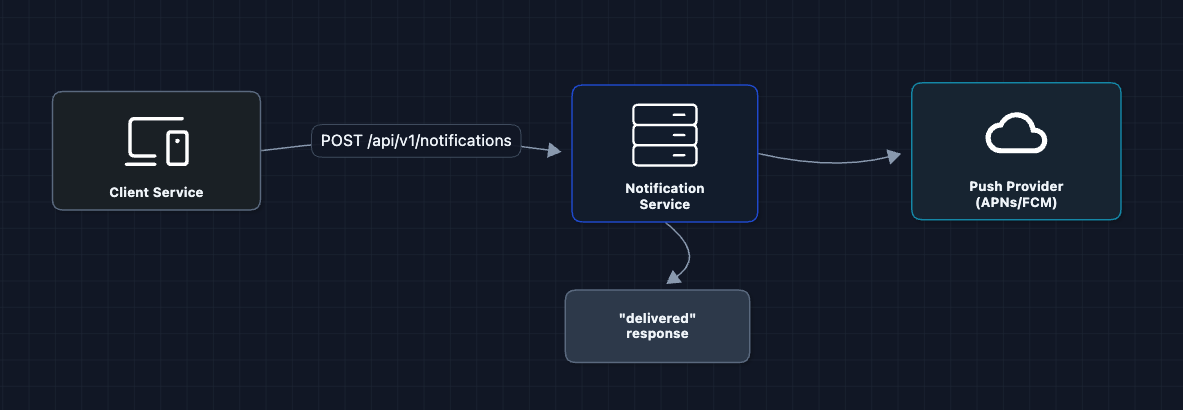
A client calls our service, we call APNs (Apple Push Notification Service) or FCM (Firebase Cloud Messaging) and we are done.
But what breaks?
- Synchronous call: If APNs is slow (or down), our API hangs and the client times out.
- No resilience: If the push provider fails, the notification is lost forever.
- Can't handle bursts: If we needed to send 1M notifications, our service would break.
We need to decouple the API from delivery.
2) Add a Message Queue: FR1 (Send Notifications)
We're still working on FR1. Let's add a queue between the API and the actual sending:
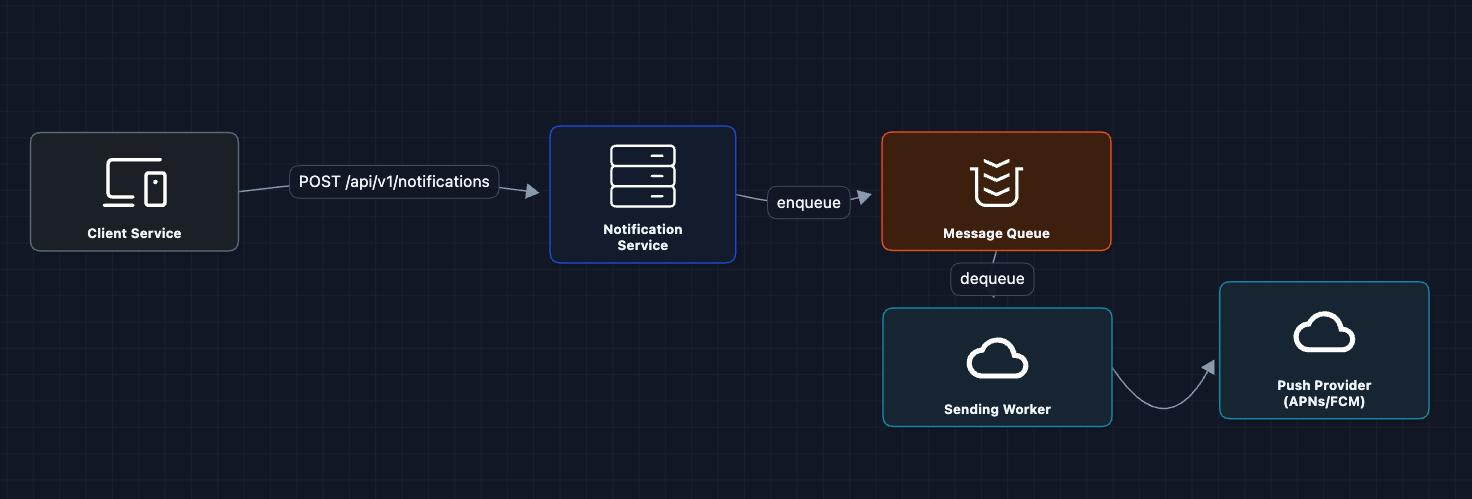
Now the API just enqueues and returns immediately. Workers pull from the queue and handle delivery.
What we gained:
- Decoupling: API doesn't wait for APNs
- Durability: Messages persist in queue even if workers crash
- Backpressure: Queue absorbs traffic spikes
The Message Queue can be Amazon SQS, RabbitMQ, or Kafka. We'll discuss trade-offs in the deep dives.
But what breaks?
- Single worker: One worker can't handle 100K notifications/second.
3) Multiple Workers: FR1 ✅
Let's add more workers to process the queue in parallel:
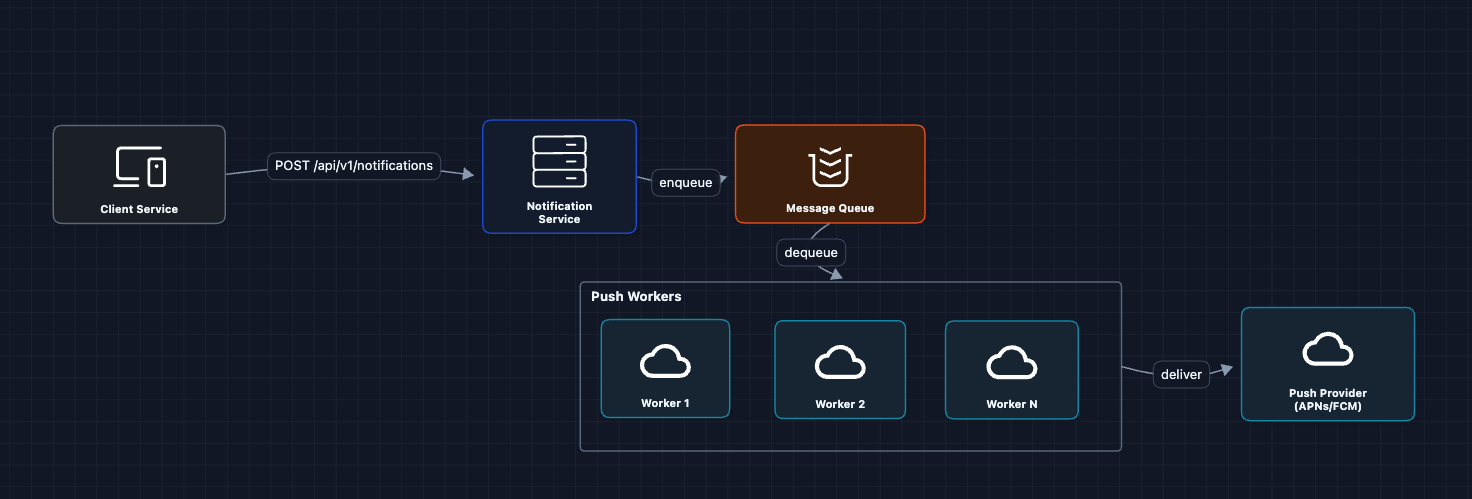
Workers consume messages in parallel. We can auto-scale based on queue depth.
But what breaks?
- We only send to push. Where's SMS and email?
4) Multi-Channel Routing: FR1 ✅
Different channels need different providers:
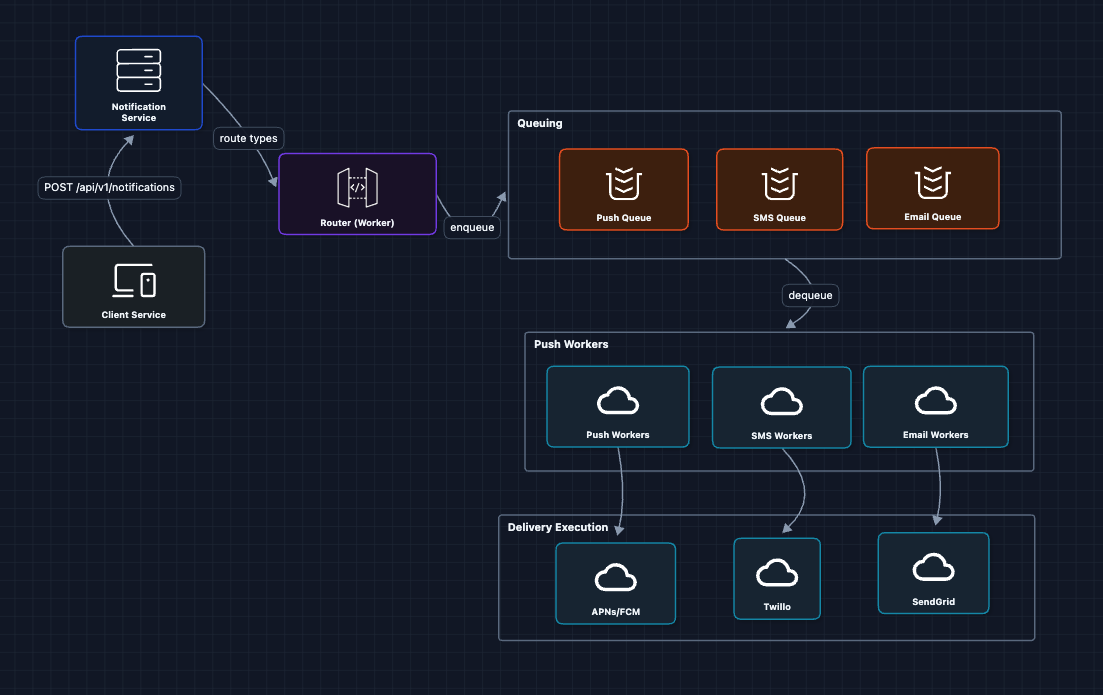
The router inspects each notification's target channel(s) and places it into the appropriate queue. Channel-specific workers then handle delivery using the corresponding provider.
Why separate queues per channel?
- Different rate limits (SMS providers are slower than push)
- Different retry strategies (email can wait, push should be fast)
- Independent scaling (push queue may be 10x larger than SMS)
But what breaks?
- We're sending to all channels. But what if the user disabled SMS?
5) Add User Preferences: FR2 ✅
Now we tackle FR2. Before routing, we need to check what the user actually wants:
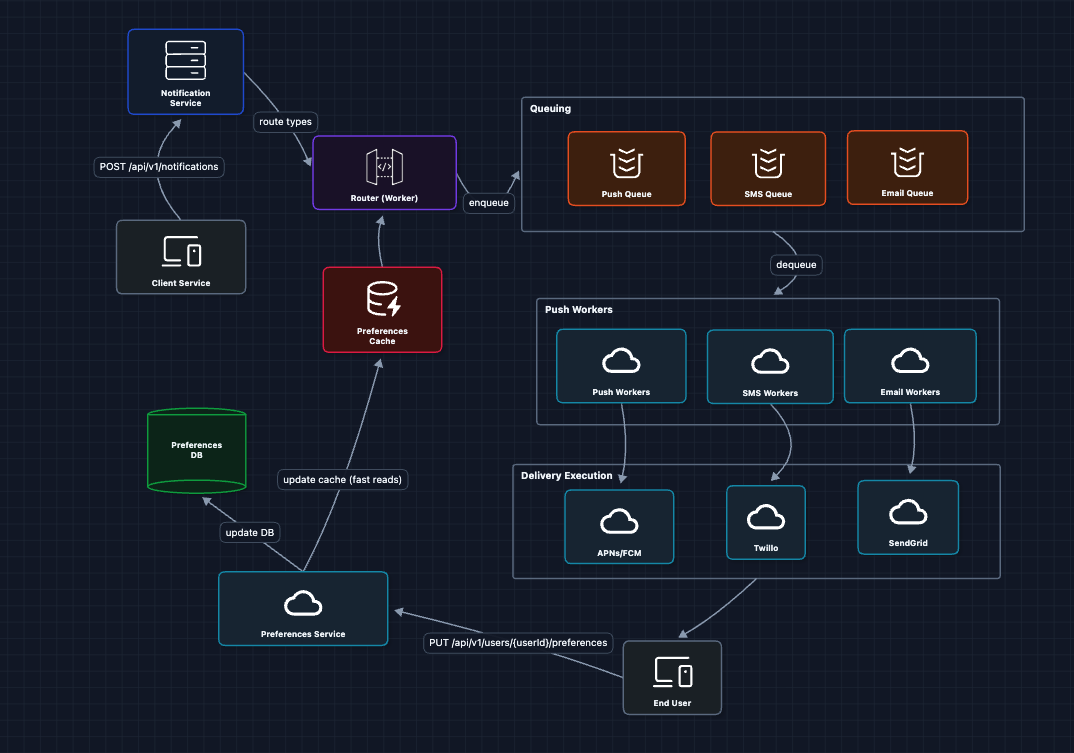
Why a Preferences Cache?
At 100K+ notifications/second, every notification triggers a preferences lookup. Hitting the database for each one would:
- Create millions of reads per minute, overwhelming the DB
- Add latency to every notification (DB reads are slow compared to cache)
- Risk timeouts during traffic spikes
A cache (Redis/Memcached) gives us:
- Sub-millisecond reads: Cache lookups are ~1ms vs ~10-50ms for DB
- Massive throughput: A single Redis instance handles 100K+ reads/sec
- Protection for the DB: The database only sees cache misses (rare) and preference updates (infrequent)
Since user preferences are read-heavy and write-rare (users update preferences occasionally, but we read them for every notification), caching is ideal.
The flow now:
- Router receives notification for
user_123 - Router checks Preferences Cache: "What channels does user_123 allow?"
- If user has push enabled but SMS disabled, only enqueue to Push Queue
- Preference updates invalidate the cache
But what breaks?
- We're sending raw data. Where do templates come in?
6) Add Template Service: FR3 ✅
For FR3, we need templated messages instead of hardcoding.
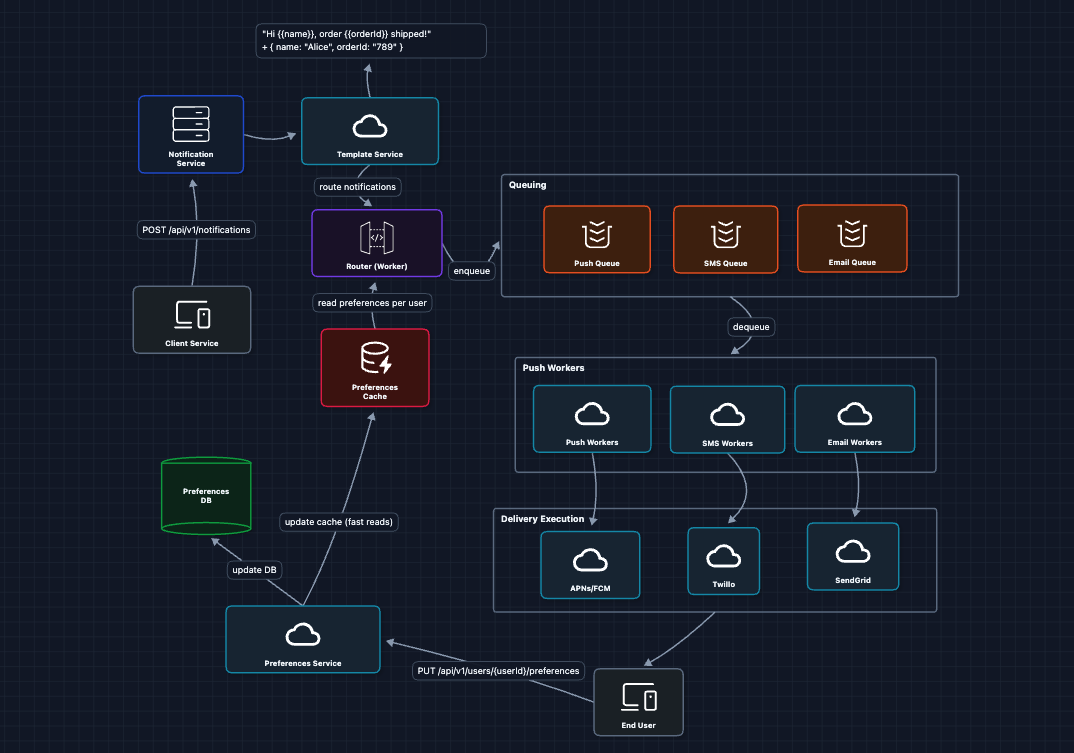
The Template Service:
- Fetches the template by ID
- Fetches user data (name, locale) from User Service
- Renders the final message:
"Hi Alice, order 789 shipped!" - Passes the rendered message to the queue
Why templates?
- Consistency: All "order shipped" notifications look the same
- Localization: Templates can have variants per language
- Non-engineer edits: Product team updates copy without code deploys
Now we have a complete working system that satisfies all functional requirements:
- FR1 ✅ Multi-channel delivery (Diagrams 1-4)
- FR2 ✅ User preferences (Diagram 5)
- FR3 ✅ Templated notifications (Diagram 6)
This is our baseline architecture.
Now we can address our non-functional requirements and more in the deep dives:
- NFR2 (Reliability): How do we guarantee delivery?
- NFR4 (Availability): What happens when providers fail?
- NFR3 (Scale): How do we handle traffic bursts?
- NFR1 (Latency): How do we prioritize urgent notifications?
Potential Deep Dives
1) How do we guarantee at-least-once delivery?: NFR2 (Reliability)
In Diagram 2, we said the queue provides durability. But what if a worker crashes AFTER dequeuing but BEFORE delivering?
Fix: Visibility timeout and acknowledgment
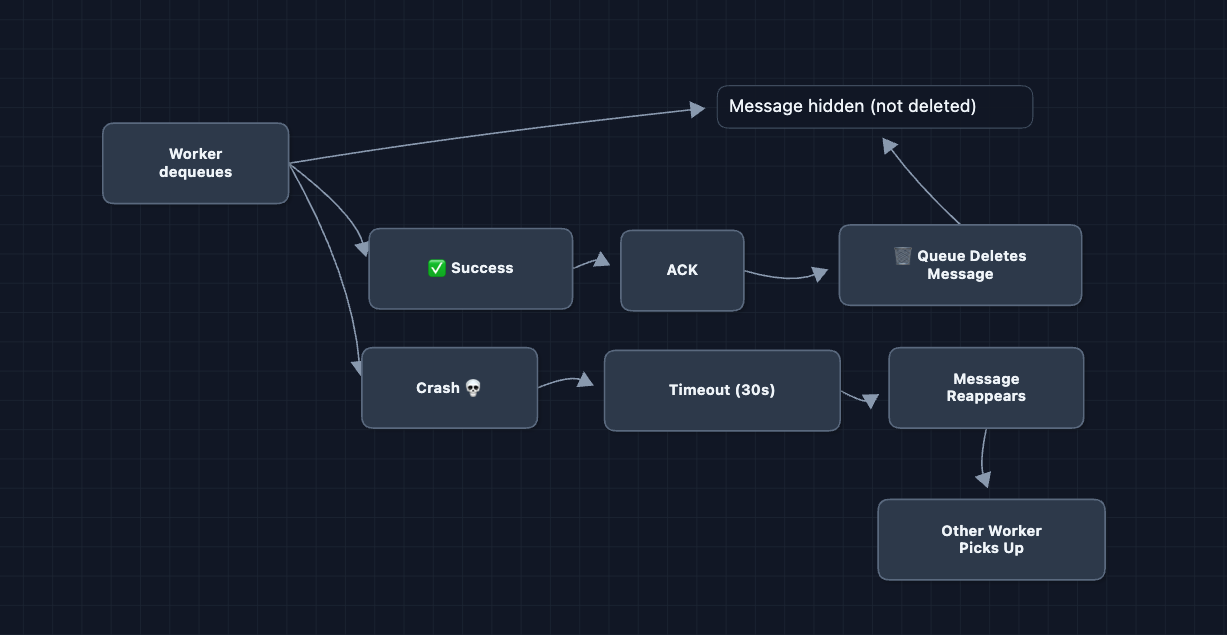
The message is only deleted after explicit acknowledgment. This is the standard SQS pattern (task queue with at-least-once delivery).
2) What happens when a provider fails?: NFR4 (Availability)
Our system depends on external providers: APNs, FCM, Twilio, SendGrid. What if Twilio goes down?
For channels with alternatives (SMS, email), we configure primary and backup providers:
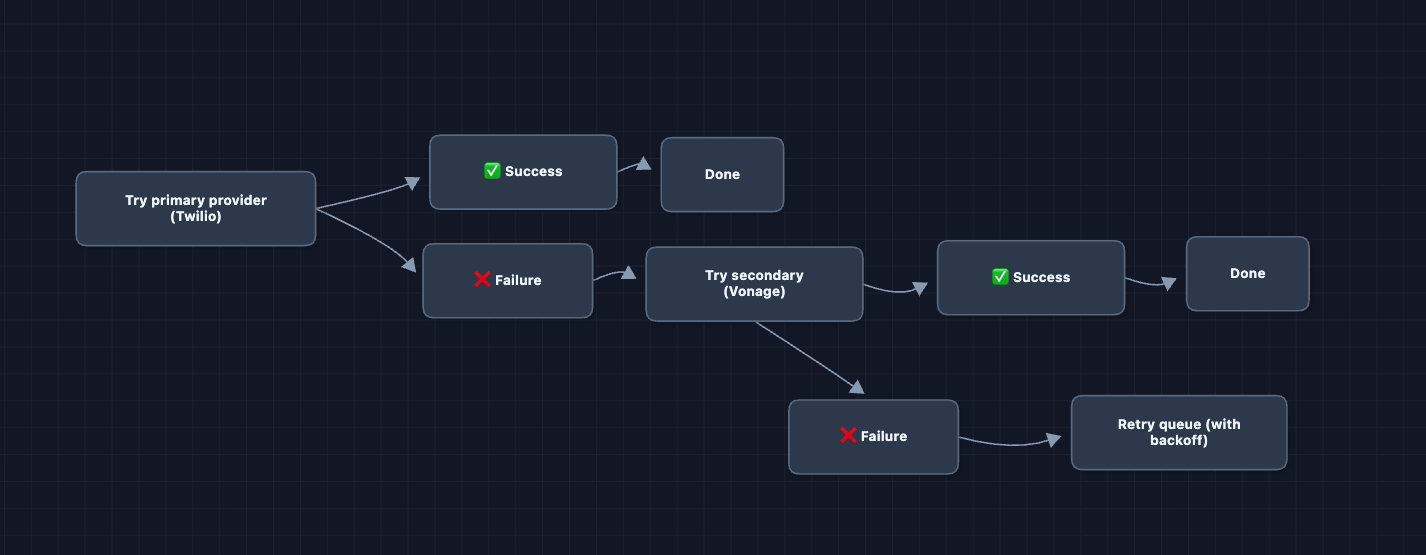
For push notifications, there is no alternative. APNs is the only way to reach iOS devices, and FCM is the only way to reach Android. We retry with exponential backoff and alert on-call if failures persist.
Health Monitoring
A background health check pings each provider every 10 seconds. If Twilio is down, we proactively route all SMS traffic to Vonage before workers even see failures. If APNs latency spikes, we increase timeouts and alert engineers.
3) How do we handle traffic bursts?: NFR3 (Scale)
A flash sale sends notifications to 50 million users. Normal traffic is 10K/sec, but this burst is 500K/sec. This causes queue memory pressure, overwhelmed workers, and provider rate limits.
Solution 1: Rate limiting at ingestion
We set limits per sender type. Marketing campaigns get 100K/min while transactional notifications (OTP, order updates) get unlimited throughput. Exceeding the limit returns 429 Too Many Requests.
Solution 2: Priority queues
Instead of one queue, we use four priority levels:
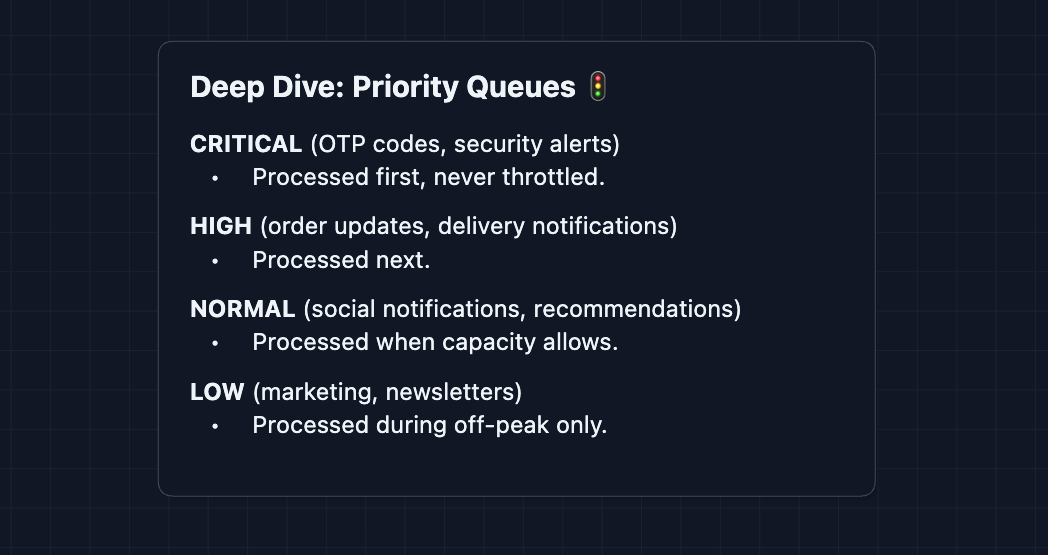
The flash sale goes into LOW queue. It will not delay the OTP code you need to log in.
Solution 3: Auto-scaling workers
CloudWatch monitors queue depth. If depth exceeds 100K for 2 minutes, we spin up additional workers. Once the backlog clears, we scale back down.
The combination of rate limiting (control input), priority queues (protect critical path), and auto-scaling (increase capacity) handles bursts gracefully.
4) How do push notifications actually work?
We keep mentioning APNs, but what does that actually mean?
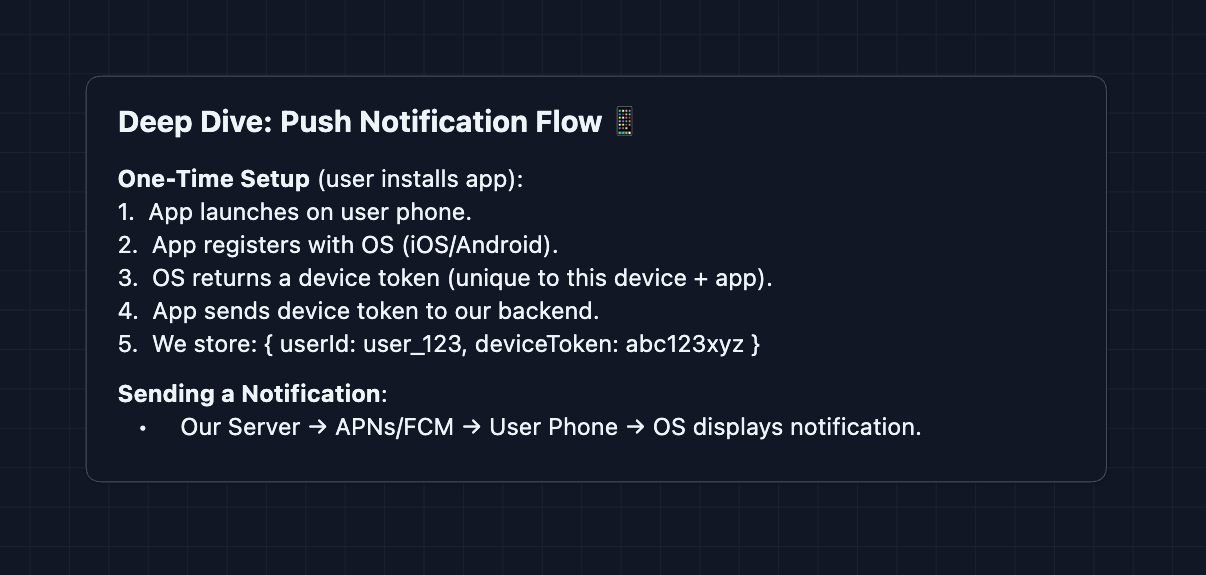
What is a device token?
A device token is a unique identifier for the combination of device, app, and environment. Apple provides one for APNs, and Google provides one for FCM. Tokens can expire or change when a user reinstalls the app or gets a new phone.
Why can we not go direct?
The user phone is behind NAT, has no public IP, and sleeps to save battery. APNs and FCM solve this by keeping always-on connections to billions of devices.
Token management is critical. If APNs returns 410 Invalid Token, we must delete it immediately. Otherwise we waste resources sending to dead tokens forever.
5) How do we prevent notification fatigue?
Users hate being spammed. How do we avoid annoying them?
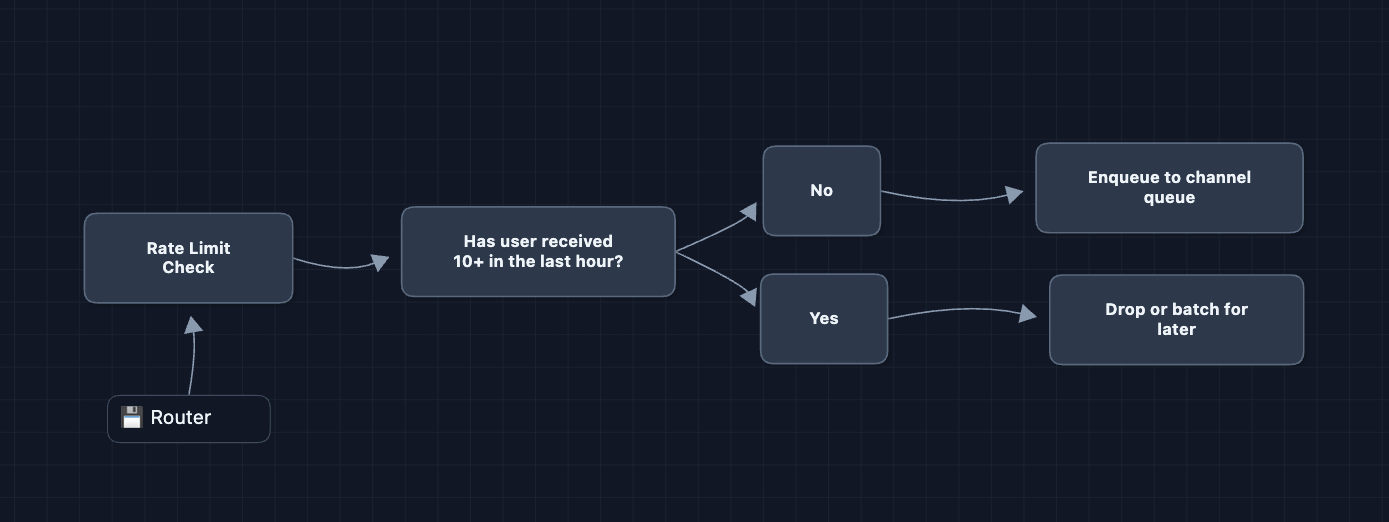
Per-user rate limiting: No user receives more than 10 notifications per hour, unless it is critical like an OTP. The router tracks counts in Redis and drops or delays excess notifications.
Batching similar notifications: Instead of 50 separate notifications saying someone liked your post, we batch them into one: Alice, Bob, Carol, and 47 others liked your post. The first notification starts a 5-minute timer and subsequent ones accumulate until the timer expires or the batch hits 50.
Quiet hours: Users set preferences for when they do not want to be disturbed. Non-critical notifications during quiet hours go to a scheduled queue and deliver when quiet hours end. Critical notifications like OTPs always go through.
These UX considerations show product thinking. Mentioning them briefly in an interview can set you apart.
6) How do we scale the database?: NFR3 (Scale)
At 100K notifications per second, we write 100K notification logs per second for delivery tracking and compliance. A single Postgres instance handles around 10K writes per second before struggling. We need to shard.
Sharding by userId
Split the notification logs across multiple database instances. Each shard owns a subset of users. When logging a notification for user 123, we hash the userId to pick a shard.
shard = hash(userId) % numberOfShards
If we have 10 shards and hash(user_123) equals 17, then 17 % 10 equals 7. Shard 7 holds all logs for user 123.
The problem with modulo
Adding an 11th shard changes the modulo. Now hash(user_123) % 11 might equal 6 instead of 7. Almost every user's data would move to a different shard, which is expensive and disruptive.
Consistent hashing
Instead of modulo, we use consistent hashing. We imagine a ring of hash values. Each shard gets a position on the ring. To find a user's shard, hash the userId and walk clockwise until hitting a shard.
Adding a new shard only affects its neighbors on the ring. Most users stay on their existing shards. For a detailed explanation with diagrams, see Distributed Key-Value Store.
Cache sharding
Redis Cluster already handles sharding automatically. When you write preferences:user_123, Redis uses consistent hashing to pick a node.
What to Expect?
That was a lot! Here's how deep you need to go based on level.
Mid-level
- Breadth over Depth (80/20): Explain why we need message queues and multi-channel routing, and be able to build the full HLD.
- Expect Basic Probing: Questions like "What if a worker crashes?" or "Why not call the providers directly?"
- Assisted Driving: The interviewer will guide you toward edge cases you missed.
- The Bar: Complete the full HLD. Understand why we need queues for decoupling and scalability, and tackle a few deep dives.
Senior
- Balanced Breadth & Depth (60/40): Go deeper into areas you have experience with. If you've dealt with message queues, explain visibility timeouts and dead-letter queues in detail.
- Proactive Problem-Solving: Identify issues before being asked: "A flash sale could overwhelm us, so I'd add priority queues..."
- Articulate Trade-offs: "Priority queues protect OTP codes from marketing blasts, but lower-priority notifications could not deliver for a long time during sustained high traffic."
- The Bar: Complete system and proactively dive into 2-3 deep dives: delivery guarantees (Deep Dive 1), provider failover (Deep Dive 2), or burst handling (Deep Dive 3).
Staff
- Depth over Breadth (40/60): The interviewer assumes you know the basics. Breeze through the HLD quickly (~15 min) and spend time on what's interesting.
- Experience-Backed Decisions: "For SMS, I'd configure Vonage as a failover to Twilio. Our health monitor checks both every 10 seconds, so we can route around outages automatically."
- Full Proactivity: You drive discussion. "Before we continue, let me address a big issue that gets overlooked: provider failures. Here's how I'd handle APNs going down..."
- The Bar: Address all deep dives without prompting. Discuss device token lifecycle, priority queue trade-offs, and notification batching strategies.
Do a mock interview of this question with AI & pass your real interview. Good luck! 📬